AI Contract Assistants Inside Word Processors Are Quietly Transforming Small Legal Teams
Discover how AI contract review inside everyday word processors is quietly transforming small legal teams, cutting review time, errors, and costs.

AI Contract Assistants Inside Word Processors Are Quietly Transforming Small Legal Teams
AI contract assistants are moving from standalone dashboards into the heart of legal work: the word processor. For small law firms and solo practitioners, embedding AI directly inside Microsoft Word and similar editors is turning contract review from a time‑sink into a point‑and‑click workflow—without forcing lawyers to abandon familiar tools or learn entirely new systems.
Why Embedded AI Matters for Small Firms and Solo Practitioners
For years, powerful AI contract review tools were marketed primarily to large enterprises and “Big Law” firms with the budgets and IT teams to support complex rollouts. That is changing quickly. Recent industry surveys show that AI adoption among small firms and solo practitioners has surged, with more than half now integrating generative AI into their workflows, up from just over a quarter two years ago. (lawnext.com)
Yet adoption patterns are uneven. Only a small minority of solos and small firms say they have AI deployed “widely or universally”; most are experimenting in targeted areas—especially document drafting and automation. (linkedin.com) That is exactly where AI inside word processors fits: it supports high‑volume, repetitive drafting and redlining tasks, while letting lawyers keep their existing file structures, templates, and collaboration habits.
Broader research on the legal sector shows the same pattern. Around 31% of individual legal professionals report personally using generative AI at work, but only about 21% say their firms have adopted legal‑specific AI tools at an organizational level. Integration with “trusted software” and tools that understand existing workflows ranks among the top decision factors when firms do invest. (fedbar.org)
For small practices, the path of least resistance is clear: bring AI into Word, not the other way around.
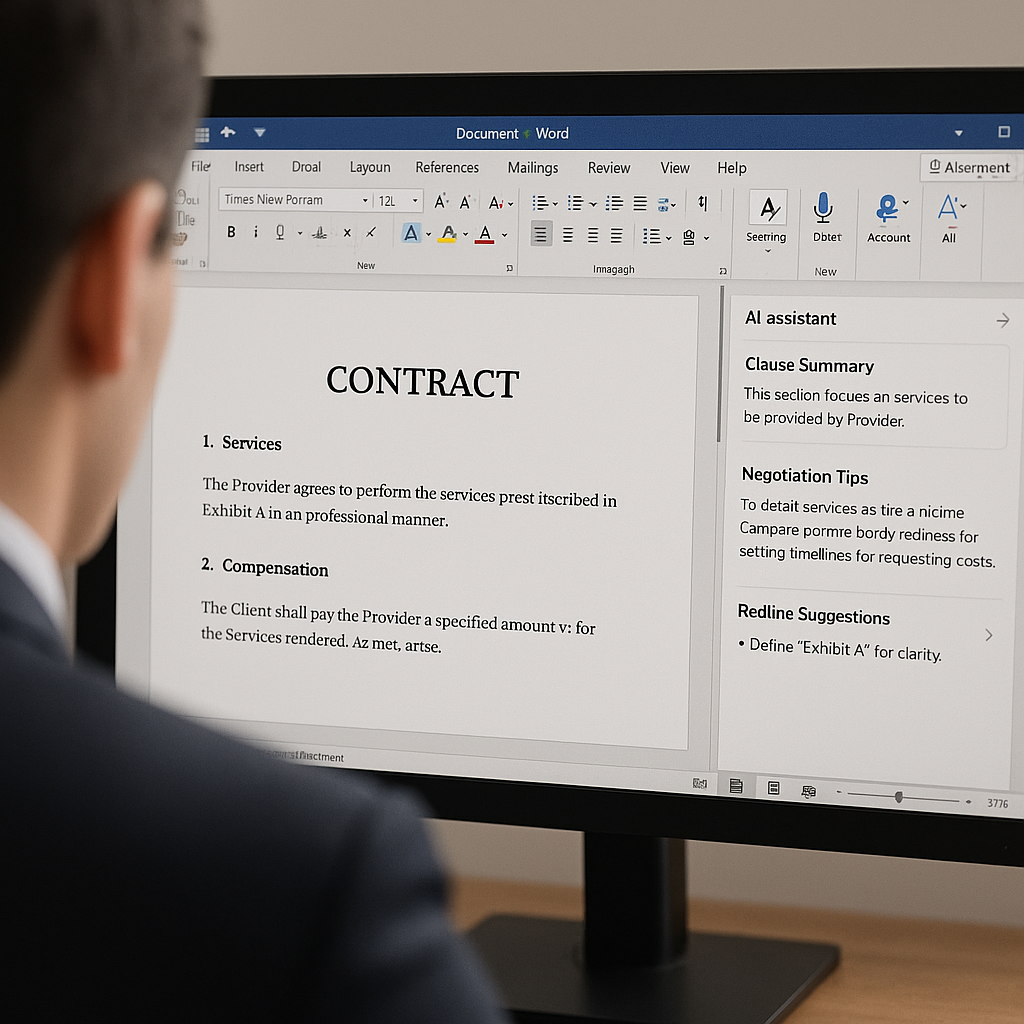
What’s Actually New: AI Contract Assistants Inside Word
Over the past 18–24 months, a wave of legal‑specific AI tools has launched as add‑ins or side panels inside Microsoft Word and Google Docs. Instead of requiring uploads to separate platforms, these assistants sit alongside the document and perform tasks on demand:
- Clause drafting: Generate missing clauses (e.g., data protection, limitation of liability, non‑compete) based on contract type and jurisdiction.
- Risk flagging: Highlight unusual indemnity terms, uncapped liability, auto‑renewal traps, or governing‑law mismatches.
- Redline automation: Propose edits aligned with a firm’s playbook and automatically generate comparison versions.
- Summarization: Produce concise term sheets, client‑friendly summaries, or issue lists from long agreements.
Surveys of practicing lawyers show document review, drafting, and summarization are consistently among the top AI use cases. One 2025 overview of “AI in law” reports that roughly three‑quarters of legal professionals using AI rely on it for document review and document summarization, and more than half use it to draft written materials. (allaboutai.com)
The key shift now is interface, not just capability. Rather than logging in to a separate portal, exporting documents, and re‑importing marked‑up versions, small legal teams can trigger AI from within the same Word ribbon they use for formatting and track changes. That reduces friction, training time, and—even more importantly—perceived risk.
Designed for Existing Workflows, Not New Ones
Legal professionals repeatedly tell researchers they prioritize AI tools that integrate seamlessly with current systems and reflect their existing workflows. In one 2025 report, 43% of respondents rated integration with trusted software as their top criterion when evaluating generative AI tools, and a third emphasized the provider’s understanding of law‑firm processes. (fedbar.org)
Embedded Word assistants address that demand directly. For a solo practitioner or a three‑lawyer firm, that means:
- No need to change DMS (do
cument management systems) or move away from Word templates.
- Minimal onboarding—often just installing an add‑in and connecting an AI account.
- Better alignment with ethical and confidentiality expectations, since work stays in known systems.
Pricing Shifts: From Enterprise Licenses to Per‑Seat Subscriptions
Another important development for small firms is pricing. Surveys continue to show that smaller practices trail large firms and in‑house departments in AI adoption; one 2025 analysis pegs AI usage at roughly 37% among small and solo practitioners, compared with 50–72% in large firms and in‑house teams. (aiqlabs.ai)
Cost is a major reason. Traditional contract review platforms often charged by seat or by volume—models better suited to corporate departments than to a boutique firm with three lawyers and a paralegal. By contrast, many of the new Word‑integrated AI tools now emphasize:
- Low‑commitment entry: Free trials or limited free tiers to test real contracts.
- Per‑seat pricing: Simple monthly fees per user, rather than firm‑wide enterprise contracts.
- Transparent usage limits: Clear caps on documents or queries, which matter for budget‑conscious solos.
For small businesses and independent professionals, this aligns with how other SaaS tools—CRM, time tracking, or e‑signature—are already purchased. The net result: sophisticated AI contract review capabilities are increasingly accessible well beyond “Big Law.”
How This Connects to the Broader Digital Document Workflow
Embedding AI contract assistants in Word is only one part of a larger trend: legal work is moving toward an end‑to‑end digital document lifecycle. Lawyers draft in Word, collaborate over email and shared drives, then export to PDF for signature and archiving. Each hand‑off can introduce friction.
New legal AI reports show firms are focusing AI investments on tools that fit that lifecycle: research, drafting, review, and then business‑operations workflows like billing and client communication. (americanlegaljournal.com) When contract drafting and redlining become faster and more accurate, the bottleneck often moves to signature collection and client approvals—exactly where modern e‑signature platforms come in.
The QuickSign Perspective: AI Drafting and Seamless E‑Signatures for Small Teams
As AI moves inside the word processor, small firms increasingly want their other tools to “speak AI” as well—especially at the point where contracts leave Word and become PDFs to sign. That’s where platforms like QuickSign are positioning themselves for small businesses, freelancers, and independent legal professionals.
QuickSign takes a similar philosophy to these new Word‑based AI assistants: powerful automation, but without enterprise‑grade complexity or pricing. Instead of locking advanced features behind per‑seat enterprise plans, QuickSign offers:
- AI Document Generation: Create contracts, NDAs, or engagement letters with AI, so solos and small firms can start from a strong baseline draft before they even open Word for custom edits.
- Effortless sending: Upload a finalized PDF, drag and drop signature and date fields, and send—no training manuals required.
- Real‑time tracking: See when clients open, review, and sign documents, helping small teams stay on top of deadlines without extra follow‑up emails.
- Flat‑rate pricing: A simple $15/month plan covers the whole team, avoiding the per‑seat cost structure common among enterprise‑focused tools.
For small legal practices testing AI inside Word, an e‑signature system that mirrors the same values—accessibility, predictability, and ease of use—helps complete the workflow. Unlike enterprise-focused solutions, QuickSign offers flat-rate pricing at $15/month, which is often easier for a two‑lawyer firm or freelance attorney to budget than multi‑user enterprise licenses.
Lowering the Barrier to Entry with a Free Tier
Cost‑sensitive experimentation is critical for small firms. Many are still at the “testing and learning” stage of AI adoption. Here, QuickSign’s free tier is designed to match that reality: small teams get 2 AI document generations and 1 document send to unlimited recipients without paying—or even adding a credit card—so they can see how AI‑drafted contracts and streamlined e‑signatures fit their real‑world matters.
Paired with a Word‑based AI contract assistant, a typical small‑firm workflow can now look like this:
- Use AI inside Word to draft or redline a contract based on the firm’s playbook.
- Export the agreed version to PDF.
- Upload to QuickSign, drag and drop fields, and send for e‑signature.
- Track status in real time and archive the signed copy alongside the matter file.
Practical Takeaways for Small Legal Teams
For small firms and solo practitioners considering AI contract assistants inside Word, several practical lessons emerge from current data and early adopters:
- Start with narrow, high‑value use cases. Focus on NDAs, engagement letters, or standard MSAs where clauses are repeatable and risk patterns are well‑understood.
- Define your “playbook.” AI works best when guided by a firm’s preferred positions on limitation of liability, indemnities, and governing law. Even a short internal memo can help align AI outputs with your standards.
- Use AI for first drafts and issue spotting—not final judgment. Surveys show growing optimism about legal AI but also emphasize the importance of guardrails and human review. (law360.com)
- Pair drafting AI with e‑signature automation. The time saved in drafting is maximized only when the signature and tracking process is equally efficient, which makes tools like QuickSign a natural complement.
- Watch the economics. Take advantage of free tiers and trials—both in Word add‑ins and e‑signature tools—to validate ROI before committing.
Skill‑Building: Training People, Not Just Buying Tools
Another lesson from firms that have successfully implemented AI—large and small—is that training and culture matter as much as technology. Legal industry commentary in 2025 repeatedly stresses that the “secret” to making AI work is getting people trained and enthusiastic, rather than simply purchasing licenses. (thetimes.co.uk)
For a boutique firm or solo practice, that can be as simple as:
- Running internal “AI hour” sessions to share prompts that work well in Word‑based assistants.
- Creating a short checklist for reviewing AI‑generated clauses before sending drafts to clients or counterparties.
- Standardizing how contracts move from Word to PDF to e‑signature in tools like QuickSign, so staff aren’t reinventing the process each time.
Video Resources: Getting Comfortable with AI Assistants
Many lawyers and small business owners are also using general AI skills content to get comfortable with the concepts behind these tools. While not legal‑specific, videos on creating AI “agents” or using copilots in familiar office software offer a useful mental model for how AI can sit alongside traditional applications like Word and Excel.
For lawyers who also handle business development, even sales‑oriented resources—like videos on effective cold‑call openers—can pair with AI‑assisted email drafting to support client outreach and relationship building.
The Bottom Line: AI Is Becoming Native to Legal Workflows
The story of AI in law is shifting from hype to infrastructure. Embedding AI contract assistants inside Word processors turns generative AI into a native part of drafting and redlining for small firms, not an exotic add‑on reserved for the largest players.
As adoption among solo practitioners and small law firms accelerates, the practices that benefit most will be those that:
- Integrate AI directly into existing tools like Word, rather than forcing radical workflow changes.
- Pair drafting and review automation with modern e‑signature and tracking solutions like QuickSign.
- Invest modestly but consistently in training and process design, so AI enhances—not disrupts—the client experience.
Looking for an affordable e-signature solution? Try QuickSign for free - no credit card required.