Cheapest E‑Signature for Small Teams: Why QuickSign’s Flat-Rate Model Wins
Discover the cheapest e-signature for small teams. See why QuickSign’s flat-rate model beats per-user pricing and slashes your monthly document costs.

Cheapest E‑Signature for Small Teams: Why QuickSign’s Flat-Rate Model Wins
If you run a small team, you’ve probably felt the pain of chasing signatures: printing, emailing PDFs back and forth, waiting days for approvals, and paying too much for “per seat” e‑signature subscriptions your team barely uses. At the same time, you can’t afford to skimp on security or professionalism.
That’s exactly where QuickSign comes in—a modern e‑signature platform designed to be both affordable and fast for small teams, with flat-rate pricing and built‑in AI document generation so you can create and sign contracts in minutes.
Why “Cheapest” Is More Than Just a Monthly Price
When people search for the “cheapest e‑signature for small teams,” they often look only at the subscription line item. But for real savings, you need to factor in:
- Subscription model – per‑user vs. team‑wide flat rate
- Hidden volume limits – envelopes, documents, or sends per month
- Time cost – how long it takes your team to draft, send, and track documents
- Operational costs – printing, scanning, postage, and admin overhead
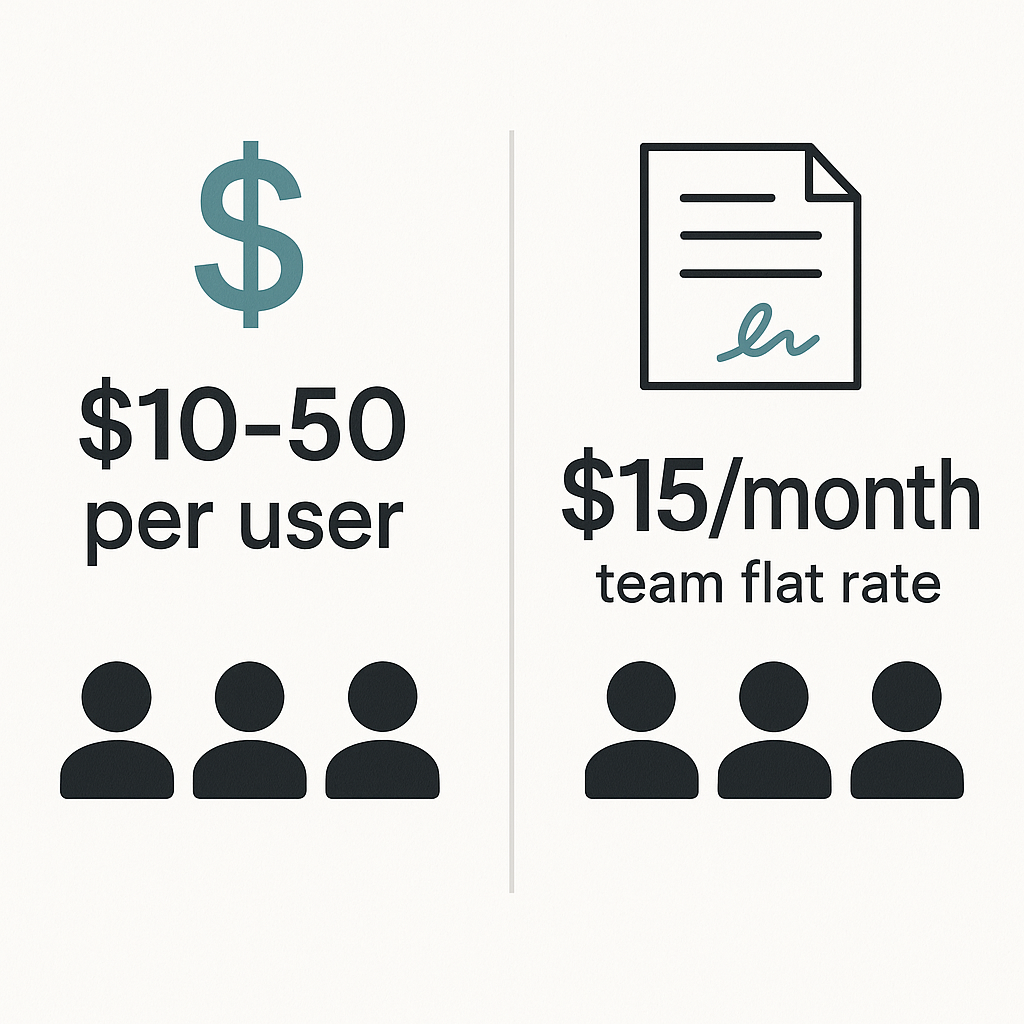
Industry data shows that typical e‑signature tools cost around $10–$50 per user per month for basic to mid‑tier plans, with team plans often ranging from $25–$40 per user per month.(esignglobal.com) For a small team of five, that can easily become $125–$200 every month—before overage fees for document volume.
QuickSign takes a different approach: affordable flat‑rate pricing starting at $15/month for the whole team, with no per‑seat fees. That’s a fundamentally different cost structure, and it’s one of the main reasons it’s such a strong fit for small teams trying to keep software costs predictable.
Key takeaway: The cheapest e‑signature for small teams isn’t just a low sticker price—it’s a platform that avoids per‑user markups, limits hidden volume fees, and slashes the time your team spends on paperwork.
Core Pain Points for Small Teams (and How QuickSign Solves Them)
Pain Point #1: Per‑Seat Pricing That Punishes Growth
Most traditional e‑signature tools charge per user. As you add a sales rep, an account manager, or an HR coordinator, your subscription climbs linearly. Industry research places average small‑team e‑signature costs at $25–$40 per user per month.(esignglobal.com) For a small but growing team, that’s painful.
With QuickSign you get flat‑rate pricing starting at $15/month for the whole team—no per‑seat markup. Whether one person or ten people are sending documents, your base cost stays predictable.
Pain Point #2: Wasting Hours Drafting the Same Contracts
Many small teams still copy‑paste old contracts or hunt through folders for the “latest template.” That manual drafting work is expensive in employee time and often leads to errors.
QuickSign tackles this with AI Document Generation. Instead of starting from a blank page, you can describe what you need—“a mutual NDA for a marketing agency and a SaaS client,” or “a simple one‑page services agreement for a freelance design project”—and QuickSign drafts it for you in seconds.
This doesn’t just reduce friction; it compounds your savings by cutting down on legal and admin hours.
Pain Point #3: Slow Turnaround Times and Lost Deals
Traditional paper‑based signatures can take days or weeks, and even basic digital workflows can be clunky if your team has to juggle multiple tools. Studies show that e‑signatures can reduce contract processing time by 28–80%(certinal.com) and cut turnaround from days to minutes.(fujifilm.com) Faster signing means faster revenue
QuickSign’s drag‑and‑drop field placement, seamless sending, and real‑time tracking are built to shave every possible minute off the process.
How QuickSign Keeps E‑Signature Costs Low for Small Teams
Flat‑Rate Pricing Instead of Per‑User Licenses
Unlike traditional per‑seat solutions, QuickSign offers flat‑rate pricing at $15/month for the whole team (with higher tiers still priced per team, not per individual). This matters because:
- You don’t pay extra every time headcount increases.
- You can give access to more people (sales, HR, operations) without a budget negotiation.
- Your monthly SaaS costs stay predictable as you grow.
Given that the average small team might otherwise pay $125–$200/month for five seats on a typical platform, QuickSign’s pricing structure alone can represent a 60–80% reduction in software spend for e‑signatures.
Generous Free Tier to Test Before You Commit
Cost‑sensitive teams often want to try a tool in a real workflow before paying. QuickSign’s free tier lets you:
- Generate 2 documents with AI
- Send 1 document to unlimited recipients for signature
- Start with no credit card required
This is enough to run a genuine test: a client contract, an NDA, or a simple HR form—without financial risk.
Time Savings That Compound Into Real Money
Research indicates companies can save up to $28 per document by using e‑signatures instead of paper, with processing costs dropping from $6–$8 to about $0.50–$1 per document.(certinal.com) Add in time savings of up to 80% on signing time,(esignglobal.com) and the ROI becomes clear.
QuickSign amplifies these gains through:
- AI Document Generation to reduce drafting time
- Drag‑and‑drop fields to eliminate layout fiddling
- Real‑time tracking so you don’t waste time manually checking on signers
- Smart reminders (from QuickSign’s workflow features) to reduce follow‑up emails
Pro tip: When evaluating “cheapest e‑signature,” calculate your total cost per signed agreement, not just your subscription. With QuickSign, the combination of flat‑rate pricing and time savings often beats tools that look cheap on paper but are expensive in practice.
How Small Teams Actually Use QuickSign Day‑to‑Day
1. Creating Contracts in Minutes with AI Document Generation
Small teams often lack a full‑time legal department. That’s where QuickSign’s AI Document Generation shines.
- Log into QuickSign and choose “Generate with AI.”
- Describe your document: e.g., “12‑month marketing services agreement for a U.S. client, monthly retainer, simple termination clause, and basic confidentiality.”
- Review the drafted contract, adjust any specifics (rates, dates, scope), and save.
Instead of losing an afternoon to formatting and searching for old versions, your team can go from idea to ready‑to‑send contract in a few minutes.
2. Uploading PDFs and Placing Fields with Drag‑and‑Drop
Already have a contract or form in PDF? QuickSign’s drag‑and‑drop field placement makes it easy to turn it into a signable document:
- Upload your existing PDF to QuickSign.
- Use the visual editor to drag signature, date, text, and initial fields exactly where you want them.
- Assign each field to the appropriate signer (client, internal approver, vendor, etc.).
This workflow is perfect for teams that have established templates but need a faster, cheaper way to get them signed.
3. Sending Documents for Signature in Under 60 Seconds
Once your document is ready, QuickSign’s seamless sending flow is straightforward:
- Add recipients by name and email.
- Optionally set a signing order (e.g., client first, internal manager second).
- Include a short message or instructions.
- Click send—recipients get a secure link and can sign on any device.
QuickSign is built so a user can go from document upload to “sent for signature” in under a minute, which is especially valuable for busy sales or operations staff who handle multiple agreements per day.
4. Tracking Status in Real Time (and Nudging When Needed)
For small teams, it’s crucial to know which deals are stalled and which are moving.
QuickSign’s real‑time tracking shows you:
- When each recipient has opened the document
- Who has viewed but not yet signed
- Exactly when each person completed their signature
This allows you to follow up intelligently—no more blind “just checking in” emails. Combined with automated reminders, you dramatically reduce delays, which studies show can shrink signature turnaround from days to minutes.(smallbusinessreport.org)
Real‑World Scenario: A 5‑Person Agency Cutting Costs with QuickSign
Consider a 5‑person digital marketing agency:
- 2 sales/business development reps
- 2 account managers
- 1 operations/HR generalist
They send about 40 documents per month: client contracts, renewals, NDAs, subcontractor agreements, and HR forms.
Before QuickSign
- They paid for a per‑user e‑signature plan at around $30 per user per month (a typical small‑team rate).(esignglobal.com) That’s about $150/month.
- They spent 30–45 minutes drafting each new contract from an old Word file.
- Turnaround time for signatures averaged 3–5 days.
After Switching to QuickSign
- They pay a flat $15/month for the whole team via QuickSign—a ~90% reduction in subscription costs compared to $150/month.
- They use AI Document Generation to build proposals and contracts, cutting drafting time from ~45 minutes to ~10 minutes each.
- They rely on drag‑and‑drop fields and seamless sending to get documents out in under 60 seconds once content is approved.
- With real‑time tracking and reminders, average turnaround shrinks to under 24 hours.
Over a month, this agency saves:
- $135/month on software alone compared with a typical per‑user plan.
- Dozens of hours in drafting and chasing signatures—time that can be used to close more deals or serve clients.
- Hundreds of dollars in indirect costs (paper, printing, admin time), aligning with industry estimates of up to 80–97% lower document handling costs when going digital.(certinal.com)
What About “Free” or Built‑In E‑Signature Options?
Some teams experiment with free tools or built‑in features, like sending contracts through basic free services or using integrations within word processors. The YouTube tutorials below, for example, show how to request signatures in various tools:
These can work in very lightweight scenarios, but small teams quickly run into limitations:
- No AI to help generate contracts or NDAs from scratch
- Restricted document or user limits on free tiers
- Manual formatting and field placement that takes time
QuickSign bridges the gap between “free but limited” and “full‑featured but expensive” by offering:
- AI Document Generation on both free and paid tiers
- Drag‑and‑drop fields and professional signing flows
- Real‑time tracking and reminders
- A generous free tier plus flat‑rate $15/month for growing teams
How to Decide If QuickSign Is the Cheapest Fit for Your Team
To know whether QuickSign is the most cost‑effective e‑signature solution for your small team, run through this quick checklist:
1. Count People, Not Just Documents
How many team members need to send or manage documents? If it’s more than one or two, per‑seat pricing will scale up quickly. That’s where QuickSign’s flat‑rate model usually wins.
2. Estimate Monthly Document Volume
Look at how many agreements you send per month (sales contracts, NDAs, HR forms, vendor agreements). Then check if your current or potential tools cap you with “envelopes” or charge for overages.
QuickSign’s simple, unlimited‑oriented plans mean you don’t have to micro‑manage document counts.
3. Include Time Savings in Your Calculation
If your team spends hours each week:
- Drafting documents manually
- Fixing formatting issues in PDFs
- Chasing down signatures via email
Those are hidden costs you can reduce with QuickSign’s AI generation, drag‑and‑drop editor, and real‑time tracking. Time saved here is often worth more than the subscription fee itself.
4. Test the Workflow With the Free Tier
Use QuickSign’s free allowance (2 AI‑generated documents and 1 send to unlimited recipients) to simulate a real process: for example, your next client contract or onboarding packet. Evaluate:
- How long it takes to go from idea to signed document
- How easy it is for your team to collaborate
- How quickly your recipients sign when the process is streamlined
If the trial run feels faster and smoother than your current process—and the numbers support significant cost savings—then QuickSign is likely the cheapest effective option for your team.
Why QuickSign Is a Standout Choice for Budget‑Conscious Small Teams
When you put all the pieces together, QuickSign offers a uniquely compelling mix for small teams:
- Flat‑rate $15/month pricing for the whole team – no per‑seat penalties as you grow
- AI Document Generation – instantly draft contracts, NDAs, and agreements from simple prompts
- Drag‑and‑drop field placement – convert any PDF into a clean, signable workflow
- Seamless sending – add recipients and send documents for signature in seconds
- Real‑time tracking – see exactly when documents are opened, viewed, and signed
- Generous free tier – 2 AI‑generated documents and 1 send to unlimited recipients, no credit card required
For small teams that need to control costs without sacrificing professionalism or speed, this combination often delivers a lower total cost per signed agreement than traditional e‑signature platforms.
Ready to simplify your document signing? Try QuickSign for free - generate 2 documents and send 1 document to unlimited recipients at no cost. No credit card required.