Document Workflow Automation: The Complete Guide for Modern Businesses
Streamline processes, cut errors, and boost productivity with document workflow automation. Discover tools, strategies, and best practices for modern businesses

Document Workflow Automation: The Complete Guide for Modern Businesses
Documents are the backbone of every business – contracts, proposals, NDAs, onboarding packets, invoices, and more. But managing them manually is slow, error-prone, and frustrating. That’s where document workflow automation comes in.
By automating how documents are created, sent, signed, and stored, companies cut turnaround times from days to minutes, reduce compliance risks, and free teams from repetitive admin work. With modern tools, including AI and e-signatures, even small businesses can build powerful workflows that used to require enterprise-level budgets and IT teams.
This guide explains what document workflow automation is, why it matters now, and how to design practical, real-world workflows – with examples, tools, and specific ways platforms like QuickSign can help you automate end-to-end document signing.
Key takeaway: Document workflow automation isn’t just “going paperless.” It’s about connecting how documents are generated, approved, signed, and stored so the process runs with minimal manual effort.
What Is Document Workflow Automation?
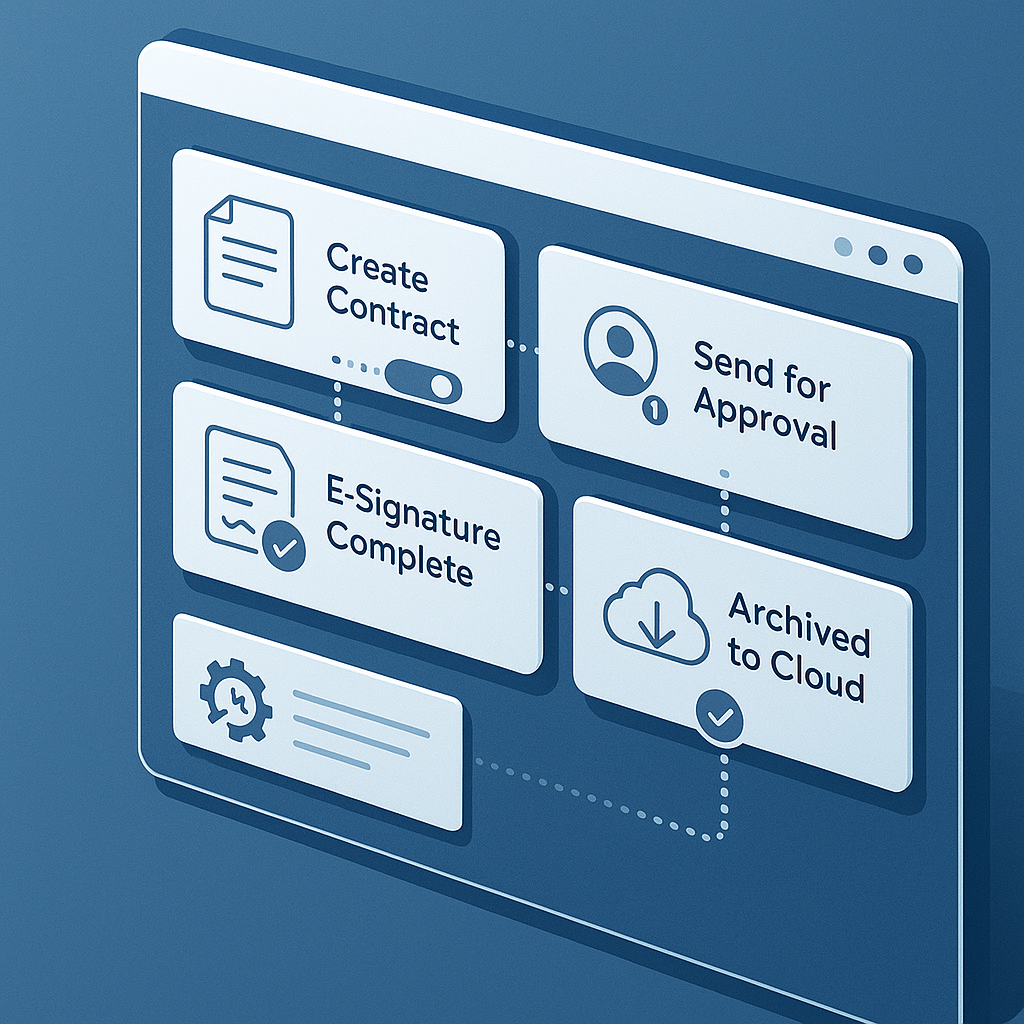
Document workflow automation is the use of software to automatically handle the steps involved in processing documents – from creation and data entry to approvals, signatures, and archiving.
In a typical business, this might include:
- Creating contracts or agreements from templates or data
- Routing documents to the right approver or signer
- Collecting legally binding e-signatures
- Sending reminders and notifications automatically
- Storing finalized documents in the correct folders or systems
Automation platforms like Zapier and n8n make it easy to connect apps and build workflows that trigger on specific events (like “new deal in CRM” or “new form submission”) and then generate and route documents without manual work. (zapier.com)
Why Document Workflow Automation Matters More Than Ever
Several trends are making automated document workflows a competitive necessity rather than a nice-to-have:
1. Speed and customer expectations
Clients today expect contracts, proposals, and agreements within hours, not days. Automation tools can generate documents instantly when a form is submitted or a deal is moved to “Closed Won,” and send them for signature without anyone touching a keyboard. Platforms like Zapier highlight how AI-powered document automation can create and store documents the moment data is captured, drastically reducing turnaround times. (zapier.com)
2. Error reduction and compliance
Manual copy-paste is a recipe for mistakes—wrong names, outdated clauses, missing initials. AI-enhanced document processing and automation are increasingly used to reduce these errors while improving consistency and auditability across large volumes of documents. (arxiv.org)
Automated workflows also make it easier to enforce standardized templates, required fields, and approval steps—critical for legal, HR, and finance teams.
3. AI-powered document creation and management
Modern automation stacks use AI to create, classify, and manage documents in real time. For example, Zapier’s AI document automation tools can generate fully formatted docs from incoming form data and route them to the right folders and stakeholders automatically. (zapier.com)
Similarly, workflow tools like n8n provide prebuilt workflows that combine AI, cloud storage (e.g., Google Drive), and document extraction to save hours each week on document routing and retrieval. (n8n-store.com)
4. Lean teams and rising workload

Core Components of an Automated Document Workflow
While every business is different, most automated document workflows share the same building blocks:
1. Triggers: When the workflow starts
Common automation triggers include:
- New CRM deal moved to a certain stage (e.g., “Closed Won”)
- Customer submits a web form or signs up for a service
- Internal team member requests a contract or NDA
- New employee joins (HR onboarding)
Tools like Zapier and n8n allow non-developers to define these triggers visually and connect them to downstream document tasks. (zapier.com)
2. Document generation (increasingly AI-powered)
Once triggered, the workflow needs to create or prepare a document. This can be template-based (mail-merge style) or AI-generated:
- Fill a contract template with customer name, pricing, and dates
- Generate a custom agreement based on answers in an intake form
- Draft an NDA or service agreement from a simple description of what’s needed
This is where QuickSign stands out. Instead of forcing you to upload a template first, its AI Document Generation lets you describe what you need (“one-page NDA for a freelance designer, standard jurisdiction, 1-year confidentiality”) and automatically drafts a legal-style document you can tweak and send for signature—no separate word processor or legal template library required.
3. E-signature and field placement
After a document is generated, the next step is to prepare it for signing:
- Add signature, name, email, date, and initial fields
- Assign fields to specific signers
- Define signing order (e.g., client first, internal approver second)
With QuickSign, you simply upload a PDF (or use a generated document) and use drag-and-drop field placement to position all required fields exactly where they belong. This visual approach dramatically reduces setup time versus older, more clunky interfaces.
4. Routing, reminders, and tracking
Effective workflows also control who gets what, when:
- Send the document to one or multiple recipients
- Automate email reminders if someone hasn’t signed after X days
- Notify internal stakeholders when documents are viewed or completed
- Push status updates back to your CRM or project tools
QuickSign supports seamless sending to one or many recipients and offers real-time tracking so you know exactly when a document is opened, viewed, and signed—perfect for sales, HR, and operations teams that need visibility into deal or onboarding status.
5. Storage and downstream automation
Finally, completed documents must be safely stored and often trigger follow-up workflows:
- Saving signed PDFs in structured folders (e.g., “Clients > 2025 > Region”)
- Logging activities back into CRM or ERP systems
- Triggering internal tasks (e.g., “Project kickoff” after contract is signed)
AI-enhanced workflows in tools like n8n can even categorize and tag documents automatically, making them easier to search and retrieve later. (n8n-store.com)
Practical Use Cases for Document Workflow Automation
1. Sales contracts and proposals
Typical manual process: Sales rep drafts a contract in Word, emails it to legal, waits for feedback, exports to PDF, uploads to an e-signature platform, manually adds fields, sends, follows up, and finally downloads and stores the signed copy.
Automated workflow:
- Deal is moved to “Closed Won” in CRM.
- Automation tool triggers AI Document Generation in QuickSign or fills a template with deal data.
- Signature fields are pre-placed (using stored templates and drag-and-drop adjustments).
- Document is automatically sent to the client, with reminders scheduled.
- Once signed, the PDF is saved in the right folder, and the CRM deal is updated to “Signed.”
Pro tip: Combine AI-powered document variables with your CRM data so names, companies, and pricing are always accurate and auto-filled—no manual editing required.
2. HR onboarding and employee agreements
Onboarding is document-heavy: offer letters, NDAs, IP assignments, handbooks, policy acknowledgments.
With an automated workflow:
- HR adds a new hire in the HRIS or form.
- AI generates an offer letter and NDA in QuickSign using standard clauses and employee details.
- All required signature and acknowledgment fields are pre-configured.
- The new hire receives a package of documents to sign digitally.
- Signed copies are automatically stored in the employee’s digital file.
3. NDAs for partnerships, vendors, and prospects
NDAs are one of the most-repeated documents in many organizations. Automation can reduce NDA turnaround from days to minutes.
Example flow:
- Sales or partnerships team submits a simple form with counterparty name, email, and basic terms.
- AI Document Generation in QuickSign creates a tailored NDA based on company policy.
- Recipient is added automatically, and the document is sent for e-signature.
- Real-time tracking shows when the NDA is opened and signed, enabling teams to move forward quickly with deeper discussions.
4. Client onboarding & intake forms
Professional services (agencies, consultants, law firms, accountants) can automate engagement letters, scopes of work, and recurring agreements:
- Client completes an online intake form.
- Automation tool triggers AI document creation (agreement or SOW) using the form data. (zapier.com)
- The document is sent via an e-signature tool such as QuickSign.
- Signed docs are routed into the client folder in your DMS or cloud storage.
Leveraging Zapier and n8n for Document Workflow Automation
Two of the most popular platforms for connecting document tools and building automations are Zapier (hosted, beginner-friendly) and n8n (open-source, self-hostable, highly flexible). (zapier.com)
Zapier: No-code automation with AI
Zapier is ideal for non-technical teams who want fast, friendly automation between cloud apps. Their AI-powered document automation features include:
- Generating documents from form submissions or CRM events
- Classifying and storing documents automatically
- Sending notifications when documents are created or completed (zapier.com)
To learn the basics of setting up automations that can include document workflows, this introductory video is a good starting point:
n8n: Flexible, self-hosted automation with AI
n8n is a fair-code workflow automation platform that can be self-hosted and is popular with technical teams that want maximum control, including custom nodes and advanced AI capabilities. (docs.n8n.io)
There is a large ecosystem of community workflows that automate document extraction, storage, and management using AI, Google Drive, and other tools—ideal for teams managing thousands of documents. (n8n-store.com)
To see how to build AI-powered automations step-by-step, this n8n tutorial is helpful:
Document automation focused tutorial
If you want a more document-specific walkthrough, this video on automated document workflows walks through setup concepts that apply regardless of which platform you use:
Where E-Signature Platforms Fit In (and How QuickSign Compares)
An automated document workflow is only as strong as its e-signature layer. That’s the stage where legal commitments are made, and any friction can cause delays, confusion, or even lost deals.
Legacy solutions vs. modern alternatives
Traditional players like DocuSign and HelloSign are widely known, but they often come with:
- Per-user pricing that scales poorly as you add team members
- Complex, enterprise-focused interfaces
- Feature sets that require extra add-ons or higher tiers for advanced needs
By contrast, QuickSign is designed specifically as a modern, user-friendly alternative for small businesses and solo entrepreneurs who need power without complexity.
While platforms like DocuSign and HelloSign charge per user and can quickly become expensive, QuickSign.it offers flat-rate pricing starting at just $15/month with unlimited team members.
Key advantages of QuickSign in document workflow automation include:
- AI Document Generation: Draft contracts, agreements, and NDAs from scratch by simply describing what you need.
- AI-powered document variables: Automatically fill in recipient information, dates, and other dynamic fields without manual editing.
- Drag-and-Drop Field Placement: Quickly prepare any PDF for signing with an intuitive visual editor.
- Seamless Sending: Add recipients and send for signature in seconds, built for sub-60-second turnaround from upload to send.
- Real-Time Tracking: See when each recipient opens, views, and signs your documents.
- Affordable Flat-Rate Pricing: Starts at just $15/month for your whole team—no per-seat fees or enterprise contracts.
- Generous free tier: Generate 2 documents and send 1 document to unlimited recipients at no cost, ideal for testing your new automated workflow before scaling up.
How to Get Started with Document Workflow Automation
Step 1: Map your current process
Pick one high-impact workflow—often sales contracts, NDAs, or onboarding. Write down:
- Who is involved (roles, not names)
- Which documents are used
- What systems are involved (CRM, storage, HRIS, etc.)
- Where delays or errors happen today
Step 2: Define your “ideal” automated flow
For the same process, define:
- What should trigger document creation (e.g., deal won, form submitted)
- Which fields can be auto-filled (client name, pricing, dates)
- Who needs to sign and in what order
- Where final documents should be stored
Step 3: Choose your tools
For many small and mid-sized teams, a simple stack might look like:
- CRM or form tool (HubSpot, Pipedrive, Typeform, etc.)
- Automation platform (Zapier for no-code, n8n for more customization)
- E-signature and document generation tool (QuickSign.it)
- Cloud storage (Google Drive, OneDrive, Dropbox, etc.)
Step 4: Start with a “minimum viable workflow”
Don’t try to automate everything at once. For example:
- When a form is submitted, create a contact in your CRM.
- Use AI Document Generation in QuickSign to draft a basic agreement.
- Manually review the first few outputs to refine your prompts or templates.
- Then add automated sending and reminders.
Pro tip: Use the free tier of QuickSign.it (2 document generations + 1 document send to unlimited recipients) to prototype your workflow without any financial commitment.
Step 5: Add intelligence and integrations over time
Once your basic workflow is working reliably, you can layer on:
- AI-based clauses that change based on deal size or risk profile
- Conditional routing (e.g., contracts over $50k require legal approval)
- Automatic sync of signed contract details to billing or project management tools
Best Practices for Successful Document Workflow Automation
Standardize templates before you automate
Automation amplifies whatever process you have—good or bad. Before wiring in AI or integrations, make sure your base templates (contracts, NDAs, offer letters) are:
- Legally reviewed
- Up to date with current policies
- Clear on which sections are variable vs. fixed
Use AI, but keep humans in the loop where it matters
AI is excellent at drafting first versions and handling routine agreements. For higher-risk deals or complex contracts, keep a human review step in your workflow. Many teams use AI generation for 80% of cases, with manual oversight reserved for exceptions.
Monitor metrics and iterate
Track basic KPIs, such as:
- Average time from “draft” to “signed”
- Number of signature-related support tickets or questions
- Percentage of documents returned with errors or changes
Use these metrics to refine your templates, reminders, and routing logic.
Make it easy for signers
Your recipients shouldn’t need to create accounts or struggle with clunky interfaces. Choose an e-signature solution—like QuickSign—that focuses on a clean, mobile-friendly signing experience. A smoother signing flow directly translates into faster turnaround and happier customers.
Ready to simplify your document signing? Try QuickSign for free - generate 2 documents and send 1 document to unlimited recipients at no cost. No credit card required.