E-Signature Software: A Complete Guide for Modern Businesses (Featuring QuickSign)
Discover how e-signature software streamlines workflows, boosts security, and cuts costs for modern businesses in this complete guide featuring QuickSign.

E-Signature Software: A Complete Guide for Modern Businesses (Featuring QuickSign)
Paper contracts, wet ink signatures, and overnight envelopes are quickly becoming relics. Today’s business teams expect to draft, send, and sign documents from anywhere in minutes—not days. That shift is exactly why e-signature software has exploded, with the global digital signature market projected to grow from around USD 12 billion in 2025 to well over USD 200 billion by the mid-2030s.(precedenceresearch.com)
Among this new generation of tools, QuickSign stands out as a modern, affordable e-signature platform that doesn’t just help you collect signatures—it also helps you generate the documents themselves using AI. For busy teams, that means less time wrestling with templates and more time closing deals, onboarding hires, and serving clients.
In this guide, you’ll learn what e-signature software is, how it works, why it’s now essential for business, and how to build streamlined workflows using QuickSign’s AI document generation, drag-and-drop fields, and real-time tracking.
What Is E-Signature Software?
E-signature software allows people to sign documents electronically, from any device, in a way that is secure, trackable, and legally enforceable in most jurisdictions. Instead of printing, signing, scanning, and emailing PDFs, signers receive a secure link, review the document, and apply their signature digitally.
Modern tools, including QuickSign, also layer in:
- Identity verification and audit trails for compliance
- Workflows to route documents to multiple signers in a specific order(adobe.com)
- Automation to send reminders and track status
- APIs and integrations to embed signing into existing systems(umatechnology.org)
Key takeaway: E-signature software isn’t just about replacing ink—it’s about creating a faster, more reliable, and fully auditable way to get business-critical documents agreed and signed.
Are E-Signatures Legally Valid?
For business professionals, legal validity is often the first concern. The good news: in most major markets, properly implemented electronic signatures are legally recognized and enforceable.
- In the United States, the ESIGN Act and UETA give electronic signatures the same legal standing as handwritten signatures for most transactions.(researchandmarkets.com)
- In the European Union, the eIDAS regulation defines electronic signatures (including Advanced and Qualified Electronic Signatures) and sets out their legal effect.(researchandmarkets.com)
- Many other regions (Asia-Pacific, Latin America, Middle East) have adopted similar laws and regulations.(researchandmarkets.com)
Platforms like QuickSign support legally compliant e-signing by capturing:
- Signer intent (a clear action to sign)
- Consent to do business electronically
- Audit trails wit
h timestamps and IP addresses
- Document integrity (protection against tampering)
For most everyday business use cases—sales contracts, NDAs, HR agreements, service renewals—this is more than sufficient to ensure enforceability.
Why Businesses Are Rapidly Adopting E-Signature Software
Across industries, e-signature tools have moved from “nice to have” to “required infrastructure.” Recent industry data shows that:
- 79% of agreements are signed within 24 hours when using e-signatures.(certinal.com)
- Contract turnaround times improve by more than 75% on average.(certinal.com)
- Roughly 60–80% of organizations have adopted some level of e-signature technology, and 95% are using or planning to use it.(certinal.com)
QuickSign is built for teams who want those benefits without enterprise-level complexity or cost. Here’s why e-signature has become essential—and how QuickSign helps.
1. Speed and Productivity
Paper-based signing often adds days to simple processes. Teams waste time printing, chasing signatures, and re-uploading scans. E-signature software compresses that cycle down to minutes.
With QuickSign, you can:
- Generate a contract or NDA with AI from a simple prompt
- Upload any existing PDF and place fields via drag-and-drop
- Send to one or many signers in under 60 seconds
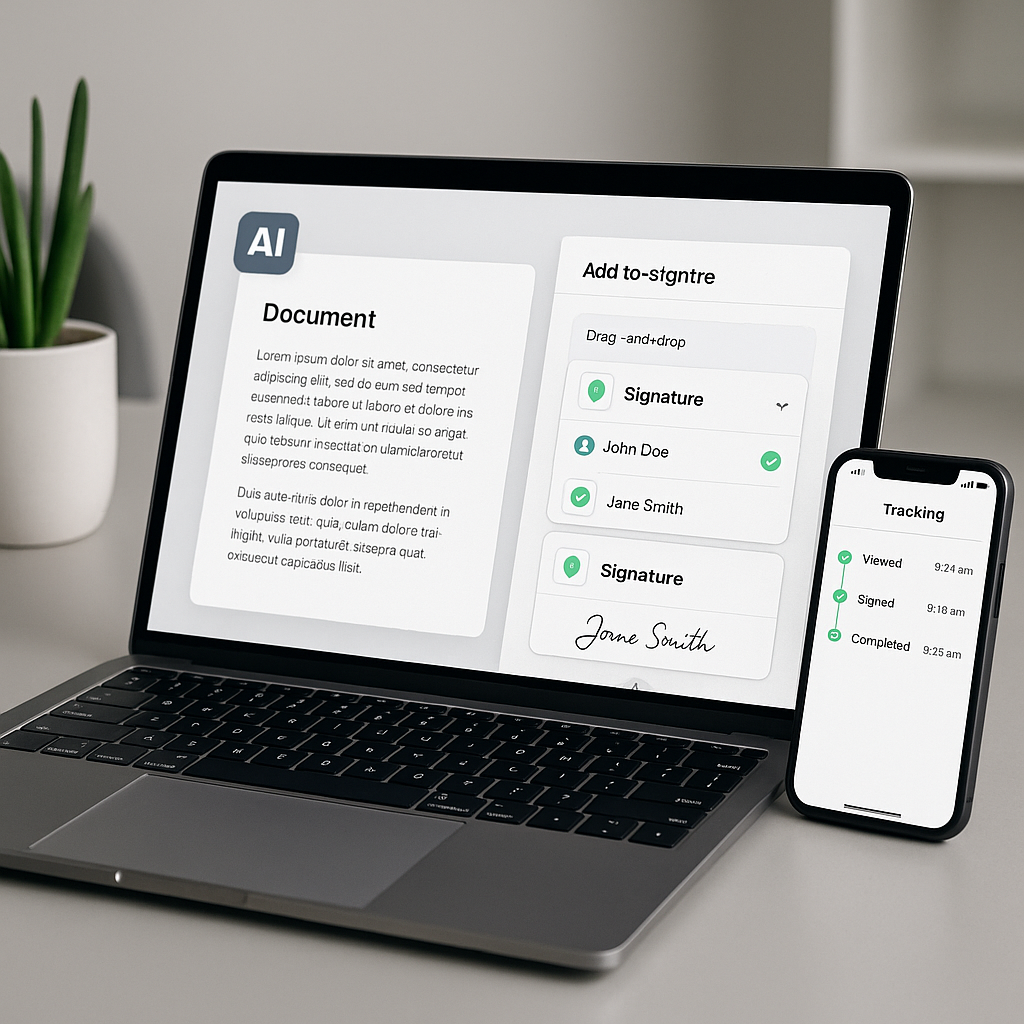
- Track views and signatures in real time
Pro tip: Use QuickSign’s AI document generation to create standard templates (e.g., “Mutual NDA for SaaS customer evaluations”) and reuse them for future deals to reduce drafting time to seconds.
2. Reduced Errors and Compliance Risks
Manual processes often lead to missing initials, wrong dates, or unsigned pages—small mistakes that create major headaches and legal ambiguity. Best-practice e-signature workflows rely on templates and pre-configured fields to reduce human error.(falkonsign.com)
QuickSign supports this through:
- Drag-and-drop fields (signatures, initials, dates, text boxes) placed exactly where signers must act
- Required field settings to prevent incomplete forms
- Consistent AI-generated language that can be refined once and reused across contracts
3. Better Visibility and Control
Without e-signature tools, tracking the status of contracts is guesswork. Modern platforms provide dashboards, notifications, and analytics. Studies show that organizations using e-signatures see roughly 39% better visibility into document status.(certinal.com)
QuickSign’s real-time tracking lets you see:
- Who has opened the document—and when
- Which recipients have signed or are still pending
- How long it typically takes for certain document types to complete
This helps sales leaders forecast more accurately, HR teams keep onboarding on schedule, and legal teams ensure critical agreements don’t stall.
4. Cost Savings and Sustainability
Beyond software licenses, traditional signing carries hidden costs: printing, shipping, scanning, storage, and labor hours. E-signatures eliminate much of this overhead while supporting ESG and sustainability goals through paper reduction.(mordorintelligence.com)
Unlike traditional per-seat solutions, QuickSign offers flat-rate pricing at $15/month for your whole team. No per-user charges means you can roll it out broadly—sales, HR, finance, legal—without worrying about license math.
Core Features to Look For in E-Signature Software (and How QuickSign Delivers)
While features vary, the most effective e-signature platforms share several essentials. Here’s what business professionals should look for—and where QuickSign shines.
1. AI-Powered Document Generation
Most tools assume you already have a perfectly formatted contract. In reality, drafting documents is one of the biggest time sinks, especially for small teams without in-house legal support.
This is where QuickSign is different: it includes AI document generation as a first-class feature. Simply describe what you need (e.g., “A simple services agreement for a marketing consultant working month-to-month with U.S. clients”) and QuickSign drafts a starting document that you can review, edit, and send.
AI is already reshaping the digital signature market by enabling smarter workflows and fraud detection;(researchandmarkets.com) QuickSign applies that innovation directly to document creation to save you from blank-page syndrome.
2. Drag-and-Drop Field Placement
Once a document is ready, you need an intuitive way to define where people sign and what they must fill out. Industry best practices emphasize clarity: instructions should be obvious, and signers shouldn’t need a tutorial just to complete the process.(falkonsign.com)
QuickSign makes this straightforward:
- Upload any PDF or AI-generated document
- Drag signature, text, date, and checkbox fields onto the page
- Assign each field to a specific recipient
- Preview the experience before sending
This reduces friction for signers and dramatically cuts down on back-and-forth due to missing information.
3. Seamless Sending to Multiple Recipients
Many business documents require multiple signers or approvers—such as a client plus an internal approver, or both parties’ legal teams. Best-practice workflows route documents in the right order and notify people automatically.(adobe.com)
With QuickSign, you can:
- Add as many recipients as you need
- Define signing order (sequential) or allow parallel signing
- Send a single document to unlimited recipients—even on the free tier
- Let the system handle email delivery, notifications, and reminders
4. Real-Time Tracking and Audit Trails
Visibility is essential, especially for teams managing a high volume of contracts. E-signature best practices recommend tracking not only whether documents are signed, but where signers drop off and how long each step takes.(falkonsign.com)
QuickSign’s real-time tracking gives you:
- A dashboard with document status (Sent, Viewed, Signed, Completed)
- Detailed activity logs for compliance and internal audits
- Insights into turnaround times by document type or team
5. Simple, Predictable Pricing
As the market has grown, pricing models have become more complex—often charging per user, per envelope, or per feature. For small and midsize teams, that makes budgeting difficult. Industry analysts note that price competition and bundled offers are reshaping the market as vendors look for more transparent models.(mordorintelligence.com)
QuickSign takes a different approach:
- Generous free tier: generate up to 2 documents and send 1 document to unlimited recipients
- Flat-rate plan: $15/month for your entire team, with no per-seat fees
This structure makes it easy to pilot e-signatures with one department and then scale across your organization without renegotiating pricing or counting licenses.
Common Business Use Cases for E-Signature Software
The global e-signature market is growing fastest in sectors like BFSI, real estate, healthcare, and HR, where document-heavy workflows are the norm.(psmarketresearch.com) QuickSign’s flexibility makes it a fit for many of these scenarios.
Sales and Revenue Operations
Use QuickSign to:
- Generate standard sales agreements and order forms with AI
- Send proposals for signature immediately after a call
- Track which prospects have opened and signed their contracts
Example workflow:
- Your sales rep writes: “Draft a one-year SaaS subscription agreement for a U.S. customer, monthly billing, including standard limitation of liability and SLA language.”
- QuickSign’s AI generates the draft contract.
- The rep reviews and customizes pricing, then drags signature fields into place.
- The contract is sent to the client; the rep gets a notification when it’s opened and signed.
Human Resources and Onboarding
HR teams often manage offer letters, NDAs, employee handbooks, and policy acknowledgments. E-signatures significantly reduce onboarding time and help maintain consistent, compliant language.(certinal.com)
With QuickSign, HR can:
- Generate offer letter templates via AI based on role and seniority
- Bundle documents (offer, NDA, policy forms) into a single signing package
- Send to new hires and get everything back—signed—before day one
Legal, Procurement, and Vendor Management
Legal and procurement teams care deeply about version control, audit trails, and enforceable language. Digital signature platforms have become essential here, with legal and financial services among the fastest adopters.(researchandmarkets.com)
QuickSign supports these teams by:
- Helping generate standardized NDAs, MSAs, and DPAs with AI
- Ensuring every clause is visible and unaltered when signing
- Providing a clear audit trail of who signed what, when, and from where
How to Implement E-Signature Workflows with QuickSign
Rolling out e-signature software is most successful when you start with a clear, simple workflow and scale from there. Best-practice guidance suggests beginning with a few low-risk document types and then expanding as the process proves itself.(techtarget.com)
Step 1: Identify Your First Use Cases
Look for processes that are:
- Frequent (e.g., NDAs, sales contracts, HR forms)
- Slowed by printing and scanning
- Low to moderate risk, so you can build confidence quickly
QuickSign’s free tier—2 AI-generated documents and 1 send to unlimited recipients—is perfect for piloting an NDA or a simple sales agreement end-to-end.
Step 2: Generate or Upload Your Document
You have two options in QuickSign:
- Generate with AI: Describe the document you need in plain language. Review and refine the draft, then save it as a template for future use.
- Upload an existing file: Drag in your existing PDF or DOCX export, then move straight to field placement.
Step 3: Add Fields with Drag-and-Drop
Next, configure the signer experience:
- Place signature fields where each party needs to sign
- Add initials where you want parties to confirm specific clauses
- Insert text fields for data like job title, purchase amount, or date
- Mark required fields to prevent incomplete submissions
Step 4: Add Recipients and Send in Seconds
Once your document is ready:
- Enter recipient names and emails
- Choose whether they sign in sequence or in parallel
- Customize the email message if needed
- Click send—and you’re done
This entire process—from AI generation to sending—can typically be completed in under 60 seconds for standard agreements.
Step 5: Monitor in Real Time and Follow Up Automatically
After sending, use QuickSign’s dashboard to monitor status:
- See when each recipient opens the document
- Get alerts when signatures are completed
- Download fully executed copies and share them internally
Over time, you can track metrics such as average time-to-sign and drop-off points, then refine your templates or messaging accordingly—just as leading organizations do when optimizing their e-signature programs.(falkonsign.com)
Learning the Basics: Helpful YouTube Resources (Plus QuickSign)
While QuickSign makes e-signature intuitive, you may still want a visual primer on creating digital signatures or signing PDFs in general. These YouTube videos provide helpful overviews that complement what you’ll do in QuickSign:
Introductory E-Signature Tutorials
This video walks through free ways to sign PDFs and create an electronic signature image you can reuse. Once you understand the basics of how a “signature” appears in a PDF, QuickSign’s drag-and-drop interface will feel second nature.
This tutorial explains the fundamentals of creating an electronic signature that you can apply in different contexts. The same concepts apply when using QuickSign—you simply skip the manual steps and rely on the platform to handle placement, identity, and audit trails.
If your team often uses Microsoft Word, this video shows how to add simple signatures directly inside Word documents. With QuickSign, you can export those documents as PDFs, upload them, and benefit from full tracking, multi-signer workflows, and AI template generation.
Key takeaway: General e-signature tutorials are a great starting point. QuickSign builds on those basics with AI drafting, drag-and-drop fields, real-time tracking, and flat-rate pricing that make electronic signatures practical across your whole business.
Ready to simplify your document signing? Try QuickSign for free - generate 2 documents and send 1 document to unlimited recipients at no cost. No credit card required.