E-Signature Solutions for Startups: How QuickSign Supercharges Your Contracts
Boost growth with an e-signature solution for startups. Discover how QuickSign speeds up contracts, cuts costs, and keeps your deals moving faster.
E-Signature Solutions for Startups: How QuickSign Supercharges Your Contracts
Why Early-Stage Startups Outgrow Paper and Email-Based Signing
If you’re running a startup, every day (and every dollar) counts. Yet many young teams still lose hours chasing signatures across email threads, printing PDFs, rescanning contracts, and manually tracking who has (and hasn’t) signed.
Those delays are more than an annoyance—they slow revenue, scare investors, and make your lean team look less professional than you actually are. Meanwhile, the global e‑signature market is exploding, projected to grow from around $13.4 billion in 2025 to over $70 billion by 2030, precisely because businesses are discovering how much faster digital workflows can be.(valcaresystems.com)
QuickSign is designed to give startups that same speed and polish—without enterprise-level pricing or complexity. Instead of bolting a legacy tool onto your stack, you get a lightweight, AI-powered e‑signature solution built for teams that need to move fast and keep costs predictable.
Key takeaway: Startups don’t just need “a way to sign.” They need a fast, affordable, and scalable signing engine that helps them close deals, hire talent, and reassure investors—without legal or operational friction.
Are E-Signatures Legal for Startup Contracts?
One of the first questions founders ask is whether e‑signatures are really valid for important agreements like customer contracts, NDAs, or vendor deals.
In the United States, electronic signatures have been broadly recognized as legally valid for over two decades. The federal ESIGN Act and state-level UETA framework both state that a contract or signature cannot be denied legal effect solely because it’s in electronic form.(en.wikipedia.org) In practice, that means your startup can safely use e‑signatures for most business transactions as long as basic conditions like intent to sign, consent to do business electronically, and record retention are met.(fynk.com)
QuickSign helps you meet these standards automatically by tying each signature to an audit trail (who signed, when, and from which email) and keeping documents accessible for both you and your signers.
When e-signatures are typically appropriate
For a startup, e‑signatures are generally suitable for:
- Sales contracts and proposals
- Non-disclosure agreements (mutual or one‑way)
- Service agreements and SOWs
- Investor updates acknowledgments, side letters (check with counsel for complex rounds)
- HR paperwork like offer letters and policy acknowledgements
- Vendor and freelancer agreements
As with any l
Why Startups Need a Purpose-Built E-Signature Platform
E‑signature tools are no longer “nice to have.” For rapidly scaling, remote‑friendly startups, they’re part of the core infrastructure—right alongside your CRM, accounting system, and code repo.
Speed: From “Send Contract” to “Signed” in Under 60 Seconds
Founders often complain that traditional contract workflows turn week‑long close cycles into the norm. Modern e‑signatures invert that: some businesses report contracts that once took a week now closing in under 30 minutes.(valcaresystems.com)
With QuickSign, the entire process is optimized for startup speed:
- AI Document Generation creates complete NDAs, service agreements, or simple sales contracts from a short prompt—no starting from a blank Word file.
- Drag-and-drop field placement lets you position signatures, dates, text fields, and initials exactly where you want them on any uploaded PDF.
- Seamless sending means you add one or more recipients and dispatch the document in seconds—no complex configuration.
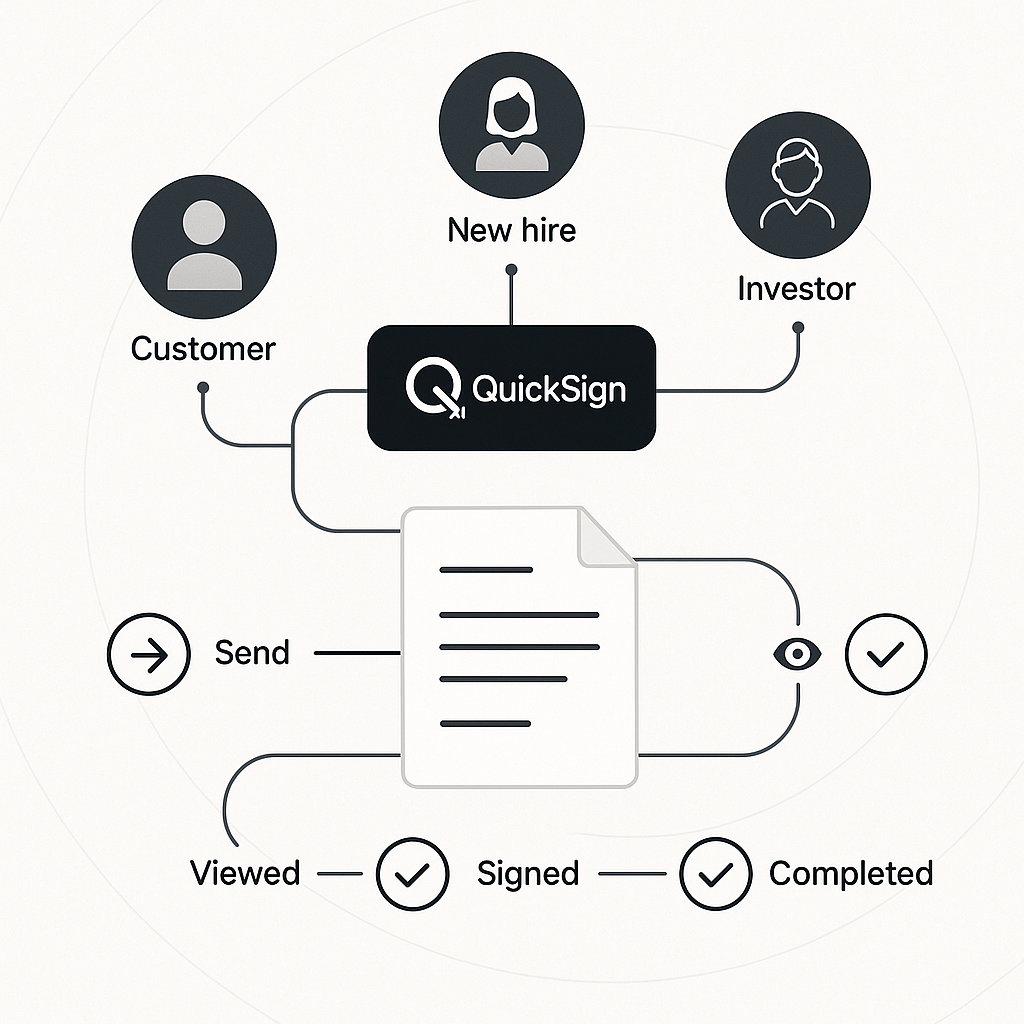
- Real-time tracking shows when a recipient has opened, viewed, and signed, so you can nudge them at the right moment instead of guessing.
Cost: Flat-Rate Pricing That Fits a Startup Budget
Many legacy e‑signature platforms are priced on a per‑seat basis, which punishes startups as they add founders, sales reps, and hiring managers. Unlike traditional per-seat solutions, QuickSign offers flat-rate pricing at just $15/month for your whole team—no per‑user fees, no unexpected jumps as you grow.
You also get a generous free tier to test the workflow: generate up to 2 documents with AI and send 1 document to unlimited recipients at no cost. That’s more than enough to run a pilot sales process, sign an early hire, or execute your first vendor agreement.
Remote-First Teams and Global Talent
Startups increasingly hire remotely and sign clients across borders. E‑signatures allow stakeholders to sign from any device—phone, tablet, or laptop—without printing or scanning.(valcaresystems.com) QuickSign is accessible from any modern browser, so your distributed team and customers can complete contracts from wherever they are.
How Startups Use QuickSign Day-to-Day
While every startup is different, most early-stage companies rely on a similar stack of recurring documents. Here’s how those map directly into QuickSign workflows.
1. Generating NDAs and Mutual Confidentiality Agreements
Most startups live on NDAs—before investor pitches, co‑development discussions, or enterprise pilots. Instead of recycling an outdated template or paying a lawyer for every variation, you can use QuickSign’s AI Document Generation to produce a tailored NDA in seconds.
- Describe what you need: e.g., “Mutual NDA between a US SaaS startup and an enterprise customer, 2‑year term, Delaware law, standard confidentiality carve-outs.”
- Let QuickSign draft the document and review it with your counsel once to align on a “golden master.”
- Save that version as your go‑to NDA and reuse it on demand.
- Add signature and date fields with the drag-and-drop editor.
- Send to your counterpart and track the signing status in real time.
Pro tip: Once legal approves your favorite NDA language, lock that template in QuickSign. Your team can then generate deal-specific NDAs from a prompt without accidentally modifying key legal protections.
2. Signing Early Customer Contracts and Pilot Agreements
Winning your first 10–20 customers is a milestone. The last thing you want is for a “we’re ready to sign” email to turn into a week-long delay while everyone prints, signs, and scans PDFs.
With QuickSign you can:
- Upload your existing contract as a PDF.
- Use drag-and-drop fields to mark signature blocks, pricing fields, and start dates.
- Add all customer signers (e.g., legal and procurement) and internal approvers in one go.
- Send it with seamless emailing and let automatic reminders and real-time tracking keep the deal moving.
Because e‑signatures eliminate printing and postage, you also save the estimated $36 per paper contract in hard costs alone—multiplied across dozens or hundreds of deals, that quickly becomes thousands in annual savings.(valcaresystems.com)
3. Streamlining Hiring and HR Paperwork
Founding teams often under‑optimize their HR workflows, even as they scramble to close sales. But slow, messy onboarding creates a poor first impression for your new hires.
QuickSign lets you manage:
- Offer letters
- Equity or option grant agreements (after review with counsel)
- IP assignment and confidentiality agreements
- Policy acknowledgements (employee handbook, security policies, etc.)
Your HR lead (or founder) can generate standard documents with AI, apply the right signature and initial fields, and send them out in minutes—no Word mail merges or manual PDF editing.
4. Vendor and Contractor Agreements
Whether it’s a fractional CMO, a contract developer, or a cloud provider, vendors keep your startup running. QuickSign helps you standardize freelancer and vendor contracts, making sure everyone signs the same vetted terms instead of one-off variations.
A Real-World Startup Workflow with QuickSign
Let’s walk through a concrete scenario: a B2B SaaS startup called “LaunchStack” closing a new customer while hiring a key engineer—using QuickSign for all signatures.
Step 1: Create an NDA with AI Document Generation
Before sharing their product roadmap with a potential enterprise customer, LaunchStack’s founder logs into QuickSign and describes the needed NDA. QuickSign’s AI Document Generation drafts a mutual NDA aligned with standard US SaaS practices.
The founder reviews the terms (already aligned with counsel from a prior pass), drops in signature and date fields, and uses seamless sending to email it to the prospect. Within minutes, both sides have signed.
Step 2: Send the Pilot Agreement for E-Signature
After a successful proof-of-concept, the prospect is ready for a 6‑month paid pilot. The sales lead uploads the pilot agreement PDF into QuickSign:
- Uses drag-and-drop field placement to position signatures for the customer’s business owner and procurement lead.
- Adds fields for contract value, start date, and renewal terms.
- Enters all recipient emails and sets the sign order (business owner signs before procurement, then LaunchStack’s CEO).
Using real-time tracking, the sales lead sees when each recipient opens the document. When procurement hasn’t signed after two days, QuickSign’s automatic reminders nudge them—no awkward “just circling back” emails required.
Step 3: Hire a Senior Engineer
At the same time, LaunchStack is closing a critical hire. The hiring manager:
- Uses QuickSign’s AI Document Generation to produce a customized offer letter and IP assignment agreement.
- Combines them into a single signing packet.
- Applies signature fields for the candidate and the CEO.
- Sends via QuickSign so the candidate can sign on their phone.
The candidate receives and signs the offer within hours, impressed by how professional and frictionless the process feels.
Step 4: Track Everything for Security and Compliance
LaunchStack’s leadership team wants to stay ahead of security expectations—especially as they watch content like “SOC 2 for Startups: Quick Guide” on YouTube, which emphasizes having auditable, well‑controlled systems for any tool touching customer data.
QuickSign’s real-time tracking and audit history supports this by providing:
- Timestamps of each view and signature
- Recipient email addresses and activity logs
- Centralized access to executed contracts for internal review
When LaunchStack later begins a SOC 2 readiness project, this visibility makes it easier to demonstrate control over contract workflows.
Time and Cost Savings: What QuickSign Means for a Startup
Let’s quantify what moving to QuickSign can mean for a typical small startup over a year.
Contract Cycle Time
Research suggests that businesses using e‑signatures can reduce contract turnaround from several days to as little as 30 minutes for straightforward agreements.(valcaresystems.com) For a startup, that can translate into:
- Faster revenue recognition: invoices can go out days earlier.
- Shorter sales cycles: deals close before momentum is lost.
- Quicker hiring: candidates sign when excitement is highest, lowering the risk they accept another offer.
Administrative and Paper Costs
Paper contracts can cost around $36 each when you factor in printing, shipping, and storage.(valcaresystems.com) If your team signs even 150–200 documents per year, that’s $5,400–$7,200 in avoidable costs—before you count your team’s time spent managing them.
With QuickSign’s flat $15/month pricing (just $180/year), even a small startup can save thousands annually, while also freeing up hours of founder and operator time.
Error Reduction and Compliance
Traditional paper workflows often lead to missing initials, unsigned pages, or wrong versions being executed. E‑signature platforms significantly reduce those errors with required fields and version control; in some cases, businesses have reported up to 90% fewer contract errors after switching to digital workflows.(valcaresystems.com)
QuickSign’s drag-and-drop fields and clear signer experience help ensure that every required field is completed before a document is considered fully signed, reducing back‑and‑forth and the risk of unenforceable agreements.
Actionable Tips for Startups Implementing QuickSign
Standardize Your “Core” Documents First
List your top 5 recurring documents (e.g., NDA, SaaS subscription, contractor agreement, offer letter, IP assignment). Use QuickSign’s AI Document Generation to draft or refine each, then have counsel review them once. Save these as reusable templates so your team can generate consistent agreements from simple prompts.
Centralize Ownership, Then Empower the Team
Initially, assign one person—often an operations lead—to set up templates and conventions in QuickSign. Once that foundation is in place, invite your whole team under the same flat‑rate plan so sales, HR, and founders can all send documents without cost surprises.
Use Real-Time Tracking to Drive Follow-Through
Instead of guessing when to remind a prospect or candidate, lean on QuickSign’s real-time tracking and notifications:
- Follow up shortly after you see they’ve opened but not signed.
- Adapt your message based on their activity (“I saw you had a chance to review…”).
- Use the audit trail to answer any disputes about who signed what and when.
Integrate with Your Broader Startup Stack Over Time
As you mature, you may want e‑signed documents to flow into your CRM, file storage, or accounting system. Start with QuickSign as your dedicated signing hub, then layer in integrations when you’re ready to further automate your operations.
Why QuickSign is a Natural Fit for High-Growth Startups
For early-stage and scaling startups, QuickSign offers a blend of capabilities that map directly to your reality:
- Speed: Generate and send contracts in under 60 seconds with AI and streamlined sending.
- Affordability: Flat $15/month pricing for your whole team and a generous free tier (2 AI document generations + 1 send to unlimited recipients).
- Simplicity: Drag‑and‑drop fields and intuitive workflows your non‑technical teammates can use from day one.
- Visibility: Real-time tracking and audit trails that support your journey toward more rigorous security and compliance (like SOC 2) as you grow.
- Scalability: The same tool works whether you’re signing your first customer or your thousandth.
Ready to simplify your document signing? Try QuickSign for free - generate 2 documents and send 1 document to unlimited recipients at no cost. No credit card required.