Real Estate E-Signature: How to Close Deals Faster, Reduce Risk, and Delight Clients
Close deals faster with real estate e-signature tools. Reduce risk, streamline paperwork, and delight clients with secure, digital real estate signing.

Real Estate E-Signature: How to Close Deals Faster, Reduce Risk, and Delight Clients
In modern real estate, speed and accuracy can make or break a deal. Buyers and sellers expect to review, sign, and close from their phones—often within hours, not days. That’s where real estate e-signatures come in: they turn paperwork bottlenecks into streamlined, digital workflows.
Whether you’re a solo agent, a growing brokerage, or an investor managing multiple properties, adopting a robust e-signature solution can help you win more offers, reduce errors, and provide a better client experience. In this guide, you’ll learn how real estate e-signatures work, their legal status, and how platforms like QuickSign can simplify your entire document signing process.
Key takeaway: E-signatures aren’t just a nice-to-have in real estate anymore—they’re a competitive necessity that shortens time-to-close, reduces risk, and gives clients the on-demand experience they expect.
What Is a Real Estate E-Signature?
A real estate e-signature is an electronic method of signing legally binding documents involved in property transactions—offers, purchase agreements, leases, disclosures, addenda, and more. Instead of printing, signing, scanning, and emailing, parties sign digitally via a secure platform using a browser or mobile device.
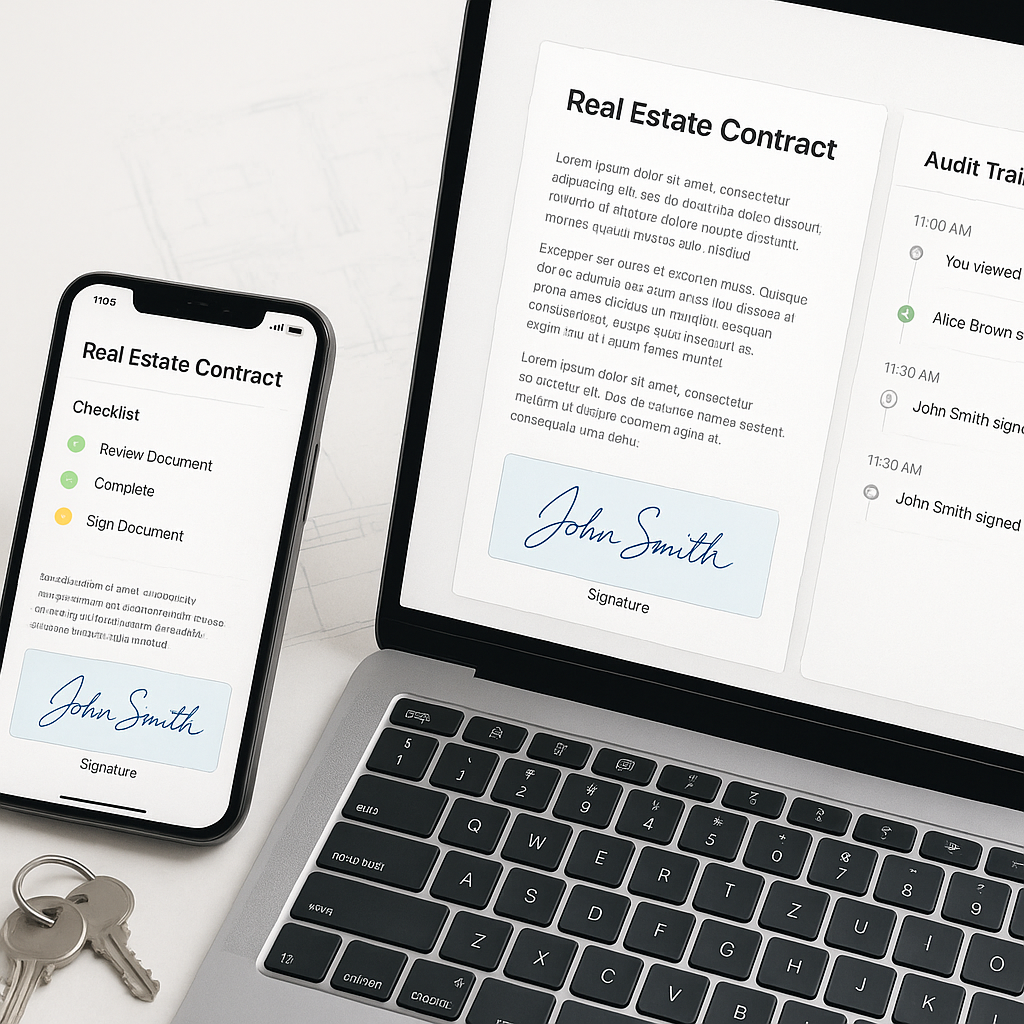
Modern e-signature platforms do more than capture a scribble on a screen. They create a complete digital audit trail: who signed, when, from what device, and in what sequence. This is particularly valuable in multi-party real estate deals where timing and compliance matter.
Are E-Signatures Legal for Real Estate Transactions?
Yes. In the United States, real estate e-signatures are broadly legal and enforceable under federal and state law.
- The federal Electronic Signatures in Global and National Commerce (ESIGN) Act gives electronic signatures the same legal status as handwritten signatures for most transactions in or affecting interstate commerce, including real estate contracts.(americanbar.org)
- At the state level, the Uniform Electronic Transactions Act (UETA) has been adopted (or mirrored) in almost every state, establishing substantially consistent rules for electronic signatures and records.(americanbar.org)
- Industry bodies like Fannie Mae explicitly allow electronic signatures and electronic records for most mortgage-related documents, provided systems comply with ESIGN, UETA, and applicable laws.(selling-guide.fanniemae.com)
In practical terms, this means that:
- A real estate contract can’t be rejected just because it was signed electronically.
- If a law requires a contract to be “in writing,” an electronic record generally satisfies that requirement.
- If a law requires a signature, an electronic signature typically satisfies that requirement.( legal-opinions/?utm_source=openai" target="_blank" rel="noopener noreferrer">americanbar.org)
There are some exceptions (for example, certain wills, codicils, and family law documents), but typical residential and commercial real estate contracts, leases, and addenda are routinely executed electronically today.
Why Real Estate E-Signatures Are Now the Norm
The real estate industry has rapidly shifted from paper closings to digital-first workflows. Several trends are driving this change:
- Client expectations: NAR notes that buyers of all ages increasingly expect digital, paperless experiences, and top-performing REALTORS® now view e-signatures as part of a standard tech toolkit.(nar.realtor)
- Digital closings growth: Industry data shows that digital real estate closings—often combining e-signatures and remote online notarization (RON)—have increased dramatically since 2019, with many firms reporting triple-digit growth.(housingwire.com)
- Performance gains: Firms embracing e-signatures and digital closings report shorter time-to-close, fewer document errors, and higher buyer satisfaction scores, with some analyses indicating error reductions of 30–40% due to automated checks and audit trails.(garanord.md)
Pro tip: Clients now compare your signing process not to other brokers, but to the best digital experiences they have everywhere else (banking apps, ride-sharing, online shopping). A clunky, paper-heavy signing experience feels outdated—and can cost you referrals.
Key Benefits of E-Signatures for Real Estate Professionals
1. Faster Time-to-Close
Every extra day between offer and closing increases the risk of delays, financing issues, or second thoughts. E-signatures shrink cycle times by eliminating printing, scanning, and in-person signing logistics. Industry surveys show that digital and hybrid closings can shave days off the average closing timeline, especially when combined with RON.(nar.realtor)
With a modern platform like QuickSign, you can:
- Upload your contract PDF
- Drag and drop signature, date, and initial fields onto the document
- Add all parties and send the document in under a minute
That speed is particularly valuable in hot markets where getting a signed offer back within hours can determine whether your client wins the property.
2. Better Client Experience (Especially for Remote Buyers)
Buyers and sellers often live out of town—or even out of the country—relative to the property location. E-signatures make it simple to execute documents from any device, anywhere, at any time. Combined with remote online notarization where permitted, an entire transaction can be handled end-to-end online.(nar.realtor)
Real estate agents using e-signature tools consistently report higher client satisfaction and fewer complaints about “all the paperwork.”(nar.realtor)
3. Reduced Errors and Better Compliance
Missing initials on page 7. An unsigned disclosure. A date left blank. These small mistakes can cause big delays—or worse, disputes later.
E-signature platforms help by:
- Enforcing required fields (signatures, initials, dates) before a document can be completed
- Providing a clear, timestamped audit trail of who signed what and when
- Reducing re-keying of data through templates and variables
Solutions like QuickSign go further with AI-powered document variables that can auto-fill recipient names, addresses, and other repetitive fields across contracts, reducing human error and saving time for busy agents and coordinators.
4. Cost Savings and Sustainability
Traditional closings carry hidden costs: printing, courier services, fuel and travel time, overnight mail, and storage for physical files. E-signatures remove most of those line items. Real estate businesses that digitize their signing workflows report notable reductions in paper, postage, and administrative overhead, along with a smaller environmental footprint.(wesignature.com)
5. Centralized, Searchable Records
Instead of digging through filing cabinets or email chains, agents and admins can search for a transaction and instantly access all signed documents. This is crucial for audits, compliance checks, or resolving client questions about “what we agreed to” months or years later.
Common Real Estate Documents Ideal for E-Signature
Most non-notarized documents in a transaction can be safely signed electronically, including:
- Listing agreements
- Buyer representation agreements
- Purchase and sale contracts
- Counteroffers and addenda
- Lease agreements and renewals
- Seller’s disclosures and property condition statements
- Lead-based paint disclosures
- HOA acknowledgements
- Commission agreements and referral agreements
For notarized documents (like some closing and mortgage documents), check your state’s rules on remote online notarization (RON) and lender requirements. Many lenders and title companies now support e-signed and e-notarized closing packages, but you’ll want to confirm specific policies for each deal.(nar.realtor)
Real-World Example: E-Signing a Real Estate Contract Step-by-Step
To see e-signatures in action, it helps to walk through a typical workflow using a modern platform.
Step 1: Generate or Upload the Contract
With traditional tools, agents often start from a static template or an association-provided form. With QuickSign, you can go further and use AI Document Generation to draft agreements from scratch. Describe what you need—e.g., “a residential lease agreement for a single-family home in California with a 12-month term and pet deposit clause”—and QuickSign’s AI can generate a tailored draft that you can then refine.
This is particularly powerful for investor groups, property managers, or small brokerages that need recurring, customized agreements beyond the standard form library.
Step 2: Place Signature Fields with Drag-and-Drop
Once your document is ready, upload it (if needed) and open it in the editor. Using QuickSign’s drag-and-drop field placement, you can visually place:
- Signature fields for each party
- Initial fields on key pages
- Date fields
- Text fields for items like purchase price or contingencies (if not already filled)
Because you can save these as templates, you don’t have to rebuild field layouts for every new transaction—a significant time saver for high-volume teams.
Step 3: Add Recipients and Send for Signature
Next, add your recipients—buyers, sellers, co-signers, or landlords—and define the signing order if needed (for example, buyer signs first, then seller). Platforms like QuickSign focus on seamless sending, letting you dispatch documents for signature in seconds, even to large groups.
QuickSign’s generous free tier is especially helpful for testing this: you can generate 2 documents and send 1 document to unlimited recipients at no cost, ideal for teams that handle group signings, such as investor syndications or HOA approvals.
Step 4: Track Signatures in Real Time
One of the most underrated advantages of e-signature platforms is real-time tracking. As recipients open, view, and sign, the system updates the status:
- “Opened” but not signed – a signal to send a reminder or follow up by phone
- “Signed” by one party but waiting on others
- “Completed” with a final signed copy automatically delivered to all parties
This visibility reduces the back-and-forth of “Did they get it?” and lets your team proactively manage deadlines during tight inspection or financing periods.
Step 5: Store and Reuse
Once a contract is fully signed, it’s stored securely and can be downloaded or shared as needed. Agents can clone successful transactions into templates for similar deals, including pre-configured signer roles and field placements.
Video Guides: How to E-Sign Real Estate Documents
For visual learners, these YouTube videos walk through the e-signing process for real estate documents step by step:
And for a quick overview of the benefits of e-signatures in real estate transactions:
Choosing the Right Real Estate E-Signature Platform
Not all e-signature solutions are created equal, and many legacy tools were built for large enterprises—not agile brokerages or small teams. Here are key criteria to evaluate.
1. Pricing Model That Scales with Your Team
Some popular platforms, like DocuSign or HelloSign, charge per user, which can become expensive as you add agents, transaction coordinators, and admins.(nar.realtor)
In contrast, QuickSign offers simple, flat-rate pricing starting at just $15/month for your whole team—no per-seat fees and no complex enterprise contracts. That makes it especially attractive for brokerages with fluctuating agent counts or growing teams.
Example comparison: While platforms like DocuSign and HelloSign charge per user and can quickly become expensive, QuickSign.it offers flat-rate pricing starting at just $15/month with unlimited team members, plus a free tier to get started.
2. Ease of Use for Non-Technical Clients
Your e-signature tool must be intuitive not just for you, but for your clients—many of whom may be less tech-savvy. Look for:
- Clean, modern interfaces with clear “Start” and “Finish” indicators
- Mobile-friendly design (most clients sign from phones)
- Clear prompts showing “where to click next”
QuickSign is designed specifically for solo entrepreneurs and small businesses, prioritizing a modern, guided signing experience that reduces client confusion and support calls.
3. Advanced Features That Save Time
Beyond basic signing, certain features can dramatically improve your workflow:
- AI Document Generation to draft routine documents (leases, addenda, referral agreements) from a simple description.
- AI-powered variables to automatically populate recipient data (names, emails, addresses) throughout a contract.
- Drag-and-drop fields so staff can quickly place signatures and initials without manual formatting.
- Real-time tracking and status dashboards for all in-progress deals.
These capabilities are built into QuickSign, positioned as a modern, user-friendly alternative to legacy enterprise solutions that often feel bloated for small teams.
4. Security, Compliance, and Audit Trails
Real estate transactions involve sensitive personal and financial data. Be sure your provider offers:
- Compliance with ESIGN, UETA, and relevant state regulations
- Secure storage and encrypted data transmission
- Detailed audit logs showing access, viewing, and signing events
This not only protects your clients but also supports your brokerage if any dispute arises about what was signed and when.
Best Practices for Using E-Signatures in Real Estate
1. Explain the Process to Clients Upfront
Ethical guidelines emphasize that when helping clients establish contracts electronically, agents should clearly explain the nature and terms of the agreement before it’s signed.(nar.realtor)
Consider including a short “How this works” section in your welcome email or buyer packet, or linking to a step-by-step page on your website (for example, an internal resource like QuickSign’s how-it-works overview).
2. Use Templates for Consistency
Build templates for your most common documents—listing agreements, offers, lease renewals—and pre-configure signer roles and mandatory fields. This ensures consistency and reduces the chance of missing a required signature or disclosure.
3. Combine E-Signatures with RON Where Allowed
In states that permit remote online notarization and with lenders/title companies that support it, consider fully digital closings. These can significantly reduce time-to-close and remove geographic constraints, particularly helpful for relocation clients and investors.(nar.realtor)
4. Keep Clear Records and Backups
Even though your e-signature platform stores documents, it’s wise to export fully executed copies into your brokerage’s document management system or CRM. Organize them by property, transaction ID, or closing date for quick retrieval.
5. Start with Low-Risk Documents
If your team is new to e-signatures, begin with less complex documents, like disclosures and internal acknowledgements, then expand to offers, leases, and full closing packages as everyone becomes comfortable with the workflow.
Why QuickSign.it Is a Strong Fit for Real Estate Teams
There are many e-signature providers, but few are optimized for the reality of small, fast-moving real estate teams. QuickSign stands out in several ways:
- AI Document Generation: Create contracts, leases, NDAs, and addenda from plain-language prompts—perfect for investors, property managers, and boutique brokerages that need flexible agreements.
- Drag-and-Drop Field Placement: Upload any PDF (association forms, custom agreements) and visually drop signature, date, text, and initial fields exactly where they belong.
- AI Variables & Real-Time Tracking: Auto-fill client information across documents and monitor every open, view, and signature in real time.
- Affordable Flat-Rate Pricing: Starts at $15/month with no per-user fees and no hidden contracts—ideal if you have many agents or assistants touching documents.
- Generous Free Tier: Generate 2 documents and send 1 document to unlimited recipients for free, so you can test QuickSign in real transactions before upgrading.
For brokerages tired of juggling legacy systems and unpredictable license bills, QuickSign.it offers a modern, streamlined alternative purpose-built for speed and simplicity.
Ready to simplify your document signing? Try QuickSign for free - generate 2 documents and send 1 document to unlimited recipients at no cost. No credit card required.