RSA Encryption and Digital Signatures: What Business Leaders Need to Know (and How QuickSign Uses It)
Discover how RSA encryption and digital signatures protect your data, reduce risk, and power QuickSign’s secure workflows for modern business leaders.
RSA Encryption and Digital Signatures: What Business Leaders Need to Know (and How QuickSign Uses It)
If your business sends contracts, NDAs, or agreements for e-signature, you’re already relying on cryptography—even if you’ve never seen a math formula in your life. At the heart of many secure document workflows is RSA, a widely used public-key algorithm that underpins encryption and digital signatures across the web, PDFs, and enterprise systems.
Modern platforms like QuickSign harness RSA and related standards behind the scenes so you can securely send, sign, and track documents without needing to be a cryptography expert. Understanding the basics of RSA helps you evaluate vendors, meet compliance requirements, and answer tough questions from security or legal teams.
This guide explains RSA in plain language, shows how it powers digital signatures, and connects it directly to how QuickSign protects your document workflows.
What Is RSA and Why Should Business Professionals Care?
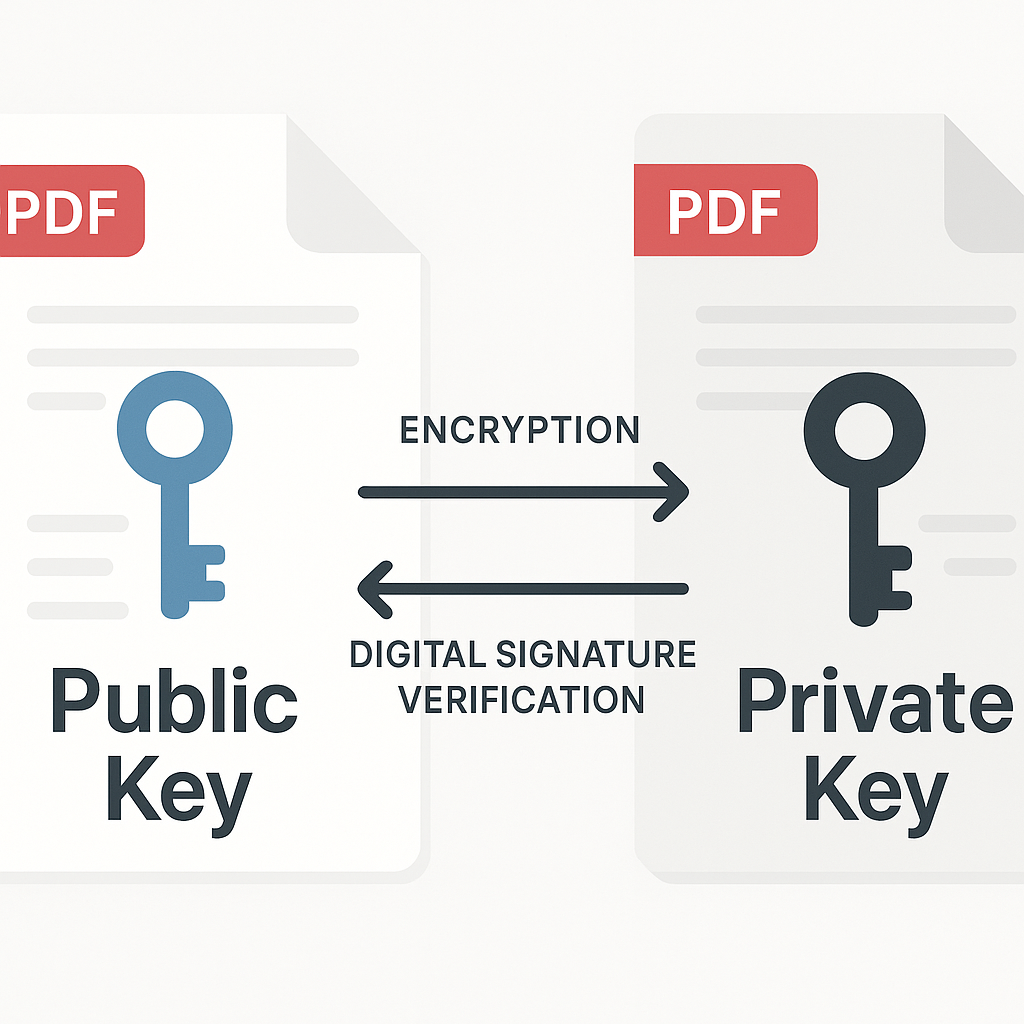
RSA (named after its inventors Rivest, Shamir, and Adleman) is a type of asymmetric cryptography. Instead of a single secret key, it uses a key pair:
- Public key – shared with others, used to encrypt data or verify signatures.
- Private key – kept secret, used to decrypt or create digital signatures.
For document signing and e-signature workflows, RSA is primarily used for digital signatures—a mathematical way to prove:
- Who signed a document (authentication)
- That the document wasn’t altered after signing (integrity)
PDF tools and enterprise systems have widely supported RSA-based digital signatures for years, often up to 4096-bit keys for strong security.(adobe.com) This long-standing interoperability is one reason modern systems like QuickSign can integrate smoothly into your existing document and compliance stack.
Key takeaway: RSA is the “engine” behind many digital signatures. Platforms like QuickSign hide the complexity so your team can send and sign documents in seconds, while still meeting strict security expectations.
How RSA Works (Without the Math Overload)
Step 1: Key Generation
At a high level, RSA key generation works like this:
- A computer picks two large random prime numbers.
- It multiplies them together to create a large number called the modulus.
- It derives a related pair of numbers that become the public and private keys.
The security comes from the fact that, given only the modulus (the product), it’s extremely hard with current technology to figure out the original two primes—even with huge computing power. This problem is known as integer factorization.(en.wikipedia.org)
Step 2: RSA for Digital Signatures
For business document workflows, RSA is often used in “signature mode” rather than pure encryption. A typical RSA-based digital signature process for a PDF or contract looks like this:
- Your system creates a hash (a unique fingerprint) of the document using a secure algorithm like SHA-256.(certguide.ai)
- The signer’s private key is used to sign that hash.
- The signature and the signer’s certificate are embedded into the document (e.g., using PKCS#7/PKCS#1 standards common in PDF signing).(adobe.com)
- Anyone with the signer’s public key can verify that the document hash matches the one that was signed and that the certificate is valid.
Platforms like QuickSign wrap this entire flow in a friendly interface. Users drag and drop fields, click to sign, and QuickSign manages the cryptographic and standards-compliance details automatically.
Want a Visual Walkthrough of RSA?
The following videos provide approachable explanations of RSA. They’re great for IT leaders, compliance officers, or technically curious founders who want a deeper understanding:
ure-in-picture" allowfullscreen>RSA, Key Lengths, and Security for Business Documents
When evaluating e-signature or document platforms, key length and algorithm choice matter because they determine how hard it would be for an attacker to forge signatures or tamper with documents.
Common RSA Key Sizes
Industry guidance and NIST recommendations provide a mapping between RSA key length and approximate security level. For example:(en.wikipedia.org)
- RSA 1024-bit: considered weak. Should not be used for new deployments.
- RSA 2048-bit: minimum for most modern systems; roughly comparable to 112-bit symmetric security.
- RSA 3072-bit: stronger, comparable to 128-bit symmetric, recommended for long-lived signatures beyond ~2030.
- RSA 4096-bit: very strong but slower; often used when additional margin is desired.
NIST guidance and related analyses indicate that RSA keys of at least 2048 bits are acceptable today, with 3072+ recommended for long-term security horizons.(newsoftwares.net) As a business user, you don’t need to pick the key size yourself, but you should ensure your e-signature provider does.
QuickSign is designed with modern cryptographic best practices in mind, using secure key sizes and algorithms that align with contemporary standards, while maintaining fast performance for everyday signing.
Pro tip for security reviews: When your security team asks about cryptography, confirm that your e-signature provider uses at least RSA-2048 with SHA-256 or better for digital signatures, and supports modern PDF signing standards.
How RSA Powers Secure E-Signatures in QuickSign
In practical terms, business users aren’t configuring RSA; they just need secure, compliant signatures that work across devices and jurisdictions. Here’s how that translates into everyday use of QuickSign.
1. AI Document Generation with Built-In Signing Readiness
One of the unique advantages of QuickSign is AI Document Generation—you can generate contracts, NDAs, and agreements from scratch using simple prompts. For example:
- “Create a one-page mutual NDA between a US marketing agency and a SaaS startup.”
- “Draft a simple consulting agreement with hourly billing and 30-day payment terms.”
QuickSign’s AI produces a structured, sign-ready document that you can then secure with RSA-backed digital signing flows. You’re not just pasting text into a PDF—you’re generating a legal document that slots directly into a cryptographically secure signing pipeline.
2. Drag-and-Drop RSA-Backed Signature Fields
Once you upload or generate a document, QuickSign lets you visually configure where signatures and other fields should appear using drag-and-drop field placement:
- Drag a signature field to the last page next to “Authorized Signatory.”
- Add initials where you need specific clauses acknowledged.
- Place a date field that auto-fills when the recipient signs.
- Add text fields for titles, PO numbers, or special terms.
Behind the scenes, when recipients sign, QuickSign’s backend uses strong cryptography (including RSA-based mechanisms for digital signatures in compatible workflows) to ensure that the resulting signed document is tamper-evident and verifiable using standard PDF readers and enterprise tools.(adobe.com)
3. Seamless Sending and Secure Delivery
With the document configured, you can:
- Add one or many recipients (e.g., external clients, internal approvers, legal).
- Configure signing order (e.g., client signs first, then COO, then CFO).
- Send the document for signature in seconds via QuickSign’s seamless sending interface.
QuickSign delivers secure, personalized signing links. When recipients open and sign, the cryptographic layer ensures document integrity—any post-signing modification breaks the signature, which compatible viewers detect and flag.
4. Real-Time Tracking and Proof of Signature
In high-stakes business deals, you often need evidence of who did what, and when. With real-time tracking, QuickSign gives you:
- Visibility into when a document is opened, viewed, and signed.
- Status dashboards showing who’s signed and who’s outstanding.
- Audit trails and metadata that complement the RSA-based digital signature at the file level.
This combination of cryptographic proof (thanks to RSA and modern standards) and operational evidence (timestamps, IPs, events) gives your legal and compliance teams the assurance they need.
Practical QuickSign Workflows That Quiet Cryptography Questions
Workflow 1: NDA Signing with Strong RSA-Backed Integrity
Imagine you’re a B2B SaaS company onboarding a new partner. You need a mutual NDA signed quickly, but your partner’s security and legal teams want assurance that signatures are robust and auditable.
With QuickSign, you can:
- Generate the NDA with AI: Prompt QuickSign’s AI to draft a mutual NDA matching your jurisdiction and requirements.
- Place signature fields: Drag one signature field for your company representative and one for the partner’s representative, plus date fields.
- Send for signature: Add both parties as recipients and send.
- Share security details: When asked, you can explain that the document is protected using industry-standard digital signature algorithms (e.g., RSA with strong key sizes), aligned with the way PDF signing is supported across leading tools.(adobe.com)
The partner’s team can open the final signed PDF in their preferred viewer and see that the signature is valid and the document hasn’t been modified since signing.
Workflow 2: Board Resolutions and Long-Term Validity
For board resolutions or corporate governance documents that must remain valid for many years, RSA key size and algorithm choice matter more.
By using modern RSA key sizes (2048+ bits) and secure hash algorithms like SHA-256—consistent with NIST-aligned advice about key strengths and lifetimes(newsoftwares.net)—QuickSign-enabled documents are designed to remain trustworthy over their expected lifespan. Combined with stored audit trails and backups, this supports long-term corporate recordkeeping.
Workflow 3: High-Volume Sales Contracts at Flat-Rate Pricing
If your team sends dozens or hundreds of contracts every month, you need both security and cost predictability.
Unlike traditional per-seat solutions, QuickSign offers flat-rate pricing at $15/month for the whole team. That includes the use of strong cryptography and secure document handling without surprise “per-signer” or “per-envelope” fees. You can rely on RSA-backed signing across high volumes of documents without watching the meter.
Key takeaway: Strong cryptography doesn’t have to mean complex pricing. With QuickSign’s flat-rate model and generous free tier, you get RSA-strength security and modern e-signature workflows at a predictable cost.
Actionable Tips: What to Ask About RSA and Security When Choosing an E-Signature Platform
When your team evaluates e-signature tools, here are concrete questions you can bring to the conversation—along with how QuickSign addresses them.
1. “What algorithms and key sizes do you use for digital signatures?”
Look for answers that include:
- Modern asymmetric algorithms like RSA with at least 2048-bit keys.(newsoftwares.net)
- Secure hash functions like SHA-256 or better (not SHA-1 or MD5).(certguide.ai)
- References to recognized standards for PDF signing and PKI.
QuickSign is built on these modern cryptographic expectations, ensuring that signatures remain resilient against realistic attacks and compliant with common enterprise policies.
2. “How do you ensure documents can be validated in standard tools?”
Your legal and counterparties’ teams should be able to open signed documents in mainstream PDF viewers and see the signature status clearly. PDF signing standards (often using RSA in formats like PKCS#1 or PKCS#7) are critical for this kind of interoperability.(adobe.com)
QuickSign produces signed documents designed to be compatible with common validation flows, so your stakeholders don’t need special software to trust what they’re seeing.
3. “Do you support high volumes without per-user cryptography costs?”
Security shouldn’t become a financial bottleneck. Because QuickSign offers affordable flat-rate pricing at $15/month for your entire team, you get robust RSA-backed security without paying per seat or per document. That means:
- Scaling sales teams without renegotiating license counts.
- Onboarding contractors and internal users quickly.
- Sending as many documents as your business needs without surprise cryptography “taxes.”
Why QuickSign Is a Smart Choice for RSA-Backed E-Signatures
Putting it all together, here’s why QuickSign stands out for business professionals who care about both security and usability:
- Modern cryptography under the hood – RSA and related standards power secure, tamper-evident signatures aligned with contemporary best practices.
- AI Document Generation – Quickly create sign-ready contracts, NDAs, and agreements without starting from a blank page.
- Intuitive drag-and-drop fields – Precisely control where signatures, dates, text, and initials appear in your documents.
- Seamless sending in under 60 seconds – Move from draft to sent document in moments.
- Real-time tracking – See when recipients open and sign, and follow up intelligently.
- Generous free tier – Generate 2 documents and send 1 to unlimited recipients at no cost.
- Flat-rate $15/month pricing – One low price for your whole team, without per-seat lock-in.
In other words, you get serious cryptography—RSA and modern standards—without forcing your team to think about keys, primes, or hash functions. You just draft, send, and sign.
Ready to simplify your document signing? Try QuickSign for free - generate 2 documents and send 1 document to unlimited recipients at no cost. No credit card required.