Digitization of Documents: A Practical Guide to a Paperless Office
Master the digitization of documents with our practical guide: learn steps, essential tools, and benefits of going paperless to boost efficiency.
The digitization of documents is all about converting your physical paper records—things like invoices, contracts, and client files—into organized, searchable digital formats. But it’s much more than just scanning. It’s about transforming that static paper into dynamic, usable business data that you can get to from anywhere, anytime.
From Paper Stacks to Digital Assets
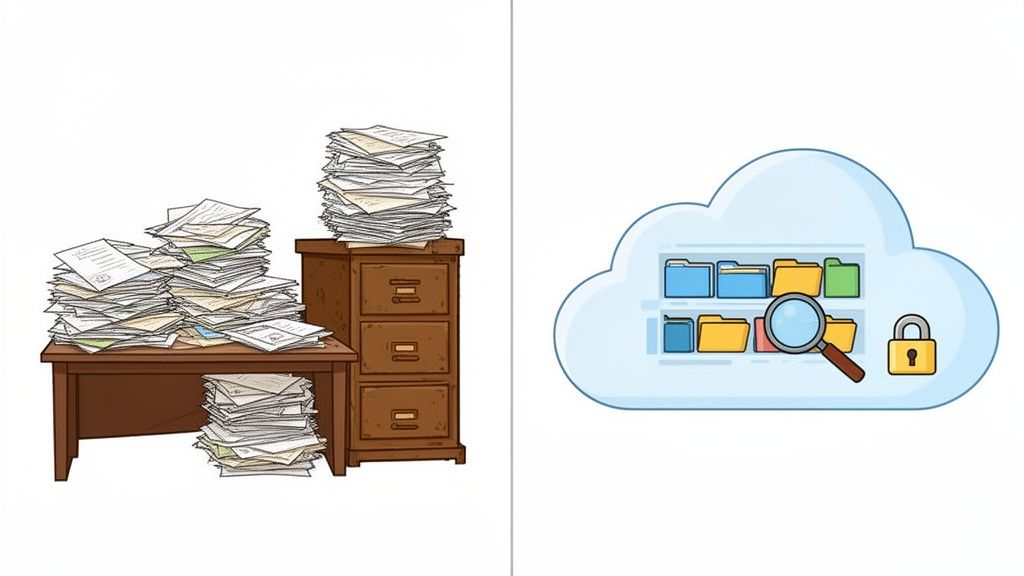
Think about the filing cabinets in your office, probably stuffed with contracts, old invoices, and client records. Finding one specific document can feel like an archaeological dig, eating up time and causing a whole lot of frustration.
Now, imagine all that same information living in a smart, secure digital library. You could pull up any file instantly with a simple keyword search, right from your laptop or phone. That's the core idea behind document digitization. It’s not just about snapping a picture of a piece of paper; it’s about fundamentally upgrading how you manage information, moving from a clunky, manual process to a powerful, automated one. It's like swapping an old-school Rolodex for a modern CRM—one just holds names, the other puts that information to work.
Why Is This Shift So Important?
For small businesses and freelancers especially, the real cost of sticking with paper is often hidden. Physical storage eats up valuable office space, printing and ink costs add up, and the time your team spends hunting for misplaced files is a direct drain on productivity. Going digital tackles these problems head-on by creating a central, efficient, and secure system.
This move solves some of the most common headaches businesses face:
- Lost or Damaged Documents: Digital files can be backed up in the cloud, keeping them safe from things like fire, water damage, or theft.
- Slow Approval Processes: Forget shuffling paper from one desk to another. Digital documents can be sent, reviewed, and signed off on in minutes.
- Inefficient Collaboration: Remote and hybrid teams can access and work on the very same document at the same time, ending version control nightmares for good.
At its core, digitization is a strategic move to unlock the value trapped within your paper documents. It converts passive records into active assets that drive faster decisions, improve client service, and secure your business's critical information.
The Building Blocks of a Digital Workflow
The journey from a physical page to a digital file relies on a few key technologies working in concert. Scanning is the first step, of course, creating a digital image of the paper.
The real magic, though, comes next with Optical Character Recognition (OCR). This is the technology that "reads" the text on that scanned image, making the document fully searchable and even editable. It’s what turns a simple picture into intelligent data.
Once digitized, your files are stored in a secure cloud-based system, usually a Document Management System (DMS), which becomes your company's smart digital archive. You can learn more about how newer tools are making small business document management more accessible and affordable. This foundation paves the way for a genuinely paperless workflow, giving your team the information they need, exactly when they need it.
The Technology That Powers Your Paperless Office
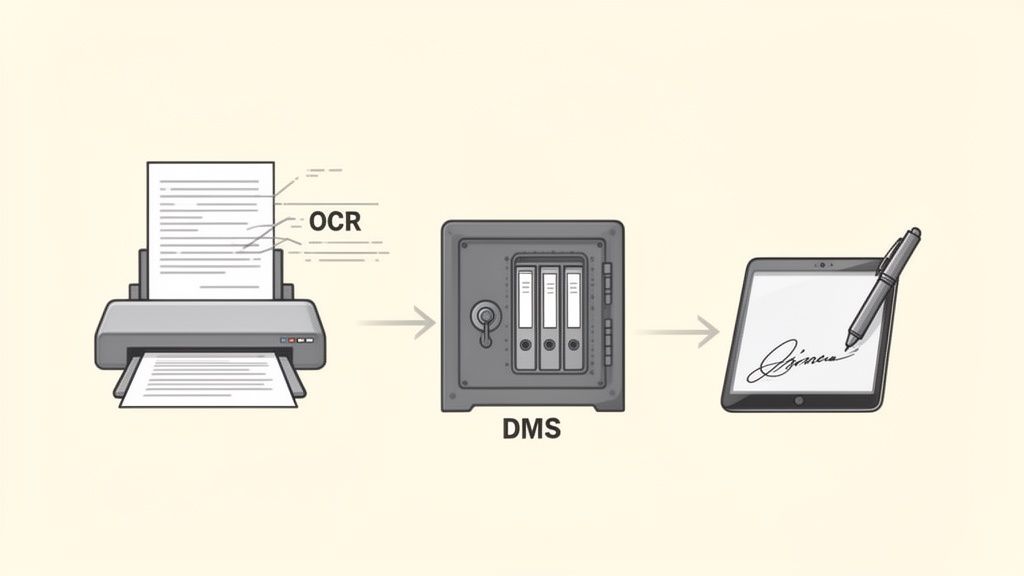
Making the leap from paper stacks to a digital system isn't magic. It's powered by a few core technologies working in harmony. Think of them as the engines that drive efficiency, security, and access in a modern office. Once you understand how they fit together, the whole process of digitization of documents becomes much clearer.
It all starts with teaching your computer how to read. Without this crucial first step, a scanned document is just a flat picture—a digital photo of words that your systems can't understand or work with.
Making Scans Smart with OCR
This is where Optical Character Recognition (OCR) technology comes in. OCR is the bridge between your physical papers and your digital world. It scans an image of a document, recognizes the shapes of letters and numbers, and turns them into actual, usable text.
Suddenly, that invoice you just scanned isn't just a picture anymore. You can now search for it by client name or invoice number. Better yet, you can copy and paste the information or even have it automatically pulled into your accounting software. No more mind-numbing manual data entry.
Your Digital Filing Cabinet: The Document Management System
Once your documents are intelligent, they need a safe and organized home. That home is a Document Management System (DMS). A DMS is so much more than a shared folder on your server; it's a purpose-built digital archive for your business.
A good DMS becomes the central source of truth for your company’s information. It offers powerful tools that paper could never match:
- Version Control: Tracks every change made to a document, so you always know you're looking at the latest draft. No more confusion over "Final_v2" versus "Final_FINAL."
- Access Permissions: Lets you decide exactly who can see, edit, or share certain files. This is essential for protecting sensitive HR records or financial reports.
- Audit Trails: Logs every single action—who opened a file, what they did, and when. This creates a bulletproof record for security and compliance.
A DMS doesn't just store files. It organizes them, secures them, and gets them to the right people at the right time. It’s the backbone of any solid digital workflow.
This move toward smarter systems is picking up steam fast. The market for Intelligent Document Processing (IDP), which is a core part of a modern DMS, is expected to reach $6.78 billion by 2025. It's a massive trend, with over 80% of businesses planning to invest more in automating how they handle documents.
Securing the Deal with E-Signatures
The final piece of the paperless puzzle is the digital handshake: the e-signature. Digitizing contracts is great, but the process breaks down if you still have to print them for a signature. E-signatures close that last gap, letting you finalize agreements from anywhere, entirely online.
These aren't just scanned images of a signature dropped onto a page. E-signature platforms like QuickSign create a secure and legally binding process. They produce a detailed audit trail that records every step of the signing journey—when the document was opened, viewed, and signed, all tied to the signer's IP address. This gives you strong, verifiable proof of consent.
By bringing these three technologies together—OCR, a DMS, and e-signatures—you build a truly seamless system. This combination is the foundation of effective document workflow automation, transforming clunky manual tasks into a smooth, efficient flow.
Why Going Paper-Free Is a Competitive Advantage
Leaving paper behind isn't just about tidying up the office. It's a fundamental business shift that gives you a serious competitive edge. When you digitize your documents, you directly improve your bottom line, supercharge your team's productivity, and lock down your data security. It's about moving from slow, manual work to the fast, automated workflows that modern business runs on.
Think about it. Instead of shelling out for filing cabinets, off-site storage, and a never-ending supply of paper and ink, you invest in a system that quickly pays for itself. The hidden costs of managing paper are everywhere—from the price of toner to the hours your team wastes hunting for a misplaced file. Going digital cuts those recurring expenses out of your budget for good.
Drastically Cut Operational Costs
The first win you'll notice in a paperless office is a big drop in direct costs. Every invoice you print, every contract you mail, and every report you file away has a real price tag attached for paper, printing, postage, and the physical space to store it all.
While small on their own, these costs add up to a significant financial burden over time. Switching to digital files makes these overheads practically disappear.
- Slash Supply Spending: No more buying reams of paper, toner cartridges, folders, and filing cabinets.
- Reclaim Office Space: Free up valuable square footage currently clogged with bulky storage, which could even let you downsize your office.
- Eliminate Shipping Fees: Sending a document for review or a signature is instant and costs nothing in postage.
Let's take a look at how these workflows actually compare side-by-side.
Manual Paper vs Digital Document Workflows
The table below breaks down the practical differences between sticking with old-school paper processes and embracing a modern, digitized approach. It's a night-and-day difference in efficiency, cost, and security.
| Process Step | Manual Paper Workflow | Digital Workflow |
|---|---|---|
| Document Creation | Typed and printed. Multiple physical copies are needed. | Created digitally. Shared instantly as a single source of truth. |
| Approval/Review | Hand-carried or mailed between people, leading to long delays. | Sent via email or DMS. Real-time collaboration is possible. |
| Signature | Requires in-person signing or slow "print, sign, scan" process. | Signed electronically in minutes from any device. |
| Filing & Storage | Manually filed in cabinets. Takes up physical space. | Automatically indexed and stored in a secure cloud server. |
| Retrieval | Requires physically searching through folders and cabinets. | Found in seconds with a simple keyword search. |
| Security | Vulnerable to physical theft, loss, or damage (fire, flood). | Protected by encryption, access controls, and audit trails. |
As you can see, the digital workflow isn't just a little faster—it transforms every single step of the process, saving time and money while reducing risk.
The true cost of paper isn't just the price of a ream. It's the wasted time, the inefficient workflows, and the security risks that come with it. Digitization turns that liability into a cost-saving asset.
Boost Team Efficiency and Productivity
Maybe the biggest payoff is the time you give back to your team. In a paper-based office, an employee can easily spend hours looking for a single document, manually punching in data from an invoice, or just waiting for a contract to be signed and mailed back.
Digital workflows put these tedious tasks on autopilot. This frees up your people to focus on high-value work that actually moves the needle for your business. With a central digital hub, finding any file takes seconds, not hours. For example, a sales team can get a client contract signed and returned in minutes instead of days. That speed ripples through your entire operation, from shortening sales cycles to delivering projects faster.
A key technology behind this leap in efficiency is Intelligent Document Processing (IDP). A 2025 AIIM survey revealed that the single biggest benefit of adopting IDP was reduced processing time, as noted by 50% of businesses. Looking ahead, Gartner predicts that by 2025, 80% of enterprises will use AI-powered tools to cut their operational costs by up to 25%. You can dive deeper into the growing IDP market and its impact on business.
Strengthen Security and Compliance
Let's be honest: physical documents are a huge liability. They can be lost in a move, stolen from a desk, or destroyed by a fire or flood with no hope of recovery. Going digital creates a far more secure home for your company's sensitive information.
Modern document management systems come packed with powerful security features that you just can't replicate with paper.
- Access Control: You can set specific permissions to control who can view, edit, or share certain documents, like confidential HR files or financial statements.
- Audit Trails: Every single action—from someone opening a file to signing it—is automatically logged in a detailed, permanent record. This is a game-changer for compliance and settling any potential disputes.
- Secure Backups: With cloud-based storage, your documents are backed up automatically, keeping them safe from physical disasters like fires or floods.
This level of control is absolutely essential for legally binding agreements. When you use e-signatures, for example, you get a complete, verifiable history of the entire signing process. You can explore the specific security benefits of digital signatures in our guide. This rock-solid security doesn't just protect your data—it builds critical trust with your clients.
Your Step-By-Step Digitization Roadmap
Going paperless can feel like a mountain to climb, but it doesn’t have to be. The trick is to stop thinking about it as one massive project and start seeing the digitization of documents as a series of smart, manageable steps.
I've broken the whole process down into a five-phase roadmap that will guide you from "Where do I even start?" to long-term success. Think of it like building a house—you wouldn't just show up with a hammer and hope for the best. You need a blueprint. This is that blueprint.
Phase 1: Assess and Plan Your Project
Before you scan a single page, you need to know what you're dealing with. Take a good look around your office and do a quick document inventory. What are the key records that keep your business running? We're talking contracts, invoices, HR files, client notes—everything.
Now, prioritize. Not all paper is created equal. The goal here is to find the low-hanging fruit. Ask yourself: which documents, if digitized right now, would make the biggest difference in our day-to-day work? Maybe it’s the invoices that always get lost or the client contracts that need to be accessed by three different people at once. Focus on those first. This gives you a clear scope and helps you set goals you can actually hit.
Phase 2: Choose Your Digitization Toolkit
Okay, you have a plan. Now it's time to get the right tools for the job. This is the engine that will power your new digital workflow, so choosing wisely is key.
- Scanners: If you're only dealing with a few documents here and there, a good multifunction office printer will do the trick. But if you have boxes of old files, you'll want to look at a dedicated, high-speed document scanner. It'll save you hours.
- OCR Software: This is the secret sauce. Optical Character Recognition (OCR) is what turns a static picture of a document into a fully searchable, intelligent file. A lot of modern scanners and Document Management Systems (DMS) already have this built in.
- Document Management System (DMS): This is your new digital filing cabinet. Look for a cloud-based DMS that offers solid security, version control (a lifesaver!), and a search function that actually works.
- E-Signature Platform: To truly close the loop on your paperless process, you’ll need a tool like QuickSign. It lets you manage agreements and contracts from start to finish without ever touching a printer, all while keeping them secure and legally binding.
This combination of tools doesn't just get rid of paper; it creates a more efficient and secure way of working, as you can see below.
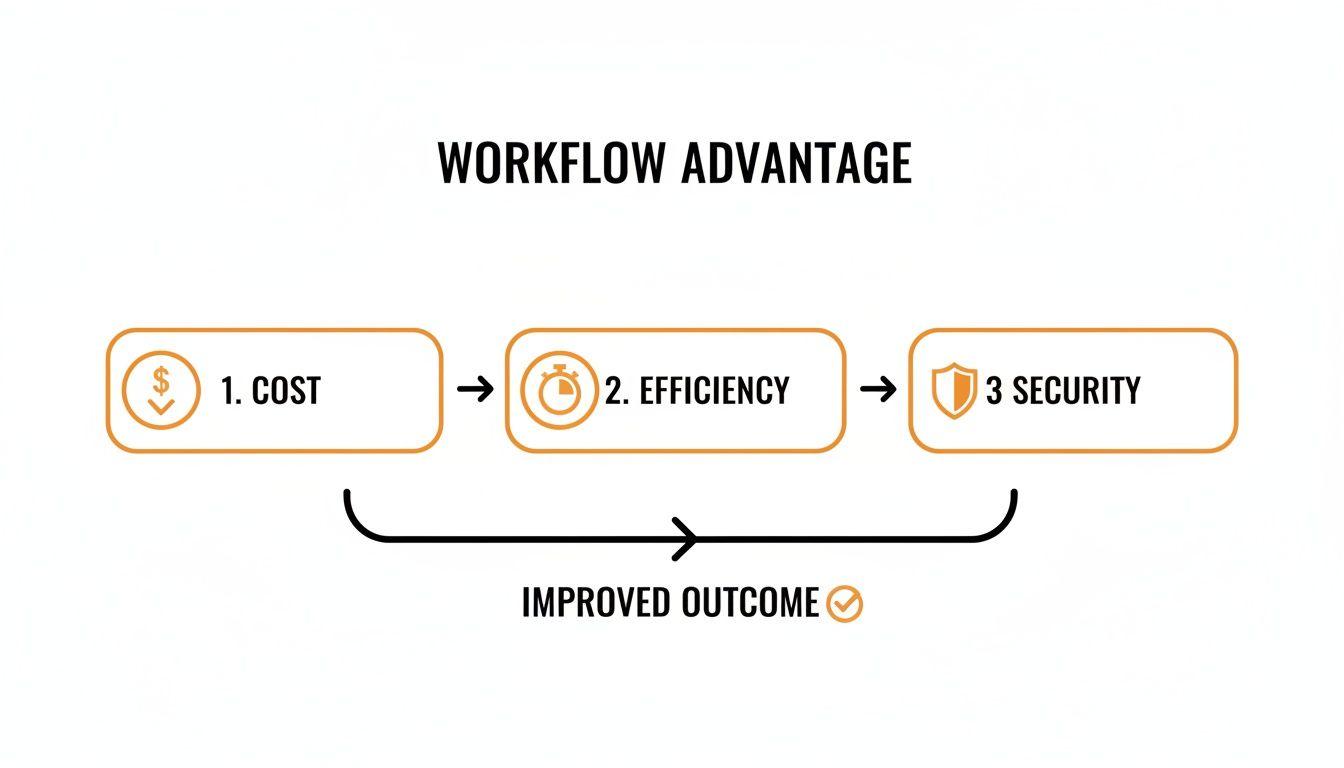
Each piece of the puzzle builds on the others to create a much stronger, faster operation.
Phase 3: Digitize and Organize Your Files
Here’s where the real work begins. As you start feeding paper into the scanner, you have to be disciplined about organization. Otherwise, you're just trading a physical mess for a digital one. The key is learning how to organize digital files before you're drowning in them.
First, map out a logical folder structure that makes sense for your business (e.g., Clients > [Client Name] > Invoices). Even more important is creating a standard file naming convention and sticking to it like glue. Something like YYYY-MM-DD_ClientName_DocumentType.pdf works wonders (e.g., 2024-10-28_AcmeCorp_ServiceAgreement.pdf). This little bit of discipline makes finding anything later incredibly fast and intuitive.
A disorganized digital system is just as useless as a cluttered filing cabinet. Taking the time to establish clear organizational rules from the start is the single most important investment you can make in the long-term success of your project.
Phase 4: Implement and Train Your Team
You can have the best system in the world, but it's worthless if nobody knows how to use it. Don't just flip the switch and expect everyone to figure it out.
I always recommend a phased rollout. Start with one department or a single workflow, like accounts payable. This lets you work out the kinks in a controlled environment before you go company-wide.
Then, you need to train your team. Show them not just how to use the new tools, but why you’re making the change. Frame it in terms of benefits to them: "This means no more hunting through filing cabinets," or "You'll get approvals in minutes, not days." When people see what's in it for them, they’ll get on board much faster.
Phase 5: Secure and Maintain Your Digital Archive
Your digital documents are some of your most valuable business assets. Protecting them is your final—and ongoing—responsibility. The great news is that digital files are far easier to secure than paper ones.
Start by setting up user permissions in your DMS. Not everyone needs access to everything. Grant access on a strictly need-to-know basis to protect sensitive data like financial records or HR files.
Finally, you absolutely need a bulletproof backup plan. Most cloud systems handle this automatically, but I still suggest having a secondary backup solution for peace of mind. And don't just "set it and forget it"—test your backups every now and then to make sure you can actually restore your files if a disaster strikes. This final step is what lets you sleep at night, knowing your critical information is safe and sound.
Completing Your Digital Workflow with E-Signatures
So, you’ve scanned your invoices, organized contracts, and shifted your archives to the cloud. Fantastic. But what happens when a document needs a signature? If you’re still printing, signing, and scanning, you’ve hit a digital roadblock.
This is the exact problem electronic signatures solve. They are the missing link that finally closes the loop on a truly paper-free process. Without them, all the efficiency you gained from the digitization of documents comes to a grinding halt at the most critical moment: getting the agreement finalized.
More Than Just a Digital John Hancock
It's a common misconception to think of an e-signature as just a fancy image of your name dropped onto a PDF. Today’s e-signature platforms are powerful tools that manage the entire lifecycle of an agreement, from the first draft to the final, archived copy.
Think of it like this: your Document Management System (DMS) is the secure digital library where your files live. An e-signature platform acts as the courier, notary, and filing clerk all rolled into one. It makes sure the right document gets to the right people in the right order, validates their identity, and then automatically files the executed copy back in your library.
Here are a few features that make this happen:
- Reusable Templates: Constantly sending out sales contracts or NDAs? Templates let you create a master version, saving countless hours and ensuring nothing gets missed.
- Automated Signing Orders: If a document needs to be signed by the manager, then the director, then legal, you can set that sequence. The platform handles the routing automatically, so you don't have to chase anyone down.
- Detailed Audit Trails: This is the non-negotiable, legally critical feature. Every single interaction is logged—who opened the document, when they viewed it, and the precise moment they signed. This creates an ironclad, legally admissible record of the entire process.
Accelerating Business from Start to Finish
The most immediate and tangible benefit of bringing e-signatures into your workflow is speed. The old "print, sign, scan, email" routine can easily add days—or even weeks—of delay to any process. An e-signature shrinks that entire cycle down to a matter of minutes.
This isn't just a minor convenience; it's a massive operational advantage. Sales teams can close deals while they’re still fresh in the client's mind. HR can onboard new hires before their first day, making them feel welcome and prepared. Legal teams can execute crucial agreements without the frustrating back-and-forth of physical paperwork.
By eliminating the final paper-based bottleneck, e-signatures act as a catalyst for your entire business. They don't just complete your digital workflow; they accelerate it, turning potential deals into signed contracts in record time.
Picture this: you send a proposal to a new client. Instead of making them hunt for a printer and scanner, they can review and sign it right on their phone while waiting for a coffee. That kind of seamless experience can be the difference between closing a deal today versus losing it next week. You can explore more about how to use electronic signatures effectively to make this a reality for your team.
Completing Your Digital Transformation
At the end of the day, adopting e-signatures is what makes your paperless initiative whole. It’s the final step that turns a partial improvement into a complete operational upgrade.
When you connect your digital document creation and storage with a secure, fast execution method, you’re building a more resilient and efficient foundation for your business. This integrated system ensures that from the moment a document is drafted to the second it’s signed and archived, it never has to leave the secure digital environment you’ve worked so hard to create. It's the final piece that locks in all the cost savings, security boosts, and productivity gains that document digitization promises.
Navigating Security and Legal Compliance
Moving your team from paper to digital often brings up some big questions. How do we keep our files safe? Will a digital signature actually hold up in court? These are smart questions to ask, but here’s the good news: a well-planned digital system is worlds more secure and compliant than a room full of filing cabinets.
The secret isn’t just about stopping hackers. It’s about gaining total control and visibility over your documents, creating a crystal-clear audit trail for every single action. Modern digital tools are built from the ground up on this very principle.
Understanding Key Legal Frameworks
When you start managing documents digitally, you’re not just winging it. You’re operating under established legal rules that give digital documents their power. For most of us, a couple of key regulations really matter.
In the United States, the ESIGN Act lays the groundwork, while the eIDAS regulation does the same for the European Union. Both essentially say the same thing: electronic signatures and contracts are just as legally binding as ink on paper, as long as you follow a few basic rules. This is what gives you the confidence to sign deals without ever touching a printer.
Then there are data privacy laws like the General Data Protection Regulation (GDPR), which sets a high bar for protecting personal information. A good digital system makes compliance much easier by letting you dictate exactly who sees what—something that’s nearly impossible when anyone can grab a folder from a cabinet. You can dive deeper into the specific legal requirements for electronic signatures to make sure you've got all your bases covered.
Best Practices for Securing Your Digital Assets
Protecting your digital archive from things like data loss or someone seeing a file they shouldn't comes down to a few core best practices. These aren't complicated, but they turn your digital files from a potential worry into a rock-solid asset.
- End-to-End Encryption: Always choose tools that encrypt your data both in transit (while it's being sent) and at rest (while it's stored). Think of it like putting your document in a sealed, tamper-proof digital envelope that only the right person can open.
- Role-Based Access Control: Not everyone in your company needs access to everything. A great system lets you set permissions so employees can only view or edit the documents directly related to their jobs. This is one of the simplest yet most powerful ways to prevent internal data leaks.
- Secure, Redundant Backups: What happens if a server goes down or there's a flood in the office? Your system should automatically back up all your files to multiple, secure, off-site locations. This means your business-critical information is safe and can be recovered, no matter what happens.
Shifting to a secure digital environment isn't about trading physical risks for digital ones. It's about upgrading from a flimsy lock to a bank vault with multi-layered, trackable, and enforceable security.
By putting these measures in place, you build a powerful defense around your company’s most valuable information. With features like audit trails, access logs, and encryption, you get a level of security that paper could never offer, giving you both peace of mind and a much stronger legal footing.
Got Questions? We’ve Got Answers.
Even with a solid plan, a few questions always pop up when you're ready to ditch the paper. Let's tackle some of the most common ones to help you move forward with confidence.
Document Imaging vs. Document Digitization: What's the Real Difference?
It’s easy to mix these two up, but they’re not the same thing. Think of it this way:
Document imaging is like taking a photo of a document. You scan a piece of paper and get a digital picture, like a basic PDF or a JPEG. It's a digital copy, sure, but your computer just sees an image—it can't actually read the words on the page.
Document digitization, on the other hand, is the real game-changer. It goes a step further by using technologies like Optical Character Recognition (OCR) to read the text within that scanned image. This unlocks the data, making the document searchable, editable, and ready to plug into your other business tools.
Imaging gives you a digital snapshot. Digitization gives you intelligent, usable data. That’s where the magic for automation and efficiency really happens.
Where Should I Even Start? What Documents Should I Digitize First?
The thought of tackling every single file in your office is enough to make anyone procrastinate. Don't do that. The key is to start smart, not big.
Focus on the documents that will give you the biggest win right away. Good candidates include:
- Your Go-To Files: Think about the stuff your team needs every day—active client contracts, current project plans, and recent invoices.
- Business-Critical Paperwork: This is your essential operational DNA, like HR records, financial statements, and important compliance documents.
- Workflow Bottlenecks: Any process that gets stuck waiting for a physical signature or approval is a prime target. This could be anything from purchase orders to new client onboarding forms.
Prioritize the files that are causing the most friction in your day-to-day work. You'll free up time and energy instantly, and you can always come back to the dusty archive boxes later.
Ready to complete your digital workflow? QuickSign makes it easy to get documents securely signed in minutes, closing the final gap in your paperless process. Start for free and transform your agreements today.