A Guide to Electronic Signature for Small Business
Discover how electronic signature for small business can save time, cut costs, and improve security. Our guide explains the benefits and how to get started.
If you're a small business owner, you're probably all too familiar with the sight of a desk piled high with paperwork. An electronic signature for small business isn't just a fancy tech tool—it's your digital handshake, a secure and legally binding way to get things done without the hassle. It turns those slow, clunky paper processes into a smooth, professional workflow.
Why E-Signatures Are a Necessity for Small Business
Think about the last time you needed an urgent contract signed. You printed it, maybe drove across town to meet the client, or paid for a courier. Then you waited... and waited... for them to sign it and send it back. Finally, you had to scan it and file it away. That whole print-sign-scan routine is more than just annoying; it’s a quiet drain on your time and money—resources you’d rather be using to actually grow your business.
Making the switch to an electronic signature platform is a genuine game-changer. It’s like moving from snail mail to email. The difference is that stark. Instead of waiting days (or even weeks), you can get agreements finalized in a matter of minutes, right from your laptop or phone.
A Modern Way to Do Business
This isn't just a passing trend; it's the new standard. The explosion in e-signature use among small businesses is one of the biggest shifts we've seen in how work gets done. Since early 2020, business adoption of e-signatures has jumped by a massive 50%. Today, an incredible 95% of companies are either using them already or have plans to start. That tells you everything you need to know: this technology is now a business essential.
For a small business, every minute and every dollar counts. Adopting e-signatures is a strategic move that directly boosts your efficiency, makes you look more professional, and helps you keep up in a fast-moving market. It simply removes the friction from your most important interactions, whether you're closing a sale or onboarding a new employee.
Positioning Your Business for Growth
Ultimately, using an electronic signature for small business is about more than just convenience. It’s a key piece of your company's digital puzzle, helping you create a seamless and impressive experience for your clients, partners, and employees. By embracing tools like QuickSign, you can automate your document workflows, build stronger client relationships with a polished process, and set your business up to scale.
To see how this fits into the bigger picture, you can check out our guide on digital transformation for small businesses.
Are E-Signatures Actually Legal and Secure?
Let's get right to it. If you're running a small business, trust is everything. So, when you're thinking about moving from pen-and-paper to digital, two huge questions pop up: Are these things legally binding? And are they actually secure?
The short answer is a confident yes, on both counts. But the why is what really matters. Once you get it, you'll feel completely comfortable making the switch.
A traditional signature is just a mark on paper showing you agree to something. An electronic signature does the exact same job, but it comes with layers of digital proof that old-school methods just can't offer. Landmark laws like the ESIGN Act in the United States and eIDAS in Europe have already laid the groundwork, giving properly executed e-signatures the same legal clout as a handwritten one.
Your Digital Paper Trail on Autopilot
Think of an e-signature platform as a digital vault with a built-in notary public. Every time you send a document, this system watches over it and records every single thing that happens. This creates what’s called an audit trail.
This trail isn't just a simple log; it’s a detailed, court-admissible record of the entire signing process. It proves who did what and when, capturing details like:
- Timestamps: The exact date and time every action was taken, from sending the document to opening it and finally signing.
- IP Addresses: The IP address of each signer's device is recorded, providing a digital footprint for the transaction.
- Signer Actions: Every view, click, and signature is logged, leaving no room for doubt about who engaged with the document.
This combination of security and efficiency is what makes the technology so powerful for small businesses, as the infographic below shows.
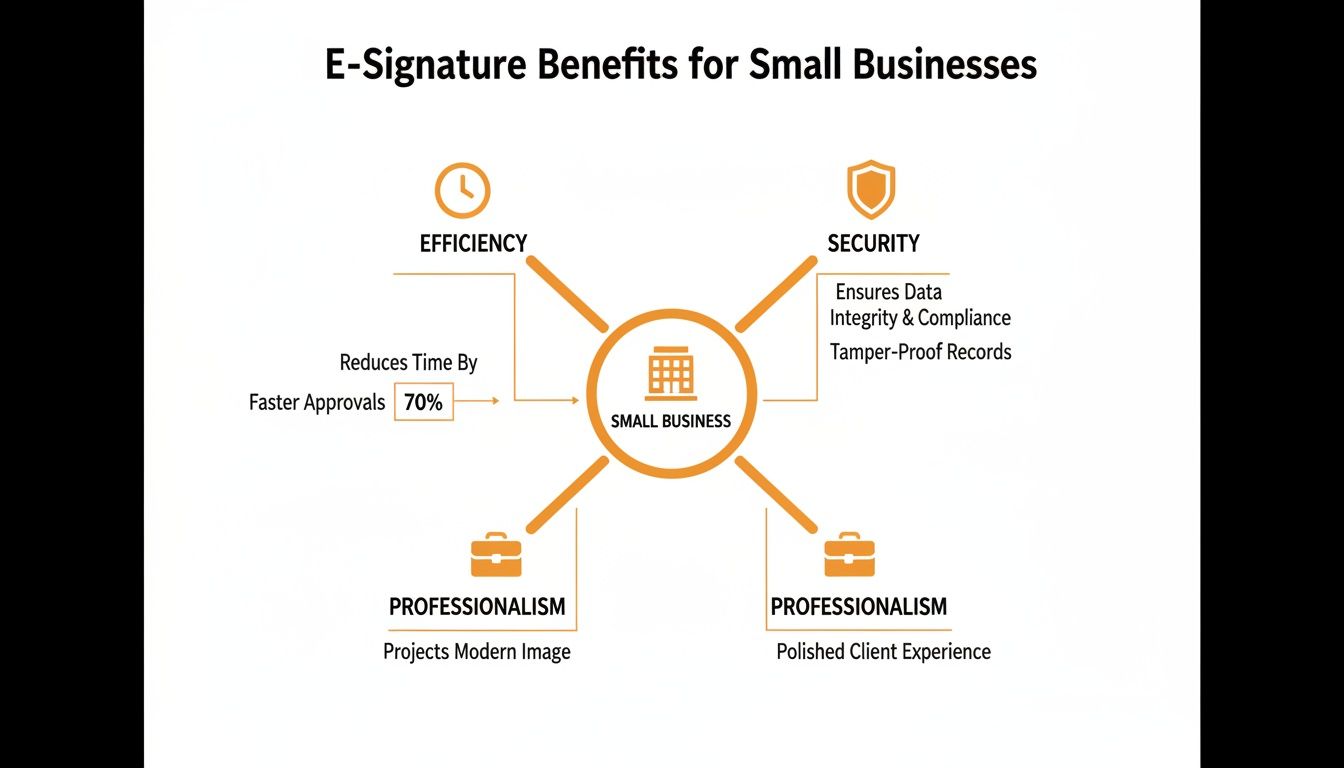
As you can see, strong security isn't just a feature—it's the foundation that supports faster workflows and a more professional brand image.
Keeping Your Documents Under Lock and Key
Beyond the audit trail, there’s some serious security tech working behind the scenes. Platforms like QuickSign use end-to-end encryption to shield your documents from prying eyes.
This essentially scrambles your sensitive information, making it completely unreadable to anyone without the right permissions. It protects your data both when it's being sent over the internet (in transit) and when it's stored on a server (at rest).
By bringing together a solid legal framework and tough security measures, e-signature platforms create a signing process that is often far more secure—and easier to prove—than traditional paper methods. This ensures your client agreements, contracts, and internal documents are kept confidential and tamper-proof.
This layered approach gives you the peace of mind you need to run your business. For a more detailed breakdown, you can learn more about the specific electronic signature legal requirements businesses need to know. It’s all about making sure your operations are not just faster, but fully compliant and secure.
What's In It For You? The Real-World Wins
Okay, so we've covered the legal and security side of things. But what does using an electronic signature for small business actually look like on a day-to-day basis? It's not just about tech—it’s about real, tangible improvements to your schedule, your bottom line, and the way your customers see you.
Think about how much time gets wasted with the old print-sign-scan routine. It's a huge bottleneck. A contract that might take a week to get back in the mail can be signed, sealed, and delivered in under 15 minutes. That’s not just a small improvement; it changes the entire pace of your business.
Get Your Time Back and Save Money
When you get rid of those delays, everything moves faster. You can close deals before the client gets cold feet, bring on a new hire the same day you make the offer, and start projects immediately instead of waiting for paperwork. That speed creates momentum and drives revenue. Suddenly, your team is spending less time chasing signatures and more time on what actually grows the business.
The cost savings are just as clear. Take a moment to add up the little expenses that come with paper-based processes:
- Supplies: Paper, ink, and printer maintenance all cost money.
- Postage: Stamps, envelopes, and courier fees are gone for good.
- Storage: No more bulky filing cabinets taking up precious office space.
This is also where mastering contract review becomes so much easier. When the whole process is digital, from review to signature, you remove frustrating barriers and get critical agreements finalized without friction.
A Better Experience for Your Clients
Maybe the most important win here is the experience you create for your clients. Sending a clunky PDF and asking someone to print it out feels outdated. It sends a message that your business isn't quite up to speed.
On the other hand, offering a simple, secure, mobile-friendly way to sign shows that you’re modern, professional, and value their time.
A smooth signing process removes the final hurdle. It makes it dead simple for your clients to say "yes," which helps you lock in agreements faster and builds a foundation of trust right from the start.
This isn’t just about convenience; it’s about perception. When signing a document with you is effortless, it sets a positive, professional tone for the entire relationship. That simple touch makes a huge difference in how clients view your brand.
To dig deeper, check out our guide on the many https://quicksign.it/blog/benefits-of-digital-signatures.
Key Features to Look for in E-Signature Software
Choosing the right e-signature software for your small business is a big decision, and honestly, it should be. While pretty much any platform can capture a signature on a PDF, the real magic is in the features that genuinely make your workday easier. It's crucial to look past the basic signing function to find a tool that can actually help you run your business better.
It’s easy to get overwhelmed by a sea of features, but a handful of them deliver the most bang for your buck. I like to think of these as the non-negotiables—the things that separate a simple digital pen from a powerful business machine. They’re designed to solve the real-world problems small businesses face every day, from mind-numbing paperwork to making sure every deal is locked down and secure.
Reusable Templates for Speed and Consistency
If you find yourself sending the same documents over and over—think client contracts, NDAs, or new hire forms—reusable templates are an absolute game-changer. Instead of building a document from scratch every single time, you create one master version with all the boilerplate text and signature fields perfectly placed.
This isn’t just about saving a few minutes here and there. It’s about building consistency into your process and slashing the risk of human error. When a new customer is ready to sign, you just grab the template, plug in their details, and hit send. It takes seconds. This feature alone can easily give you back hours of admin time every month.
The goal is to build a system that works for you, not the other way around. Templates turn your most common documents into a simple, repeatable process, freeing you up to focus on more important tasks.
Comprehensive Audit Trails for Compliance
Think of the audit trail as the digital proof that makes your e-signature legally solid. It's a detailed, time-stamped record of every single thing that happens to a document. It shows who opened it, when they viewed it, the exact moment they signed, and even technical details like their IP address.
This little feature is your best friend if a signed agreement is ever questioned. In case of a dispute, the audit trail provides a clear, court-admissible history of the entire signing process, proving the document's integrity. For any small business, this layer of security isn't just a "nice-to-have"—it's essential for protecting yourself and earning your clients' trust.
Advanced Tools That Drive Efficiency
As your business picks up steam, your needs will evolve. The best software grows with you, offering smart features that help you scale without adding friction. These are the tools that can truly change how you manage agreements and get paid.
When you're comparing options, it's helpful to break down what each feature actually does for you.
Feature Checklist for SMB E-Signature Software
| Feature | What It Does | Why It's Important for Your Business |
|---|---|---|
| Reusable Templates | Lets you save documents with pre-placed fields for repeated use. | Saves hours on admin, eliminates copy-paste errors, and ensures brand consistency. |
| Audit Trails | Creates a detailed, time-stamped log of all document activity. | Provides court-admissible proof of signing, ensuring legal validity and compliance. |
| Bulk Sending | Sends a unique copy of one document to a large list of recipients at once. | Perfect for sending policy updates, annual agreements, or event waivers without manual effort. |
| Integrated Payments | Allows you to collect payments or deposits right after a signature is provided. | Gets you paid faster, improves cash flow, and makes the client experience seamless. |
| Automated Workflows | Sets up multi-step, multi-signer sequences for approvals. | Speeds up complex processes like onboarding or project kick-offs and reduces bottlenecks. |
Let's dig a bit deeper into some of those advanced capabilities:
- Bulk Sending: Need to get a new policy out to your entire client list? Or an updated agreement to all your contractors? Bulk sending lets you upload a list and send a personalized copy to every single person in one click. It saves you from what would otherwise be a mountain of tedious work.
- Integrated Payments: This is brilliant. It lets you collect a payment or a deposit the very moment a client signs your contract. It’s a fantastic way to secure commitment, improve your cash flow, and connect the agreement directly to the transaction. No more chasing invoices.
- Automated Workflows: Setting up automated document signing can dramatically reduce errors and speed up approvals. You can learn more about how to streamline approvals and reduce errors in our detailed guide.
How to Get Started with E-Signatures
Jumping into the world of electronic signatures is surprisingly straightforward. You don't need to be a tech wizard or map out a massive project plan. Honestly, you can have a solid system ready to go in less than an hour. Let's walk through how to make the switch without skipping a beat.

First things first: you need to pick a platform. Think back to the features we talked about, like reusable templates and detailed audit trails. Your best bet is a tool with a clean, easy-to-use interface and pricing that can scale with you. That way, it grows as you do, without a huge upfront cost.
Once you’ve found a provider that feels right, like QuickSign, getting everything set up is quick and painless.
Your Quick Implementation Checklist
Getting up and running only takes a few small, impactful steps. This isn’t some month-long overhaul; it’s about getting a system in place that starts paying for itself immediately. Just focus on these core tasks to build out your new digital workflow.
- Set Up Your Account and Branding: Once you sign up, the first thing you should do is upload your company logo and tweak the colors to match your brand. This simple step makes every document you send feel professional and instantly recognizable to your clients.
- Create Your First Templates: Grab your most common documents—think service agreements, NDAs, or new client forms. Turning them into reusable templates is a game-changer. It will save you hours of busywork and stop those frustrating copy-paste mistakes for good.
- Communicate the New Process: Give your team and clients a quick heads-up. You can frame it as an upgrade that makes everyone's life easier. A short, friendly email explaining the new, secure way of signing is all it takes.
Adopting an electronic signature for small business isn’t about adding complexity; it’s about removing it. The goal is to plug in a system that smooths out your operations from day one, so you can get deals done faster and get back to growing your business.
Choosing the Right E-Signature Partner
Picking the right e-signature tool for your small business is one of those decisions that will either make your life easier every single day or become a constant headache. This isn't just about getting a digital autograph; it's about finding a partner that plugs right into how you get work done.
So, what should you actually look for? Start with the non-negotiables: rock-solid security and bulletproof legal compliance. You need to know that every agreement is protected and legally binding. After that, focus on the user experience. If the tool is a pain to use—for you or your clients—it’s going to create more problems than it solves.
Core Features That Matter
Once the basics are covered, dig into the features that will save you the most time. Things like reusable templates for your common documents and automated reminders to gently nudge signers are absolute game-changers.
Finally, take a hard look at the price tag. You want straightforward, transparent pricing that grows with you. Avoid plans that lock you into rigid tiers or punish you for your own success.
A great e-signature tool doesn’t just digitize a signature; it streamlines the entire agreement workflow, from creation to finalization. This accelerates deals, improves client perception, and frees up your valuable time.
Platforms like QuickSign are designed specifically for the hustle of a small business, focusing on an easy-to-use interface, smart AI for document generation, and pricing that makes sense. As you shop around, you might also find that some platforms offering comprehensive document automation software bundle e-signatures, which can really amplify your efficiency.
Making the Final Call
It always helps to see how the big names stack up. Our comparison of DocuSign vs. Adobe Sign and a modern alternative can give you a clearer picture of what different providers offer.
Ultimately, the best way to know if a tool is right for you is to get your hands on it. Take advantage of a free trial, send a few test documents, and see for yourself how the right partner can fundamentally improve the way you do business.
Common Questions About E-Signatures for Small Business
Whenever you're thinking about adding a new tool to your business, it's natural to have a few questions. Let's clear up some of the most common ones we hear from small business owners so you can feel confident about making the switch.
What’s the Difference Between an Electronic and a Digital Signature?
You’ll often hear these terms used interchangeably, but there's a crucial difference under the hood.
Think of an electronic signature as the digital equivalent of you scribbling your name on paper. It could be your typed name at the bottom of an email or an image of your signature on a PDF. It shows you intended to sign.
A digital signature is a much more secure, super-powered version of an electronic signature. It uses complex encryption—like a unique digital fingerprint—to lock the document. This process not only verifies who signed it but also proves the document hasn't been secretly altered since it was signed. All the best platforms, including QuickSign, build their services on this more robust digital signature technology for maximum security.
Do My Clients Need Special Software to Sign?
Nope, not at all. And honestly, that's one of the best parts. Modern e-signature platforms are designed to be incredibly simple for the person on the other end.
Your client gets an email with a secure link. They just click it, review the document right in their web browser, and sign with their mouse or finger. It works on any computer, tablet, or smartphone without any downloads or installations. The goal is to make saying "yes" as easy as possible.
The core idea behind a great e-signature platform is simplicity. It should make life easier for both you and the person signing, removing technical barriers so you can get agreements finalized faster.
Can I Use E-Signatures for Any Document?
For nearly everything you do day-to-day, the answer is a resounding yes. E-signatures are legally binding and perfect for the documents that keep your business moving forward.
- Sales Contracts and Proposals: Get those deals closed the same day you send them.
- Client Service Agreements: Kick off new client relationships with a smooth, professional start.
- Non-Disclosure Agreements (NDAs): Securely protect your confidential information with just a few clicks.
- HR and Onboarding Paperwork: Send out offer letters and new-hire forms that people can sign from their phone.
- Vendor and Contractor Agreements: Make your agreements with partners and freelancers official in minutes, not days.
There are a few rare exceptions. Some highly specific legal documents, like wills or certain property deeds, might still need a traditional wet-ink signature depending on your local laws. But for over 99% of what a small business needs, e-signatures are the way to go.
Still have questions? We've put together a quick-reference table to answer a few more common queries at a glance.
| Question | Answer |
|---|---|
| What is the difference between an electronic and a digital signature? | Think of an electronic signature as the digital equivalent of a handwritten signature—it's an image or typed name showing intent to sign. A digital signature is a more technical, secure type of electronic signature that uses encryption to validate the document's authenticity and the signer's identity, providing a higher level of security and compliance. |
| Do my clients need special software to sign documents? | No. Modern e-signature platforms like QuickSign are browser-based. Your clients will receive a secure link via email and can review and sign the document on any device—computer, tablet, or smartphone—without needing to download or install any software. |
| Can I use e-signatures for any type of document? | You can use e-signatures for the vast majority of business documents, including sales contracts, client agreements, NDAs, vendor forms, and HR paperwork. However, a few specific legal documents, like wills or documents requiring a notary, may still require a physical signature depending on your local jurisdiction. |
Hopefully, this clears things up! The main takeaway is that for almost every agreement, contract, and form you use, e-signatures are a secure, legal, and incredibly efficient solution.
Ready to see how an electronic signature for small business can change your workflow? QuickSign makes it simple to send, sign, and manage documents securely. Start your free trial today and get your first documents signed in minutes!