Your Essential Graphic Design Contract Template
Protect your work and get paid faster with our customizable graphic design contract template. Secure your projects, clarify scope, and build client trust.

A good graphic design contract template is so much more than a legal formality. It’s the blueprint for the entire project, heading off misunderstandings before they start and, most importantly, protecting your income. Don't think of it as a hurdle to jump over—it's the foundation for a professional, successful client relationship right from the get-go.
Why a Solid Contract Is Your Best Business Tool
I’ve seen too many designers treat contracts as a necessary evil—a document to rush through just to get to the fun, creative part. Trust me, that mindset is a costly mistake. A strong contract is actually your best communication tool, turning vague conversations into concrete commitments before you even think about opening Illustrator.
Without a clearly defined scope, a "simple logo design" can balloon into a full branding package with social media templates and a new website design, all for the original price. That’s scope creep, the silent profit killer for freelancers. Your contract is what builds a fence around the project, defining exactly what’s included and, just as crucially, what isn’t.
Setting the Stage for Success
A well-crafted agreement does a lot more than just list out deliverables. It builds immediate trust and signals your professionalism. When you hand a client a clear, comprehensive contract, you’re not being difficult. You're showing them you're a serious business owner who values clarity and mutual respect.
This proactive approach puts you in control of the project’s most critical aspects:
- Securing Your Paycheck: It locks in your payment schedule, from the initial deposit to final payment, and outlines any late fees.
- Defining Revisions: It clearly states how many rounds of revisions are included, preventing the project from turning into an endless cycle of tweaks.
- Clarifying Ownership: It spells out who owns the final files and exactly when those rights transfer (hint: after final payment).
- Providing an Off-Ramp: It includes a termination clause so both parties have a clear way out if things just aren't working.
A contract is where your goals and your client's goals shake hands and agree to play nice. It’s the professional boundary that protects your time, your money, and your sanity.
A Financial Safety Net in a Growing Industry
The global graphic design market is a massive industry. With a value now over $60 billion, it’s clear there are significant financial stakes in every single project. In North America alone, the sector is worth over $19.65 billion, and freelancers are commanding a huge range of fees. A solid contract is non-negotiable if you want to secure your piece of that pie without getting burned.
But it’s not just about legal protection. A good contract is part of your bigger business strategy. Many designers pair their contracts with tools like time tracking software for designers to make sure projects stay profitable. Really understanding the core elements of a contract is the first step toward building this essential framework for your business.
Grab Your Free Graphic Design Contract Template
Here's what you came for—a comprehensive graphic design contract template, ready to download and put to work. You can get it in whatever format fits your workflow best: PDF, Google Docs, or Microsoft Word. Think of it less like a rigid document and more like a professional starting point, designed to be customized for each unique project you take on.
I’ve seen too many designers get burned by handshake deals. This template is your first line of defense. You can easily upload it to a platform like QuickSign, save it for future clients, and build a reliable foundation for every new job. Taking this one step will fundamentally change your client onboarding for the better.
A Quick Word of Advice: Once you download it, don't just fill in the blanks and hit send. Treat this template as the operating system for your design business. Every clause is an opportunity to communicate your value, establish professional boundaries, and keep the project on track.
So, What's Inside?
Before we start tweaking the language, let's get a bird's-eye view of what this template covers. It’s designed to include all the essential pieces you need to protect yourself and your client, preventing those all-too-common freelance headaches.
For a deeper dive into the anatomy of a rock-solid agreement, you might also want to check out our complete guide to the freelance contract template.
Here’s a quick look at the critical sections included in the template. We'll explore each of these in detail in the next section.
| Clause | Purpose | Why It's Critical |
|---|---|---|
| Scope & Deliverables | Defines exactly what you will (and won't) create. | This is your best defense against scope creep. |
| Revisions & Feedback | Sets firm boundaries on how many rounds of edits are included. | Prevents endless tweaks that eat into your profit margins. |
| Payment Terms | Outlines your rates, deposit, payment schedule, and late fees. | Ensures you get paid on time, every time. |
| Copyright & Usage Rights | Clarifies who owns the final work and how the client can use it. | Protects your intellectual property and adds value for the client. |
| Termination | Provides a clear, professional exit strategy if things go wrong. | Offers a way out for both parties without burning bridges. |
Having this structure in place from the get-go is a game-changer. It sets a professional tone and helps you sidestep common issues like clients ghosting on payments or asking for "just one more little change."
Now, let's break down how to customize each of these clauses to fit your business perfectly.
How to Customize Your Contract, Clause by Clause
A downloaded graphic design contract template is a fantastic starting point, but its real power comes from making it your own. Think of it as a great suit—off the rack is fine, but one tailored to your specific measurements offers unbeatable protection and comfort. This is where we turn that generic document into your personalized project shield.
Let's break down the most critical clauses, one by one. I’ll share practical advice and real-world examples to show you how to adapt the language for any project, whether it's a simple logo or a full-scale branding overhaul.
Defining the Scope of Work
This is it. This is arguably the most important clause in your entire contract. If you get this wrong, you're setting yourself up for a world of pain. Vague language here is the number one cause of scope creep—that dreaded beast where a small project slowly morphs into a massive undertaking for the exact same fee.
Your goal here is to be ruthlessly specific.
Don't just write "logo design." That's an invitation for trouble. Instead, spell out precisely what that includes.
- A Good Example: "Designer will deliver three (3) initial logo concepts for Client review. Upon selection of one concept, Designer will provide up to two (2) rounds of revisions to the chosen concept. The final deliverable will be a logo package including .AI, .EPS, .PNG, and .JPG formats in full color, black, and white versions."
- A Bad Example: "Designer will create a new logo for the Client."
The bad example leaves everything up for debate. How many concepts? How many revisions? What file formats? This ambiguity is where disagreements are born. The good example, on the other hand, sets clear, measurable boundaries from the get-go.
Clarifying Deliverables and File Handoff
Tied directly to the scope, the deliverables clause specifies the tangible assets the client will actually receive. A common point of friction I see all the time is the confusion between final files and source files.
Final files (.JPG, .PNG, .PDF) are the assets ready for the client to use. Source files (.AI, .PSD, .INDD) are the original, editable design files you worked in. Handing over your source files gives the client the power to alter your work down the line, which can devalue your future services.
You are not obligated to provide source files unless it's explicitly stated and, just as importantly, priced into the project. Many designers charge a premium—often 50% to 100% of the project fee—for a full buyout that includes the source files.
Here’s how you can frame it:
- Standard Clause (No Source Files): "Upon final payment, Designer will deliver the final, approved design files in the following formats: [List formats like .PNG, .JPG, .PDF]. The delivery of editable source files (e.g., .AI, .PSD) is not included in this agreement."
- Premium Clause (Includes Source Files): "Upon final payment, Designer will deliver all final design files and native source files (.AI, .PSD). The fee for this full buyout is included in the total project cost."
Setting Firm Boundaries for Revisions
Endless, nitpicky revisions can absolutely destroy a project's profitability and drain your creative spirit. Your contract must set a firm limit on how many rounds of changes are included in the quoted price.
A "round of revisions" should also be defined. I always define it as a single, consolidated list of feedback from the client. This is key to preventing that chaotic back-and-forth of one-off email requests that drives every designer crazy.
Here’s some sample language I've used:
- "The project fee includes up to two (2) rounds of revisions on the chosen design concept. A round of revisions is defined as a single list of requested changes delivered by the Client in one email."
- "Additional revisions beyond the included two rounds will be billed at the Designer's hourly rate of [$X] per hour, with a minimum charge of one hour. All additional work will require Client's written approval before commencement."
This approach doesn't say "no" to more changes; it simply clarifies that extra work requires extra payment. It’s about respecting both your time and the client's budget.
Structuring Your Payment Terms
Let's talk about money. Getting paid on time is the lifeblood of any freelance business, so this clause needs to be crystal clear. With rates in the design industry varying wildly—freelancers can charge anywhere from $25 to $150 per hour and web design projects can hit $10,000—having specific terms is non-negotiable.
Your payment terms should always include:
- A Non-Refundable Deposit: Always, always, always require a deposit before you lift a finger. A 50% deposit is standard and confirms the client's commitment while securing your time.
- A Clear Payment Schedule: For bigger projects, I like to break payments into milestones (e.g., 50% deposit, 25% after concept approval, 25% on completion). For smaller jobs, a simple 50/50 split works perfectly.
- A Late Fee Policy: Don't be shy about charging for late payments. A typical late fee is 1.5% per month on the outstanding balance. It’s a gentle nudge for timely payment and compensates you for the headache of chasing invoices.
Sample Payment Clause: "A non-refundable deposit of 50% of the total project fee is required before work begins. The remaining 50% is due upon project completion, prior to the release of final files. Invoices are payable within 15 days of receipt. A late fee of 1.5% per month will be applied to any overdue balances."
Demystifying Intellectual Property and Usage Rights
This clause is mission-critical for defining ownership. By default, you, the designer, own the copyright to the work you create. The rights only transfer to the client under specific conditions—namely, once you’ve been paid in full.
You need to decide if you are assigning (transferring) the copyright or simply licensing the work.
- Assignment: The client owns the final design outright after payment. This is typical for logos and core branding assets.
- License: The client gets permission to use the design for specific purposes, for a set amount of time, or in a certain region. You keep the ownership. This is great for things like illustrations or patterns you might want to resell.
Here’s a simple, effective way to phrase the transfer of rights:
"Upon completion of the project and receipt of full payment, the Designer agrees to assign all rights, title, and interest in the final, approved artwork to the Client. The Designer retains the right to display the work in their portfolio and for self-promotional purposes. All preliminary concepts and unused designs remain the intellectual property of the Designer."
This protects you by ensuring rights don't transfer until you're paid, and it gives you permission to showcase your hard work. When you're putting your contract together, remember that mastering document structure can greatly improve clarity for both you and your client, ensuring complex clauses like this one are easy to understand.
Crafting a Professional Termination Clause
Sometimes, even with the best intentions, a project just doesn't work out. A termination clause provides a clean, professional off-ramp for both you and the client, spelling out exactly what happens if the project gets cancelled.
A solid termination clause should cover:
- Client Cancellation: If the client decides to cancel, they forfeit the deposit and must pay for all work completed up to that point at your hourly rate.
- Designer Cancellation: If you have to cancel for some reason, you should refund any payment for work that hasn't been completed.
- Asset Handover: It should state that upon termination, any work already completed must be paid for, and the client receives the files for the work they've funded.
This clause ensures you are compensated for your time and effort, even if the project doesn't make it to the finish line.
As your process for creating agreements gets more refined, you might want to explore new ways to draft them efficiently. For instance, you could read our guide on how to create legal documents with AI prompts and send them for signature using QuickSign to speed up your workflow. Customizing these key clauses is what turns a simple graphic design contract template into a powerful business tool—one that protects your income, manages expectations, and ultimately builds better client relationships.
Getting Your Contract Signed Without the Hassle
Alright, you've put in the work and customized your contract. Now for the moment of truth: turning that document into a legally binding agreement. An unsigned contract is just a proposal, really. It’s the signature that gives it teeth and protects you. But let's be honest, this part can feel a little awkward, shifting from a creative brainstorming partner to a professional laying down the law.
Remember the old way of doing this? It was a mess. You’d save your contract as a PDF, attach it to an email, and then cross your fingers that your client owned a printer-scanner combo from 2005. They'd have to print it, sign it, figure out how to scan it (usually resulting in a blurry, crooked image), and finally email it back. This whole song and dance just created delays, version-control nightmares, and frankly, made you look a bit dated.
Thankfully, we don't have to live like that anymore.
The Modern Workflow with E-Signatures
Today, platforms like QuickSign have made this entire process ridiculously simple and secure. Instead of chasing email attachments and sending awkward "just checking in" follow-ups, you can manage everything in one place. The experience is designed to be quick, professional, and dead-simple for your client, removing all the friction that can stall a project's kickoff.
This diagram breaks down how the key clauses in a typical contract flow together, which can help a client quickly grasp the structure.
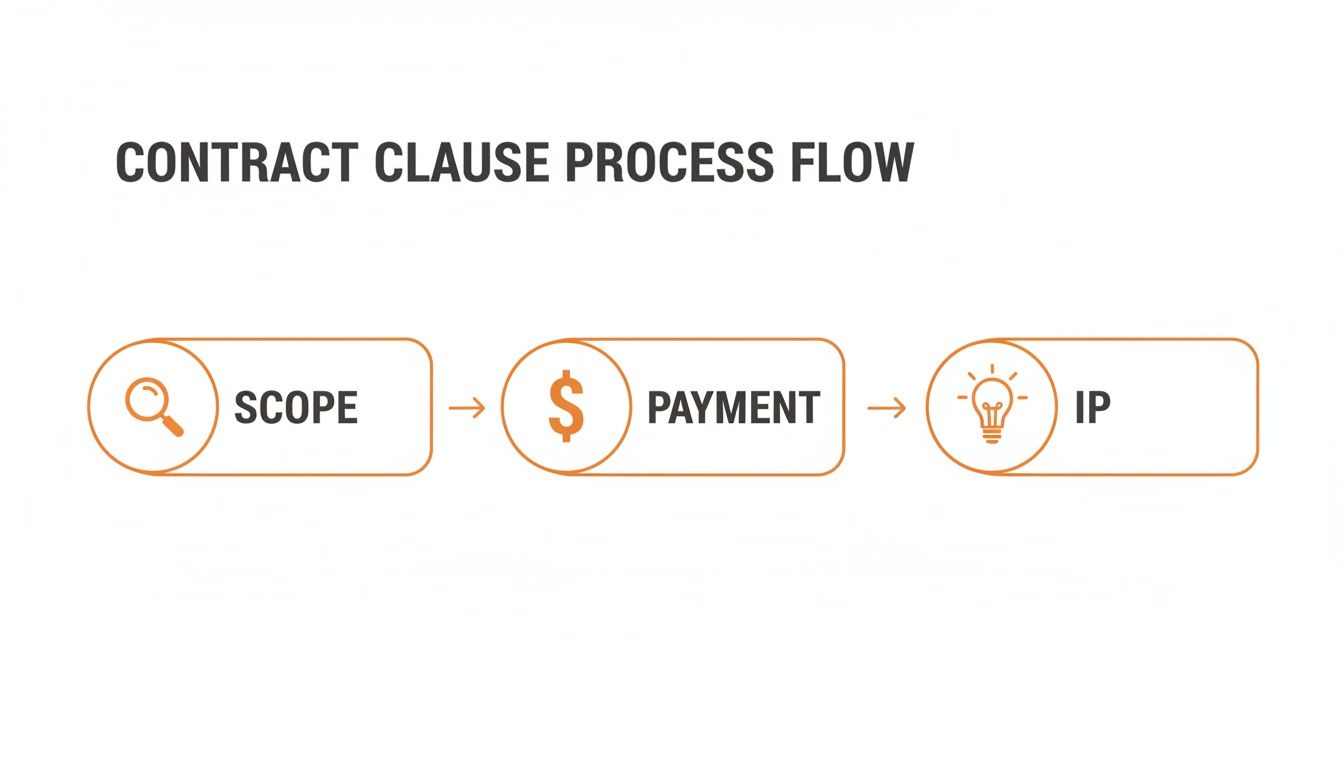
Giving clients a visual like this helps them see the big picture at a glance—from what you're delivering to how payment works and who owns the final files.
Here’s what this modern approach actually looks like in practice:
- Upload Your Doc: You just drag your finalized Word or PDF contract straight into the platform.
- Place the Fields: Next, you add fields for signatures, initials, or dates exactly where they need to go. It makes it crystal clear what the client needs to fill out. No guesswork.
- Send It Off: With one click, you can invite your client to sign via a secure email link. They can open and sign the document on their phone, tablet, or computer. No printing needed.
- Watch It Happen: The system will notify you the moment your client opens, views, and signs the document. The guessing game is officially over.
One of the biggest wins of using an e-signature platform is the legally binding audit trail. Every single action is time-stamped and logged—when it was sent, opened, and signed. This creates an unshakeable, verifiable record of their consent, which is huge if you ever need to prove the agreement was made.
Presenting the Contract to Your Client
How you send the contract is almost as important as what's in it. Don’t just fire off an email with the subject "Contract" and an attachment. That feels cold and intimidating. You want to frame this as a positive, normal part of your professional workflow.
When you send that signing link, keep the message short, sweet, and enthusiastic:
- "Hi [Client Name], I'm so excited to get started on this! Here's our project agreement for you to look over. It covers everything we discussed—the scope, timeline, and payment details. Just let me know if any questions come up before you sign."
This kind of message positions the contract as a tool for clarity and mutual success, not a sign of distrust. It keeps the project's momentum rolling forward and reinforces that you're a pro.
If you want to dive deeper into streamlining this final step, check out our guide on how to get signatures on contracts fast without the back-and-forth chaos.
What to Do When a Client Asks for Changes
So, what happens if your client replies with questions or wants to tweak a clause? First off, don't panic. This is completely normal. It's actually a good sign—it means they're reading it carefully.
Here’s my go-to process for handling edit requests:
- Listen First: Get on a call or ask them to clarify what their concern is. More often than not, it's a simple misunderstanding you can clear up with a quick explanation.
- Assess the Ask: Is their request reasonable? A client asking to shift a payment date by a week is one thing. A client asking you to remove your kill fee or termination clause is a giant red flag. Know your boundaries.
- Revise Digitally: If you agree to the change, always go back to your original document and make the edits there. Never scribble notes on a signed copy. Upload the revised version and resend it for a fresh signature. This ensures the final, executed contract is clean and accurate.
Using a tool like QuickSign makes managing these revisions a breeze. You can easily track different versions and ensure that the final document everyone signs is the correct one, keeping the whole process smooth for both of you.
Spotting Red Flags Before You Sign
Your contract is your best friend, but it’s worthless until it’s signed. The time between sending the proposal and getting that signature—the negotiation phase—is incredibly telling. This is where you get a real glimpse into what a client will be like to work with.
Learning to spot these warning signs is a skill I’ve honed over years, and it's just as crucial as your design chops. It’s about more than just dodging bad projects; it’s about knowing when to educate a client and stand firm on professional boundaries.
The Dreaded Request for Spec Work
If a potential client ever asks you to design something for free before a contract is signed, that's a hard no. They might say it’s "to see if you're a good fit," but what they're really asking for is speculative work. It’s a huge red flag that signals they don't value your time or expertise.
We're strategic partners, not idea machines. A solid portfolio and an insightful discovery call should be all the proof they need.
Here’s a polite but firm way to shut it down:
"I appreciate the opportunity! My process is built to deliver the best results, which starts with a deep-dive discovery phase right after we've signed the agreement and the initial deposit is paid. This lets me dedicate the focused, strategic time needed to develop concepts that actually hit your goals. I'd be happy to walk you through my portfolio to show you how I've solved similar challenges for other clients."
This response doesn't just say "no." It reinforces your professional process and frames it as a direct benefit to them—they get better, more thoughtful work.
Vague Feedback and Unclear Goals
Scope creep and the dreaded "revision-hell" almost always start with a client who can't articulate what they want. If you hear phrases like, "I'll know it when I see it," or the classic, "Just make it pop," prepare for trouble. This is a sign of a client who lacks a clear vision, which means you'll be left guessing.
This is where your contract process becomes your best tool for forcing clarity. Before you even think about sending that document, make sure the project brief is rock-solid.
- Nail down the brief: Get the project goals, target audience, and must-have messaging in writing before anything else.
- Dictate the feedback loop: Your contract should state that all feedback must be consolidated and come from a single point of contact. No more conflicting notes from five different people.
- Always circle back to the brief: When revisions come in, your first question should be, "How does this request support the goals we outlined in the brief?"
This simple structure creates a powerful anchor, giving you a written document to point to when requests start veering off track.
Pushing Back on Deposits and Payment Terms
A client who argues about paying a deposit is often a preview of a client who will be a headache to collect from later. Deposits are standard practice for a reason: they secure your time in a busy schedule and confirm the client is financially committed. Any serious pushback here is a major warning.
Don't be afraid to hold your ground. The 50% upfront deposit is non-negotiable for most seasoned freelancers. If a client questions it, calmly explain that it covers the initial discovery, research, and resource allocation needed to kick off their project successfully.
Similarly, watch out for clients trying to scrap your late-fee clauses or drastically alter your payment schedule. These terms protect your cash flow, the lifeblood of your business. Before finalizing any agreement, it’s also a good idea to understand how signature verification works on e-sign platforms. Knowing the tech behind the signature adds another layer of security, ensuring every agreement you sign is both secure and legally sound.
Common Questions About Graphic Design Contracts
Even with a rock-solid contract template, you're bound to run into a few tricky questions from clients. It happens. Think of this section as your quick-reference guide for navigating those "what if" moments like the seasoned pro you are. Knowing how to handle these situations not only protects you but also shows clients you’ve got your business in order.
What if a Client Refuses to Sign a Contract?
This is the biggest red flag of them all. Seriously. A client who won't sign a contract, no matter how "easy-going" they claim to be, is waving a giant banner that reads "I might cause problems later." It suggests they don't respect your process or, worse, are intentionally leaving things vague to exploit you down the line.
Your best move is to be polite but firm. Explain that the agreement isn't just for you; it's a professional tool to protect both of you by making sure all expectations, deadlines, and deliverables are crystal clear. If they still refuse? It's almost always the right call to walk away.
No project is worth the risk of working without a signed contract. It leaves you completely exposed, legally and financially. Don't do it.
Is an Email Agreement Good Enough?
Technically, an email exchange can sometimes be legally binding, but relying on it is like building a house on a foundation of sand. It's messy, disorganized, and full of holes. Emails get buried, conversations get fragmented across different threads, and crucial details are almost always left out.
Ask yourself: does that email chain explicitly cover what happens if the project is cancelled? Does it define usage rights or how many rounds of revisions are included? Probably not. A formal contract, especially one managed through a proper e-signature platform, creates a single, undeniable source of truth for the entire engagement.
How Do I Handle Clients Who Want to Own Everything?
This comes up a lot. A client will ask for not just the final design but every sketch, every unused concept, and all the native source files. You need to get ahead of this by defining ownership clearly in your contract.
Your agreement should state that the client receives the usage rights for the final, approved design after their final payment clears. That’s the industry standard. You, the designer, retain the copyright and ownership of all your preliminary work, process files, and rejected concepts.
- Standard Practice: The client gets the final exported files they need (like .JPG, .PNG, or .PDF).
- Full Buyout: If a client insists on owning the source files (.AI, .PSD, etc.), that's a completely different deal. This is a full buyout of your intellectual property, and you need to charge a significant premium for it. You're not just selling a design; you're selling the tools and raw materials behind it.
What Are the Best Payment Terms for a Large Project?
When you’re looking at a project that will take weeks or even months, the classic 50% up front and 50% on completion just doesn't cut it. It can leave you with serious cash flow gaps and lump huge payments on your client at inconvenient times.
The answer is milestone-based payments. You simply break the project down into logical phases and tie a payment to the completion of each one. It keeps your cash flow steady and makes the total investment feel much more manageable for your client.
For example, you could structure it like this:
- 25% Upfront Deposit: Kicks off the project and secures their spot in your schedule.
- 25% After Concept Approval: Due once they've signed off on the initial creative direction.
- 25% After Final Design Delivery: Paid when the core creative work is complete and approved.
- 25% Upon Final File Handoff: The final payment that releases all the high-resolution assets to them.
This approach transforms the payment process from two massive hurdles into a series of smaller, predictable steps. It's better for everyone.
Ready to stop worrying about contracts and start getting them signed in minutes? QuickSign offers a secure, simple way to send, sign, and manage all your agreements. Try QuickSign for free and streamline your workflow today!