A Guide to Verification of Signature for Fraud Prevention
Learn the essentials of verification of signature with our guide. Understand digital methods, legal standards, and best practices to prevent fraud.

At its most basic, signature verification is the process of making sure a signature is real and that the document it’s attached to hasn’t been changed since it was signed. Think of it like a bank teller comparing the signature on a check to the one on file—it's a fundamental step to build trust and stop fraud.
What Is Signature Verification and Why It Matters

Signature verification is the foundation of trust for countless agreements, from simple day-to-day contracts to massive corporate deals. It’s the essential safeguard that confirms the person signing a document is who they say they are and that the terms of the agreement haven't been secretly altered.
Without a dependable way to verify a signature, the integrity of any signed document falls apart. This is why the methods have evolved so much over time, moving from a simple visual check of a wet-ink signature to the sophisticated cryptographic validation used for digital signatures today.
The Growing Importance in Modern Business
As business moves faster than ever, the need for solid, reliable verification is absolutely critical. The risks of forgery, fraud, and document tampering are very real, often leading to huge financial losses, messy legal battles, and a damaged reputation.
The market numbers tell the same story. The global signature verification market was valued at USD 2.8 billion in 2025 and is expected to climb to USD 3.6 billion by 2030, all because of growing security concerns. You can dive deeper into these trends in our detailed market analysis on the QuickSign blog. This surge shows just how seriously businesses are taking the need to secure their agreements.
A failed verification can completely invalidate a contract, expose a company to liability, or let fraud slip through the cracks. This isn't just a box-ticking exercise; it's a critical security measure.
This process is vital in every industry, protecting everything from mortgage applications and patient consent forms to intellectual property agreements. The stakes are simply too high to get it wrong.
Core Components of Signature Verification
No matter the method—handwritten, electronic, or digital—the core goals of signature verification are always the same. To help break it down, here’s a quick look at the fundamental components of any verification process.
| Component | Purpose | Example |
|---|---|---|
| Authenticity | Confirming the signer's identity. | Matching an electronic signature to a verified digital ID or comparing a handwritten signature to a known sample. |
| Integrity | Ensuring the document hasn't been altered post-signature. | A cryptographic seal that breaks if even a single character in the document is changed. |
| Non-Repudiation | Creating undeniable proof of signing. | A detailed audit log that captures the time, date, and IP address associated with the signature event. |
These three pillars—authenticity, integrity, and non-repudiation—work together to create a legally sound and trustworthy agreement. When a signature is properly verified, everyone involved can move forward with confidence, knowing the document is secure and enforceable. This guide will show you exactly how to achieve that.
The Three Types of Signatures Explained
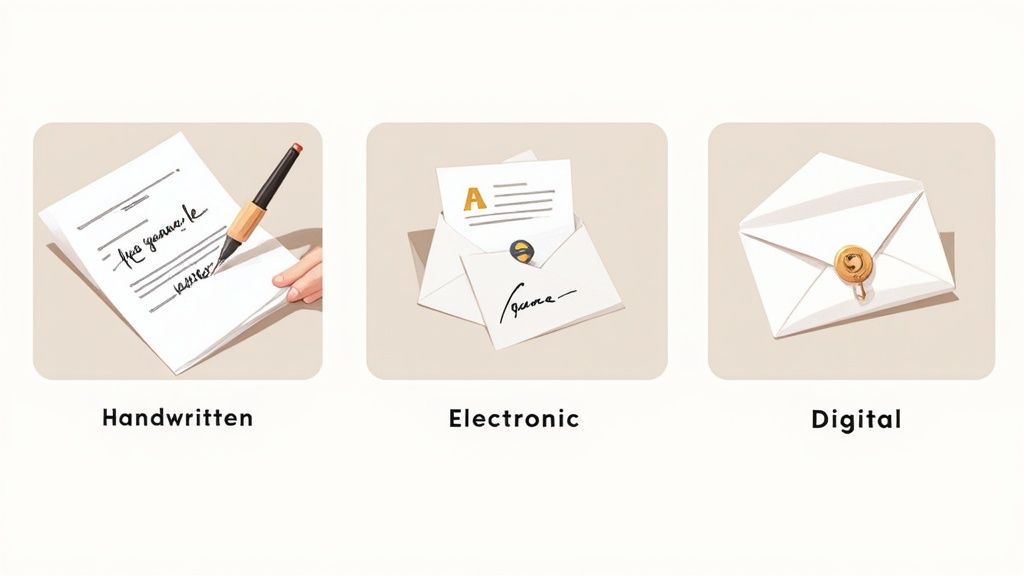
Before we jump into the technical side of things, it’s crucial to understand exactly what you’re verifying. Signatures aren't a one-size-fits-all deal. They come in three main flavors, each with its own security profile and validation method.
Getting these differences straight is the first real step toward picking the right tool for your agreements and performing a solid verification of signature.
The Handwritten Signature: A Personal Seal
This is the classic we all know and recognize—the physical act of putting pen to paper. Often called a "wet signature," it's been the go-to for legal and financial documents for centuries.
Think of it as your unique, personal seal. The specific loops, the pressure of the pen, and the slant of the letters are supposed to be a one-of-a-kind mark of your identity and intent.
How is it verified?
Verification is a hands-on, manual process. It usually involves comparing the signature in question against a known, authentic sample. Forensic experts look at details like:
- Letter formation and slant
- Pressure and ink flow
- Spacing and baseline habits
The problem is that this method is subjective and doesn't scale well. Forging a wet signature that can pass a quick glance is surprisingly easy, making it the least secure option for many of today's transactions.
The Electronic Signature: A Digital Handshake
An electronic signature, or e-signature, is a broad category that covers any signature applied in a digital format. It’s designed to show a person's intent to agree to a document's terms, just like its handwritten cousin.
This could be as simple as typing your name in an email, drawing your signature with a stylus, or even just clicking an "I Agree" button. It’s the digital version of a firm handshake—it signals agreement, but its legal strength depends entirely on the evidence surrounding the act.
How is it verified?
Verifying an e-signature comes down to the evidence trail collected during the signing event. A reliable platform like QuickSign creates a detailed audit log that captures key information:
- The signer's email address
- The IP address used to sign
- Timestamps marking when the document was viewed and signed
This digital paper trail connects the signature to a specific person at a specific time, providing the necessary proof of the agreement. To dig deeper, check out our guide on the real difference between electronic and digital signatures.
The Digital Signature: A Tamper-Proof Envelope
A digital signature is a specific, highly secure type of electronic signature. It relies on advanced cryptographic technology to essentially lock down a document, guaranteeing its contents haven't been touched since the moment it was signed.
Imagine sealing a critical contract inside a tamper-proof digital envelope. This envelope doesn't just verify the signer's identity; it also proves the seal has never been broken.
A digital signature provides the highest levels of security and assurance. It is built on a technology called Public Key Infrastructure (PKI), which binds the signer's identity to the document with a unique, encrypted key.
How is it verified?
Verification is an automatic process handled by software. When you open a digitally signed document in a program like Adobe Acrobat, it instantly checks a few things behind the scenes:
- Authenticity: It confirms the signer’s identity against a trusted digital certificate issued by a Certificate Authority (CA).
- Integrity: It runs a check on the document’s unique cryptographic "hash." If even a single character has been changed, the verification will immediately fail.
This powerful combination of authenticity and integrity makes digital signatures the gold standard for high-stakes agreements where security is everything.
How Digital Signature Verification Works
Digital signatures are the gold standard for document security, but what’s happening behind the scenes isn't magic. It's a clever, multi-step process that guarantees a document is both authentic and hasn't been secretly changed. Let's lift the hood and see exactly how this high-level verification of signature actually works.
The entire system is built on something called Public Key Infrastructure (PKI). The easiest way to think about PKI is to imagine a high-tech, personalized mailbox system for the internet.
Picture a special mailbox that requires two different keys. One is a public key, which you can copy and give to anyone you want. This key lets them drop a securely locked message into your mailbox. The other key is your private key, and you are the only person in the world who has it. This is the only key that can open your mailbox and let you read what’s inside.
This two-key setup, officially known as asymmetric cryptography, is the bedrock of digital signature security. It creates a secure and provable link between a person and their actions online.
The Cryptographic Hash: A Unique Digital Fingerprint
Before any signing happens, the first step is to create a one-of-a-kind identifier for the document. This is done through a process called hashing. A special algorithm scans the entire document—every letter, every space, every pixel—and condenses it into a short, fixed-length string of characters. This string is called a hash.
You can think of the hash as the document’s unique digital fingerprint. If anyone changes anything—even just adding a single comma—the hash will change completely. This makes it an incredibly powerful tool for spotting any tampering.
With this unique hash generated, the document is ready to be signed.
Creating the Digital Signature
The next move is to combine that unique hash with the signer's private key. Here’s a quick breakdown of how it happens:
- Generate the Hash: A unique hash (the digital fingerprint) is created from the document's contents.
- Encrypt with the Private Key: The signer uses their private key to encrypt this hash. This encrypted hash is the digital signature.
- Bundle and Send: The digital signature is then attached to the original document, along with the signer's public key and a digital certificate.
This complete package contains everything needed to prove the signature is real and the document is unchanged. That encryption step is crucial—it ensures that only the person holding that specific private key could have possibly created the signature.
The Role of Digital Certificates
Okay, so how does anyone know a public key actually belongs to the right person? That's where digital certificates come into play. A digital certificate is essentially a digital passport, issued by a trusted third party called a Certificate Authority (CA).
Think of a Certificate Authority as the passport office of the internet. It runs rigorous identity checks on a person or organization before issuing a digital certificate that vouches for who they are.
This certificate officially links a signer's identity to their public key, giving everyone confidence that the key is legit. When you receive a digitally signed document, your software looks for this certificate to make sure the signer’s identity has been verified by a reliable source.
The Final Verification Process
When someone opens a digitally signed document, their software (like Adobe Acrobat or a platform like QuickSign) instantly runs the whole process in reverse to perform the verification of signature.
It’s a two-part check that happens in the blink of an eye:
The Integrity Check: The software first uses the signer’s public key to decrypt the digital signature, which reveals the original hash. At the exact same time, it generates a brand new hash from the document it just received. If those two hashes are a perfect match, it proves the document hasn't been altered one bit since it was signed.
The Authenticity Check: Next, the software inspects the attached digital certificate. It confirms the certificate was issued by a trusted Certificate Authority and checks to see that it hasn't expired or been revoked. A valid certificate confirms the signer is who they claim to be.
If both of these checks pass, the software displays a confirmation that the signature is valid. This seamless, automatic process provides the three pillars of a secure agreement: authenticity, integrity, and non-repudiation. It creates an undeniable, tamper-evident record that gives you the highest level of assurance for your most important documents.
A Step-by-Step Guide to Verifying a Digital Signature
Alright, we’ve covered the cryptographic theory behind digital signatures. Now, let’s get our hands dirty and walk through how to actually verify one in the real world. You don’t need to be a tech wizard; all it takes is a PDF viewer like Adobe Acrobat Reader and a few clicks.
Think of it as being a digital detective. You’re on the lookout for specific clues that prove a document is authentic and hasn’t been messed with since it was signed. Following these steps will give you the confidence to trust the documents and agreements that land on your desk.
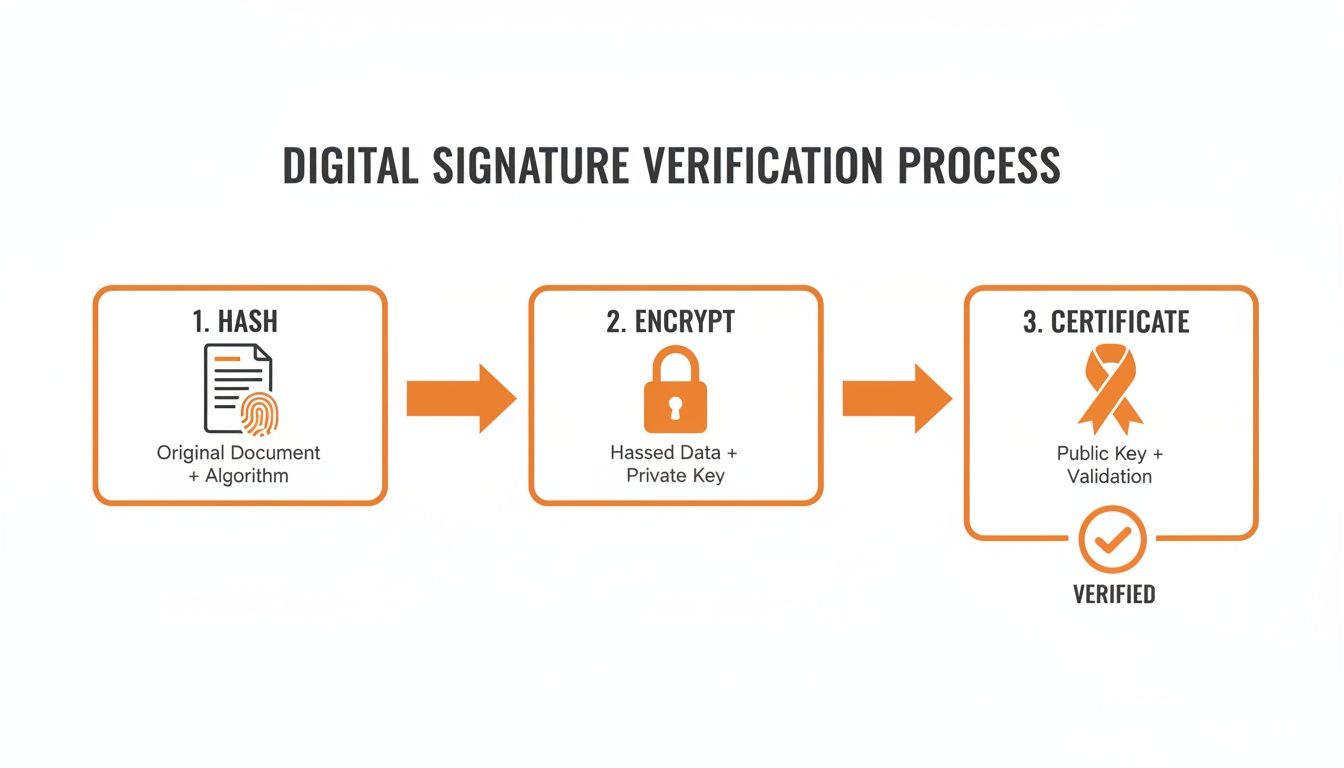
This process might seem complex, but your software does all the heavy lifting. It checks the document’s unique digital fingerprint (the hash), confirms it was locked with the signer's private key, and validates the digital ID card (certificate) that comes with it. This tightly sealed package is what makes verification so reliable.
Step 1: Open the Signature Panel
First things first: open the signed document in a program that can handle digital signatures, like Adobe Acrobat. You’ll often see a blue banner right at the top telling you the document is signed and that everything looks good.
To see what’s going on under the hood, find and click on the Signature Panel. This is your main dashboard for verification. It lists every signature in the document and gives you a quick status update. A little green checkmark is your first good sign.
Step 2: Check the Signature Validity Status
In the Signature Panel, each signature will have a validity status. This is the software’s initial verdict on whether the signature is trustworthy.
What you're hoping to see is a clear, simple message like "Signature is valid." This tells you the software ran its initial checks on the signature's integrity and the signer's identity, and it didn't find any red flags. It’s your at-a-glance confirmation that things are in order.
A valid status confirms two critical things: the signature is cryptographically sound, and the document has not been altered since it was signed. This is the first and most important checkpoint in the verification process.
If you get a warning or an error message, hit the brakes. It could mean the document was tampered with after signing, or there might be an issue with the signer’s digital certificate.
Step 3: Inspect the Certificate Details
Now it's time to dig a little deeper into who actually signed the document. Right-click the signature and look for an option like "Show Signature Properties," then click "Show Signer's Certificate." This brings up the signer’s digital ID.
Here’s what you need to check:
- Issued To: Does this name match the person or company you expected?
- Issued By: This shows the Certificate Authority (CA) that vouched for the signer’s identity. Look for well-known CAs like DigiCert, GlobalSign, or IdenTrust.
- Validity Period: Make sure the signature was created within the "Valid from" and "Valid to" dates. A signature made with an expired certificate is a major red flag.
This level of scrutiny is non-negotiable in high-stakes industries. For example, the signature verification market in the financial sector was valued at USD 669 million in 2021 and is on track to hit USD 4,984 million by 2030. Banks and financial firms rely on these certificate details to fight fraud every single day.
Step 4: Confirm Document Integrity
The last check is to make absolutely sure the document itself is pristine. Back in the signature properties window, you’ll find a clear statement about the document's state.
You’re looking for a message that says something like, "The document has not been modified since this signature was applied." This is the ultimate proof of integrity. It means your software calculated a new hash for the document and found that it perfectly matched the original hash locked inside the signature.
If you ever need to create your own secure signature, our guide on how to digitally sign a PDF breaks down the process from the signer's point of view.
Digital Signature Verification Checklist
To make things even easier, here’s a quick checklist you can use anytime you need to verify a digital signature. It pulls together everything we’ve just discussed into a simple, practical reference.
| Verification Step | What to Look For | Indication of a Problem |
|---|---|---|
| Open Signature Panel | A blue banner and a green checkmark next to the signature. | A yellow warning triangle or a red 'X'. |
| Check Validity Status | A clear message: "Signature is valid." | Messages like "Signature is invalid" or "Unknown validity." |
| Inspect Certificate | Signer's name is correct; issued by a trusted CA; valid dates. | Mismatched name, unknown CA, or an expired certificate. |
| Confirm Integrity | A statement like "Document has not been modified." | A warning that the document has been altered since signing. |
Following these four simple steps will help you confidently verify any digital signature. Tools like QuickSign are built with this tamper-evident technology at their core, ensuring every document you send or receive is secure and verifiable from start to finish.
Understanding Legal Standards and Global Compliance
So, you’ve verified a signature—the cryptography checks out, and the audit log is perfect. But what good is any of that if it won't hold up in court? The real muscle behind any signature verification process comes from the legal frameworks that make digital agreements stick.
Without these rules, a signed document is just a collection of pixels. Governments around the world have created laws to give electronic and digital signatures the same legal weight as their old-school, ink-on-paper cousins. This creates a stable and predictable environment where you can do business confidently, knowing your contracts are legally sound.
Getting a handle on these standards is non-negotiable. It’s the difference between having a secure, compliant, and enforceable agreement and just hoping for the best if a dispute ever arises.
Key Legal Frameworks Around the World
While many countries have their own local rules, a couple of major frameworks have really set the global standard, influencing digital signature laws everywhere. They lay out the ground rules for what makes a signature legally binding and establish different levels of security.
The two you’ll hear about most often are:
- The ESIGN Act (United States): Enacted way back in 2000, the Electronic Signatures in Global and National Commerce Act makes electronic signatures legally valid for nearly any kind of transaction across the U.S.
- eIDAS (European Union): This is the big one for Europe. The Electronic Identification, Authentication and Trust Services regulation creates one consistent legal framework for all EU member states.
Both are built on a simple but powerful idea: a contract can't be dismissed just because it was signed electronically. This "technology-neutral" philosophy has been the key to making digital contracts a part of everyday business.
If there’s one thing to take away from these laws, it's this: the legal strength of a signature hinges on your ability to prove who signed the document and that they genuinely intended to. That’s why a detailed audit trail is absolutely essential.
Understanding eIDAS and Its Tiers of Assurance
The eIDAS regulation is especially worth knowing because it doesn't treat all electronic signatures the same. It created a tiered system, where each level offers a different degree of security and legal weight. This is incredibly practical, as it lets you match the signature type to the risk involved in the transaction.
Under eIDAS, there are three tiers:
- Simple Electronic Signature (SES): This is the most basic form—think of it as ticking a consent box or typing your name at the end of an email. It works great for everyday, low-risk agreements.
- Advanced Electronic Signature (AES): This level steps things up. An AES has to be uniquely linked to the signer, capable of identifying them, and created in a way that the signer maintains sole control. Crucially, it must be linked to the document so that you can tell if anything has been changed after signing.
- Qualified Electronic Signature (QES): This is the gold standard. A QES is an advanced signature that's been created with a special, secure device and is backed by a qualified certificate from a trusted authority. In the eyes of the law, a QES has the same legal power as a handwritten signature in every single EU member state.
Picking the right tier is a crucial part of staying compliant. For high-value contracts or documents where the law demands it, a QES gives you the strongest legal footing possible. You can dive deeper into the specifics in our guide to the legal requirements for electronic signatures.
This is exactly why platforms like QuickSign are built to meet these tough standards—to make sure every signature you collect is backed by a process that is both robust and fully compliant.
Common Pitfalls and Best Practices in Signature Management
Knowing the technical and legal theory behind signature verification is one thing. Putting it into practice day-in and day-out is where the real work begins. Even with the best tools on the market, simple human error can unravel the security and legal standing of your signed documents.
Getting signature management right is all about building strong, proactive habits. It’s about treating private keys with the respect they deserve and knowing precisely what to look for when a signed document lands on your desk. This prevents problems before they can start.
Best Practices for Secure Signing
For any signature to be considered trustworthy, it has to start with solid fundamentals. Whether you’re the one signing or the one managing the signing platform, these practices are non-negotiable for maintaining the integrity of your agreements.
- Guard Your Private Keys: Think of your private key as the master key to your digital identity. It must be stored securely and never shared. Using hardware security modules (HSMs) or even simple hardware tokens adds a crucial physical barrier against compromise.
- Stick with Trusted Certificate Authorities (CAs): Only get your digital certificates from well-known, reputable CAs. These organizations are the gatekeepers; they perform the necessary identity checks to confirm that a certificate genuinely belongs to you or your company.
- Make Audit Log Reviews a Habit: Tools like QuickSign give you a complete, time-stamped history of every action taken on a document. Regularly checking these logs ensures that every signature and modification was performed by the right person at the right time.
Common Pitfalls to Avoid
It’s surprisingly easy to make a mistake during the verification process, and the consequences can be severe—from accidentally accepting a bogus document to finding out an agreement isn't legally binding. One of the most common blunders is confusing a simple electronic signature with a cryptographically secure digital signature; they are not the same thing.
A mistake I see all the time is people ignoring the signature validation warnings in their PDF reader. That little yellow triangle or red 'X' isn't just a suggestion—it's a massive red flag telling you the document was altered after signing or the signer’s identity couldn’t be verified.
This becomes even more critical as we deal with more complex document formats. For example, certain vulnerabilities in XML-based signature workflows can open the door to major security breaches if not handled properly. You can dive deeper into these risks and how to defend against them in our guide on critical XML crypto flaws. Trust me, overlooking these details is a mistake you don’t want to learn the hard way.
As businesses everywhere go digital, these practices become even more essential. The signature verification market in the Asia Pacific region alone is expected to explode, rocketing from USD 347 million in 2021 to a projected USD 2,585 million by 2030. As this wave of adoption continues, steering clear of these common pitfalls will be what separates secure digital operations from vulnerable ones. You can read more about this regional market growth on skyquestt.com.
Frequently Asked Questions About Signature Verification
Even when you have a good handle on the basics, real-world questions always pop up. Let's tackle some of the most common ones that people run into when verifying signatures.
What’s the Real Difference Between Electronic and Digital Signatures?
It's easy to get these two mixed up, but the distinction is crucial. Think of an electronic signature as the umbrella term for any signature done electronically. This could be as simple as typing your name at the bottom of an email or even just clicking an "I Agree" button.
A digital signature, on the other hand, is a specific, highly secure type of electronic signature. It uses powerful cryptography to create a unique "fingerprint" that locks the document, proving it hasn't been changed. It also links that signature back to a verified identity using a digital certificate.
So, while every digital signature is an electronic one, most electronic signatures lack the heavy-duty security that comes with a true digital signature.
The key takeaway is that a digital signature provides verifiable proof of both signer identity and document integrity. A basic electronic signature often relies solely on an audit trail to prove intent, making it less secure.
Can a Digitally Signed Document Be Forged?
Forging a digital signature is, for all practical purposes, impossible with today's technology. A bad actor would have to steal the signer's private key and somehow get around all the security measures protecting it, which is an incredibly tall order.
However, the system isn't foolproof if human error or fraud enters the picture. For example, if someone is careless with their private key, or if a digital certificate was issued based on fake ID documents, the trust in that signature is compromised. This is exactly why relying on trusted Certificate Authorities and practicing good key security is so important.
What Should I Do If a Signature Verification Fails?
First, stop. A failed verification of signature is a major red flag that you cannot ignore. Don't trust the document.
Here’s what to do next:
- Do not proceed with whatever action the document requires.
- Contact the sender using a different, trusted method (like a phone call or a known email address) and let them know the verification failed.
- Ask for a new, correctly signed version of the document.
A failure means one of two things: either the document was tampered with after it was signed, or the signer's certificate has a problem (like being expired or revoked). Either way, the document's integrity is shot, and you shouldn't rely on it.
Ready to secure your agreements with legally binding, verifiable signatures? QuickSign offers end-to-end encryption and detailed audit logs, making every signature you collect trustworthy and compliant. Get started for free today.