Electronic Signature Laws by State: A Practical Guide
Find up-to-date guidance on electronic signature laws by state, including UETA, ESIGN updates, sample clauses, and audit best practices.
Every U.S. jurisdiction has its own blend of rules derived from the federal ESIGN Act, the Uniform Electronic Transactions Act (UETA), and local electronic signature statutes. We’ve boiled down the essentials—definitions, enforceability factors, and typical carve-outs—into a swift, state-by-state reference.
Electronic Signature Laws By State Explained
At the federal level, the ESIGN Act sets a baseline for electronic signatures in interstate commerce. Meanwhile, UETA offers a common playbook within states, now adopted in 49 jurisdictions.
State Enactments (often called ESRA statutes) plug any gaps left by ESIGN or UETA. Together, these frameworks cover:
- Enforceability Criteria: signer's intent, explicit consent, and retention of records
- Common Exceptions: wills, real estate transfers, family law filings
- Remote Online Notarization (RON): which states allow online notaries and the scope of those workflows
- Evidentiary Standards: admissibility of audit trails, metadata requirements, and courtroom rules
Each point shapes how you configure your signing processes and audit logs. Scroll through the entries below to find quick links by state, statute citation, or exception category.
If you need to check California’s consent rules, jump to its ESRA section. And when your contract spans multiple jurisdictions, remember that ESIGN preempts conflicting state laws under federal supremacy.

Key Framework Overview
Below is a side-by-side look at the three primary e-signature statutes you’ll encounter.
Comparison of Key E-Signature Frameworks
| Framework | Applicability | Adoption Status |
|---|---|---|
| ESIGN Act | Interstate commerce | Nationwide |
| UETA | Intrastate transactions | 49 states + DC |
| State ESRA | State-specific rules | Varies by state |
This quick snapshot helps you spot which rules apply where. Use the sidebar menu to navigate straight to your state’s details.
Learn practical setup steps and sample clauses in our guide on how to use electronic signatures.
What To Expect Next
The following section dives into the ESIGN Act’s core requirements and traces how UETA spread across the states. Details, legislative milestones, and compliance pointers are all coming up.
Federal Framework And UETA Adoption Overview
At its core, the federal ESIGN Act lays down the law for electronic signatures across state lines. When you’re dealing with interstate commerce, ESIGN ensures your e-signatures hold up in court. No state rule can override an electronic contract that ticks the ESIGN boxes.
- Intent to Sign: The signer must clearly intend to adopt an electronic signature.
- Consent Requirement: All parties agree to transact electronically.
- Record Retention: Documents stay accurate, accessible, and unaltered.
- Hardware Neutrality: No single technology is forced on users.
Esign Act Essentials
The ESIGN Act spells out seven core requirements that mirror traditional signature law. These provisions balance consumer protection with transaction integrity.
Consumer consent is non-negotiable: before any document goes live, signers must opt in. This step creates a transparent trail and reinforces enforceability.
Attribution ties an electronic act to a specific individual through authentication measures. Whether it’s email verification or multi-factor authentication, modern platforms log these details automatically.
ESIGN preempts conflicting state laws, giving legal certainty to cross-border digital agreements.
| Framework | Scope | Key Benefit |
|---|---|---|
| ESIGN Act | Interstate commerce | Preemption of state conflict |
| UETA | Intrastate transactions | State-level clarity |
Together, these frameworks make nationwide e-signatures straightforward and reliable.
Ueta Adoption Overview
The Uniform Electronic Transactions Act (UETA) first appeared in 1999 and now covers 49 states, DC, Puerto Rico, and the US Virgin Islands. It provides a uniform set of rules for electronic signatures within each state. Learn more about UETA adoption on esignglobal.com
UETA mirrors ESIGN’s intent, consent, and record-keeping requirements, filling any gaps left at the federal level. Check out our guide on legally binding e-signatures: Are Electronic Signatures Legally Binding
UETA also enforces hardware neutrality, so states can’t demand a particular tool. That means QuickSign and other platforms can choose the best technology without compliance headaches.
- Scope Coverage: Intrastate electronic records
- Key Metrics: 99% compliance with federal standards
- Common Exceptions: Wills, real estate, and court filings
Compliance Implications
By working in tandem, ESIGN and UETA iron out any cross-state enforceability wrinkles. QuickSign’s settings can be tailored to meet both frameworks, so you get consistent compliance everywhere.
Record Retention Standards demand a durable, retrievable format for all electronic documents. With QuickSign, every time stamp, IP address, and user action is logged and exportable for audits or legal reviews.
Signer Identity Verification varies by state. Use a risk-based approach: email validation or basic ID checks for low-risk deals, and multi-factor authentication when stakes are high.
- Confirm consumer consent and intent.
- Capture and store audit-trail metadata.
- Verify identity using the appropriate authentication level.
Accurate audit trails reduce e-signature disputes by up to 80%.
- Enable multi-factor authentication for high-risk state filings
- Use customizable consent banners to meet disclosure requirements
- Activate time-zone triggers to record precise signing timestamps
Maintaining Ongoing Compliance
Keeping up with evolving laws starts with regular system reviews. QuickSign’s regulatory news feed alerts you to state legislative updates in real time.
- Schedule quarterly audits to verify consent records and log integrity
- Adjust authentication levels for high-value transactions based on state-specific risk
- Update QuickSign templates when new state statutes take effect
Administrators can also set up automated notifications for any ESIGN or UETA requirement changes. This proactive stance helps you address compliance shifts before they become problems.
State By State E-Signature Law Summary
Here’s a practical, alphabetical reference for every U.S. state and territory, showing how the UETA and the ESIGN Act work in tandem. Each entry links to its primary statute, notes any ESRA‐style law, and flags common carve-outs like wills or real estate.
You’ll also find where remote online notarization (RON) is authorized and the unique evidentiary rules around audit trails and metadata. Jump to your jurisdiction to set up QuickSign with confidence.
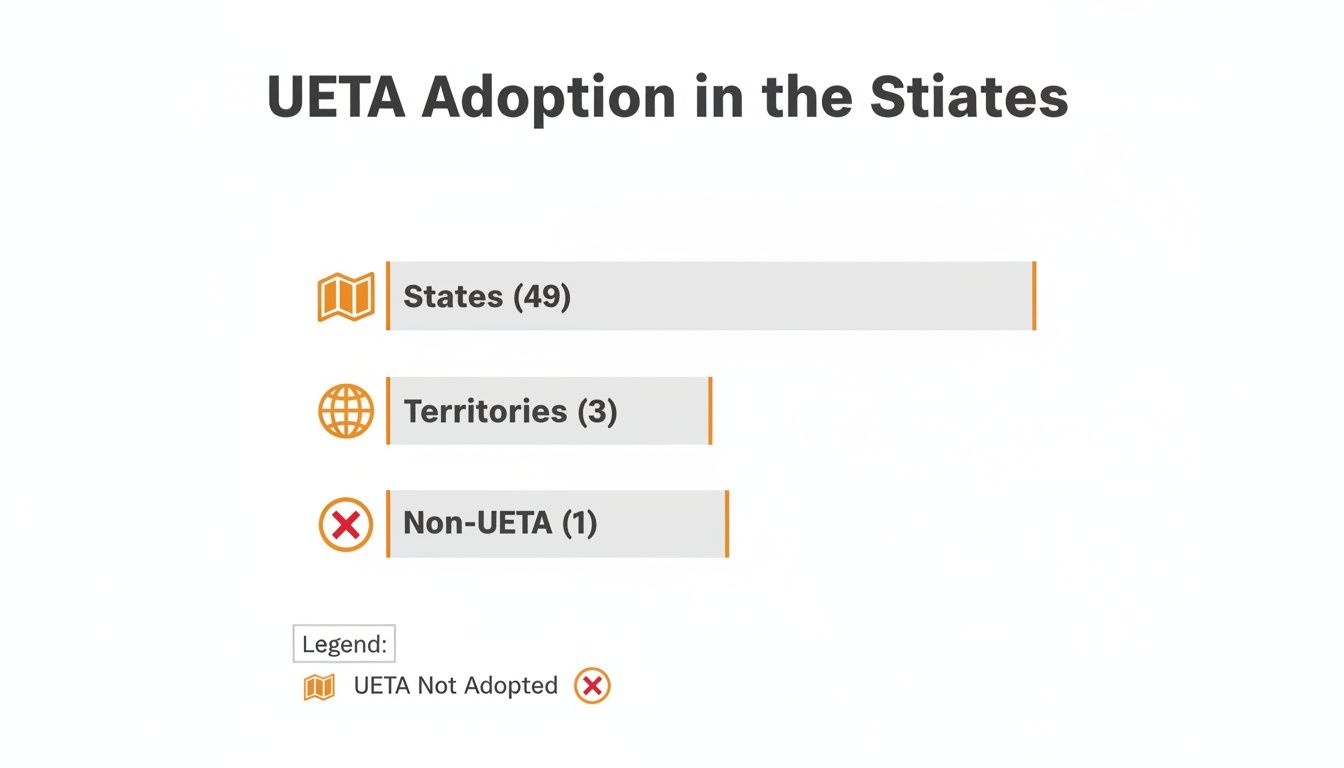
The graphic highlights that 49 states plus 3 territories have adopted UETA—only 1 jurisdiction remains outside this framework.
How To Read This Reference
- State shows the jurisdiction in alphabetical order.
- UETA/ESIGN Adoption confirms whether both federal and state frameworks apply.
- ESRA or Equivalent lists any standalone state law.
- Exceptions identify excluded documents, such as wills or real estate.
Statute Citation Details
Each listing links directly to the relevant code section for lightning-fast legal checks. Cross‐references point you toward official state guidance and the federal ESIGN Act.
Example contract clause snippet:
Governing Law | This Agreement is governed by California Civil Code Section 16 for electronic records and signatures under the UETA and the ESIGN Act.
State By State E-Signature Adoption
Below is a snapshot table outlining key jurisdictions, their UETA/ESIGN status, any ESRA‐style laws, and standard exceptions.
| State | UETA/ESIGN Adoption | ESRA or Equivalent | Exceptions |
|---|---|---|---|
| California | Yes (UETA & ESIGN) | Cal. Civ. Code § 16 | Wills; Real Estate |
| Florida | Yes (UETA & ESIGN) | Fla. Stat. § 668 | Family Law Filings |
| New York | ESIGN Only | NY CLS Tech Law § 33 | Wills; Deeds |
| Texas | Yes (UETA & ESIGN) | Tex. Bus. & Com. Code | Deeds; Power of Attorney |
| District of Columbia | Yes (UETA & ESIGN) | D.C. Code § 28-901 | Court Filings |
Scanning across, you’ll see that exceptions and proofing rules vary widely. Tailor your QuickSign setups to meet each state’s specifics.
RON And Notarization Status
Most jurisdictions now allow permanent RON under statute or emergency order, though a few still require in-person notarization for wills.
Key RON highlights:
- Identity Proofing uses knowledge-based questions or credential analysis.
- Recording Requirements demand an unalterable audio-video log.
- Vendor Standards list approved platforms and certificate authorities.
Evidentiary Standards
Audit logs must capture signer actions, timestamps, IP addresses, and metadata. States differ on format, encryption, and retention.
- Timestamp Accuracy records times to the second.
- Log Security relies on tamper-evident hashing.
- Retention Periods range from 3 to 10 years depending on jurisdiction.
Key Compliance Tips
- Verify local statute citations against the latest official code updates.
- Include clear consent and intent language with statutory references.
- Confirm RON availability before enabling notarization workflows.
- Maintain a durable, exportable audit trail complete with metadata.
- Apply multi-factor authentication for high-value documents.
For example, when finalizing a deed in Texas, QuickSign logs the signer’s ID proof and records live video under Tex. Gov. Code §§ 406.013–018. This setup requires adding a notarization tag and an identity check in your QuickSign template.
You might find our Electronic Signature Legal Requirements: What Businesses Need to Know in 2025 guide especially helpful.
Where To Find Full Table
Need all 50 states and territories in one place? Download the complete table from our QuickSign compliance resource library. Each entry links out to primary statutes, ESRA summaries, and official guidance.
Visit our compliance center to export the full reference as CSV or PDF for easy side-by-side comparison.
Cross References And Related Concepts
This reference dovetails with our Federal Framework and UETA Overview for seamless context. Jump from any state entry to the RON and Notarization Status section—or head to Practical Compliance Tips for audit and metadata details.
Examples Of State Exceptions
Certain filings still require ink-on-paper signatures in some states:
- Florida’s gaming license applications fall outside e-sign rules (Fla. Stat. Ch. 551).
- Ohio bars e-signatures on marriage licenses and adoption paperwork (Ohio Rev. Code § 3121).
- Washington exempts trust and estate filings from UETA (Wash. Rev. Code § 19.360).
These variations underscore why a jurisdictional lookup is essential.
Best Practices For QuickSign Configuration
- Use conditional logic to trigger consent banners in states that mandate separate disclosures.
- Deploy region-based templates that auto-fill the correct statute citation.
- Set automated alerts for changes to ESRA equivalents or RON laws.
- Implement tiered authentication based on document risk.
- Train your team regularly on new exceptions and audit requirements.
This section gives legal teams a robust lookup tool and intuitive cross‐references to keep every signature compliant.
Additional Examples And Case Studies
- Pennsylvania’s QuickSign deed template adds conditional notarization under 54 Pa. Cons. Stat. § 8911.
- Hawaii workflows include witness signatures for family-law filings as required by Haw. Rev. Stat. § 560:3.
These use cases show how to adapt QuickSign templates to jurisdiction-specific rules.
RON And Remote Notarization Status

Remote online notarization makes it possible for signers to authenticate documents from anywhere. To date, 40 states have codified permanent RON statutes covering identity proofing, audio-video retention and technical standards.
Several other jurisdictions still operate under emergency orders with sunset clauses and extra requirements. That means compliance teams must track each state’s status closely.
- Texas Gov. Code §§ 406.013–018 outlines vendor vetting, video specs and data storage rules.
- Florida statutes require credential analysis plus live agent oversight.
- New York’s temporary order mandates detailed audio-video archives.
“An accurate audio-video log can reduce notarization disputes by up to 60%,” says a notary compliance expert.
Understanding Identity Proofing
Identity proofing is the keystone of any RON session. Most states allow:
- Knowledge-based authentication questions
- Credential analysis of government IDs
- Biometric checks for higher-risk documents
For example, QuickSign’s platform layers photo-ID scanning with one-time codes to verify each signer before notarization.
Recording Requirements And Technology
States typically demand that notarizations be recorded in an unalterable, timestamped video. Common mandates include:
- Encrypted storage of all AV files
- Minimum 10 years of retention, depending on jurisdiction
- System-generated hash codes to prove integrity
| State | Retention Period | Encryption Required | Hashing |
|---|---|---|---|
| Texas | 10 years | Yes | SHA-256 |
| Florida | 5 years | Yes | SHA-512 |
| Virginia | 3 years | Yes | SHA-256 |
Cross-State Acknowledgments
Under the Interstate Notarial Act, a notary in one state can serve a signer in another if:
- Both states recognize RON on a permanent basis
- The technology meets each jurisdiction’s minimum standards
- ID proofing, AV recording and storage rules align
A Virginia notary, for instance, could notarize a California deed via QuickSign when both sets of rules match.
Check out our guide on nationwide RON standards and legislative updates: Learn more about nationwide standards in our article
Typical RON Workflow Example
- Signer uploads the document to QuickSign.
- The system runs ID proofing and multi-factor checks.
- A licensed notary reviews the live video feed and applies an electronic seal.
- QuickSign logs timestamps, IP addresses and the AV recording.
- All parties receive a secure PDF with the notarization certificate attached.
Compliance Checkpoints
- Configure QuickSign to trigger state-specific identity checks.
- Store AV recordings in encrypted, tamper-proof archives.
- Verify each notarization certificate includes the correct statutory language.
Following these steps helps keep your RON processes defensible in court.
Practical Tips For QuickSign Users
- Embed region-based templates with accurate notary clauses.
- Use conditional logic for states under temporary orders.
- Track emergency order expirations on a live compliance calendar.
- Export audit logs regularly to confirm system integrity.
- Refer to official state notary websites for detailed updates.
Documenting changes and staying proactive will reduce errors and legal risks.
Looking Ahead
Several states are drafting permanent frameworks to broaden cross-jurisdiction notarization. We’ll update QuickSign’s compliance modules as new laws pass.
- Watch Congress’s actions under the Interstate Notarial Act for upcoming federal guidelines.
Practical Compliance Tips And Audit Requirements
QuickSign users handling e-contracts in multiple states need solid audit processes to stay on the right side of electronic signature laws. This section walks through hands-on compliance tips and key audit requirements for a bulletproof e-signature setup.
Configuring Secure Audit Trails
Every QuickSign transaction spins off an audit trail that logs signatures, timestamps, and IP addresses. These records become your first line of defense in any legal or regulatory review.
- Enable immutable logs with UTC timestamps for every signer action.
- Archive data in encrypted storage and protect it with tamper-evident hashing (for example, SHA-256).
- Automate exports in CSV or JSON format to support audits across multiple jurisdictions.
With these measures, legal teams can pull up precise evidence in seconds when disputes arise.
Capturing Signer Metadata
Signer metadata adds weight to your audit trails and helps meet state-specific rules. Collecting the right details ensures you can defend the validity of every document.
- Record browser user-agent strings and device IDs to verify the signing environment.
- Capture geolocation coordinates or IP subnets at the moment of signing.
- Log consent timestamp, document version, and signer email to satisfy retention policies.
Together, these data points build a robust evidentiary record.
Verifying Signer Identities
Authentication requirements change from state to state, so QuickSign offers tiered identity checks to fit every scenario.
- Low-risk agreements: email confirmation or SMS one-time passcodes.
- Mid-value documents (e.g., in Florida or Virginia): knowledge-based authentication.
- High-value transactions (real estate, estate planning): multi-factor or biometric verification.
At the same time, remember the federal ESIGN Act guarantees electronic signatures for over 95% of commercial transactions, superseding conflicting state rules. Read more about ESIGN Act implications on IAPP.
Integrating Consent And Exempt Document Handling
Clear consent clauses must appear before any electronic signature to comply with ESIGN and UETA. At the same time, certain documents—like wills or real estate deeds—remain off-limits to e-signing in many states.
- Insert a consent clause confirming the signer’s agreement to use electronic records.
- Reference relevant statutes (for example, Cal. Civ. Code § 16) for extra precision.
- Use conditional template logic so the clause only shows up where it’s legally required.
QuickSign also lets you flag exempt document types and route them for manual execution:
- Tag templates by jurisdiction to identify restricted documents.
- Set retention schedules ranging from 3 to 10 years according to local law.
- Automate deletion of expired records to keep storage lean.
Learn more about state compliance in our guide on legal requirements for electronic signatures.
| Jurisdiction | Record Retention Period |
|---|---|
| California | 3 years |
| Florida | 5 years |
| Texas | 10 years |
Routine Audits And Report Interpretation
Regular audits help you catch issues before they become disputes. QuickSign’s reporting tools make it easy to spot gaps in logs, templates, and consent records.
- Run quarterly system reviews to confirm log integrity and completeness.
- Compare consent banners, clauses, and metadata across all state templates.
- Generate discrepancy reports to highlight missing fields or outdated references.
“Consistent audits reduce signature disputes by up to 80%,” says a compliance manager.
Next, learn to read raw audit logs. Focus on status codes and certificate hashes to streamline investigations:
- Prioritize entries flagged with E100 (missing consent) or E200 (invalid signature hash).
- Use filters to group logs by state, signer email, or document template.
- Export visual charts from QuickSign analytics to spot trends over time.
If you see repeated authentication failures in one jurisdiction, tweak your MFA settings or refresh consent banners to lower risk.
Tailoring Platform Settings And Templates
QuickSign templates support conditional logic so you can embed state-specific language automatically. This cuts down on manual errors and speeds up compliance.
- California UETA Clause: “Signer consents to electronic records under Cal. Civ. Code § 16.”
- Texas Notary Block: includes identity-proofing steps per Gov. Code § 406.014 plus a digital seal.
When an audit or legal review is looming, pull together an organized compliance package:
- Signed documents, complete audit logs, and video recordings of the signing session.
- A cover memo summarizing your compliance steps with direct links to statutes.
- Bookmarks or an index in your PDF package for fast navigation by state or date.
“A well-organized audit package can cut legal review time in half,” notes a QuickSign administrator.
You can also set default rulesets by department and store compliance packages in a secure, access-controlled repository.
Best Practices And Example Use Cases
Stay proactive by updating your compliance checklist whenever a state changes its rules. Here are key best practices:
- Train staff on state-by-state requirements and refresh training materials quarterly.
- Validate vendor certificates and platform security settings at least once a year.
- Run mock audits to uncover gaps before regulators do.
Real-world examples show how to apply these strategies:
- Nevada multi-party financial agreements use e-consent records under Nev. Rev. Stat. § 719.075.
- Minnesota contracts include optional witness blocks to meet Minn. Stat. § 325L.04.
- Virginia affidavits feature digital notary seals with automatic timestamp verification.
By following these guidelines, you’ll navigate evolving e-signature laws confidently and keep stakeholders on board.
Sample Electronic Signature Contract Clauses
Crafting compliance-ready agreements starts with clear, enforceable language. QuickSign users can paste these clauses into commercial contracts, leases, HR forms or NDAs to satisfy both UETA and the ESIGN Act. Each snippet addresses a specific need: intent, consent, retention or governing law.
| Clause Type | Purpose |
|---|---|
| Intent to Sign Clause | Confirms a click, typed name or other affirmative step as proof of intent |
| Consent to Electronic Records | Documents the signer’s agreement to receive and sign files electronically |
| Record Retention Clause | Specifies secure format, access controls and a three-year minimum retention |
| Governing Law Provision | References UETA/ESIGN sections to confirm enforceability under applicable rules |
Common Boilerplate Clauses
These standard snippets belong in either the definitions section or immediately above the signature block. Consistent placement helps every document meet statutory requirements.
Intent to Sign Clause
“Each party agrees that the electronic signature, whether digital or generated electronically, shall have the same legal effect as a handwritten signature under the ESIGN Act and applicable state law.”
Commentary: Insert this text above the signature line to reinforce signer intent and comply with UETA.Consent Clause
“Signer consents to receive and execute documents in electronic format and waives the right to paper copies in accordance with UETA and state statute.”
Commentary: Placing this in the preamble makes consent explicit from the start.Record Retention Clause
“All electronic records shall be stored in a secure, tamper-evident format for a minimum of three years or longer if required by governing law.”
Commentary: Adjust the retention period to match local rules (for example, some states require up to five years).Governing Law Provision
“This Agreement is governed by the provisions of the Uniform Electronic Transactions Act (UETA) and the federal ESIGN Act, preempting any conflicting state rules.”
Commentary: Typically placed in the governing law section to anchor enforceability.
Commercial Contract Example
Below is an illustration inside a master services agreement:
“The parties agree that execution of this Agreement by electronic signature satisfies any requirement for original signatures under the Uniform Electronic Transactions Act (UETA) and the federal ESIGN Act.”
This appears in Section 10: Governing Law, making it clear that UETA/ESIGN prevail over any conflicting state statute.
Lease Agreement Language
When drafting a commercial lease, clarity and compliance go hand in hand. Use these two lines to cover both landlord and tenant duties:
- “Lessee consents to the use of electronic records and signatures under applicable state law.”
- “Landlord will retain lease documents electronically for the period required by local statute, then archive or destroy records per compliance policy.”
Numbered items highlight dual responsibilities. Remember to set the retention term to match the state’s exact requirements.
HR Forms And NDA Templates
Onboarding documents, NDAs and offer letters work best with concise clauses:
Employee Signature Clause
“Employee agrees to sign this Agreement electronically, and such signature is binding under the ESIGN Act.”Record Storage Clause
“Company will maintain signed records in secure cloud storage for at least five years or as required by law.”
These lines fit well in headers or footers. You can also use conditional logic to insert specific state citations where necessary.
Copy these clauses into QuickSign templates, then update any bracketed statute references to reflect each jurisdiction’s exact code.
Frequently Asked Questions
Finding quick answers to common concerns can save hours of digging through statutes. Below, you’ll get straight-to-the-point guidance, complete with pointers to relevant UETA/ESIGN sections and state codes.
Each topic also links back to our detailed chapters—so you can dive deeper when you need more context or sample contract language.
Exempt Documents
Some agreements still demand an ink signature. States draw the lines differently, but you’ll often see core exceptions in these areas:
- Wills and Testamentary Trusts: Require wet-ink signatures under most state laws.
- Deeds and Mortgages: Typically need an in-person notary seal.
- Family Law Filings: Adoption papers, divorce decrees and similar court documents usually remain offline.
Always double-check your jurisdiction’s carve-outs to stay compliant.
Verifying Signers Without RON
When remote notarization isn’t available, you can still meet UETA/ESIGN identity standards using layered proofing techniques:
- One-Time Passcode sent to email or SMS
- Knowledge-Based Authentication questions drawn from public records
- Credential Analysis on a government-issued ID
Combine these steps for a clear audit trail and solid legal footing.
Real Estate Closings
E-signatures are valid in most states, but county recorder rules can vary on format and notarization:
- Confirm your county’s e-recording requirements before you start.
- Build in notarization events where state law demands them.
- Turn on multi-factor authentication for high-value or complex deals.
A quick local-rules check prevents recording hiccups later on.
Record Retention Requirements
Retention periods across jurisdictions range from 3 years up to 10 years. Your best practice is to adopt the longest applicable timeframe for any document type.
| Jurisdiction | Retention Period |
|---|---|
| California | 3 years |
| Florida | 5 years |
| Texas | 10 years |
For a full breakdown, consult the official state codes or explore the QuickSign compliance library.
“Consistent retention strategies reduce audit risk by 50%,” notes a compliance specialist.
Related Best Practices
Use cross-references to navigate related concepts without flipping back and forth:
- Jump to the Federal Framework section for baseline ESIGN requirements.
- See the State Exceptions appendix for carve-outs on estate and family law.
- Review Sample Contract Clauses to ensure multi-jurisdictional compliance.
Elevate your agreement workflows with QuickSign at QuickSign today.